From registration to revenue: a playbook for B2B webinar attendance
Why only half your registrants show up, what actually moves that number, and how to run the reminder, live and follow up phases.
Tantra Growth Team14 min read
The number that should bother you about webinars is not the registration count. It is the gap between that count and the number of people who actually turn up.
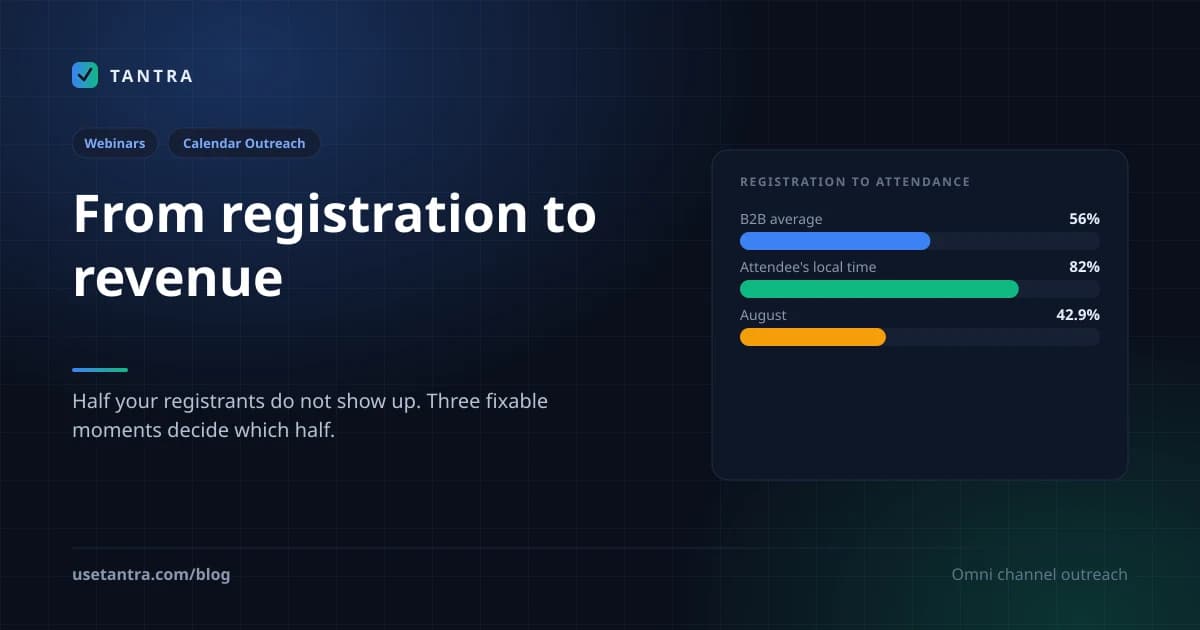
Typical B2B registration to attendance sits between 40 and 60%, with a commonly cited benchmark around 56%. So roughly half the people who told you they were coming do not come. And the raw scale is smaller than most decks admit: one study of B2B technology webinars found 83% of them had fewer than 50 attendees.
That gap is not a marketing problem in the abstract. It is a series of specific, fixable failures at three moments: the decision to attend, the decision to stay, and the decision to act afterwards. This is a playbook for all three, written around what the data supports rather than what makes a nice slide.
Quick summary: the benchmarks worth knowing#
| Metric | The number |
|---|---|
| Registration to attendance, B2B average | 40 to 60%, benchmark around 56% |
| B2B tech webinars with under 50 attendees | 83% |
| Best days | Wednesday and Thursday; Tuesday shows a 51.7% show up rate |
| Best times | 11:00 AM, 1:00 PM, 2:00 PM local to the attendee |
| Attendance when timed in the attendee's own timezone | up to 82% |
| Weakest month observed | August, dropping to 42.9% |
| Attendance lift from an automated reminder workflow | 25% in one documented case |
| Retention lift from interactive elements | 23% higher |
| B2B attendees who want live Q&A | 92% |
| Attendees preferring chat based Q&A over microphone | 54% |
| Follow up email open rates | 39 to 50%, sometimes 58% |
| High intent lead handoff window | 24 to 72 hours |
Pick the time on evidence, not on preference#
Scheduling is the cheapest lever in this entire playbook and the one most often decided by whoever owns the calendar.
Day of week. Wednesday and Thursday lead globally. Tuesday performs strongly too, with one source putting its show up rate at 51.7%. Friday generally underperforms, because end of week distraction and weekend planning both work against you.
Time of day. Late morning around 11:00 AM and early afternoon around 1:00 PM or 2:00 PM are the consistent winners. The logic holds up: those slots sit after the morning triage rush and deep focus block, but before the mid afternoon energy dip and the end of day scramble.
Timezone. This is the multiplier. Correctly timed in the attendee's own local time, those slots have produced attendance as high as 82%. A global audience needs either timezone aware scheduling or clearly stated start times for each region.
Month. August is the weak spot, with rates observed as low as 42.9%. Plan around it rather than through it.
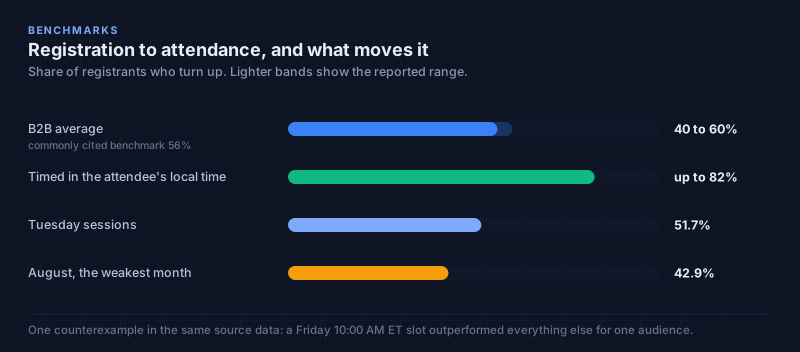
One honest caveat, because the tidy version of this advice is wrong often enough to matter. A counterexample in the source data had a Friday 10:00 AM ET slot outperforming everything else for one specific B2B audience, particularly in Q4 and Q1. Benchmarks are a starting hypothesis, not a rule. If you have historical data from your own events, it beats every number in this article.
Remove the friction between registering and remembering#
Someone registers. Then they close the tab. Whether they attend now depends on whether the event exists anywhere other than in your database.
The standard advice is to add a prominent "Add to Calendar" link to every confirmation and reminder, with action oriented wording like "Add to Google Calendar" or "Save the date" rather than a bare icon. Marketing automation platforms can insert dynamic calendar invites that populate the correct date, time and timezone automatically. For global audiences, timezone aware invites are not optional.
That advice is correct, and it is also a workaround for a problem that does not have to exist.
An "Add to Calendar" link asks the registrant to perform an action. Some fraction of them will not. A calendar invitation skips the request entirely: the event is created on your calendar, the person is added as an attendee, and Google's own invitation is what arrives. It lands on their agenda rather than in a queue of things to file. There is no link to click to make it real, because it is already real.
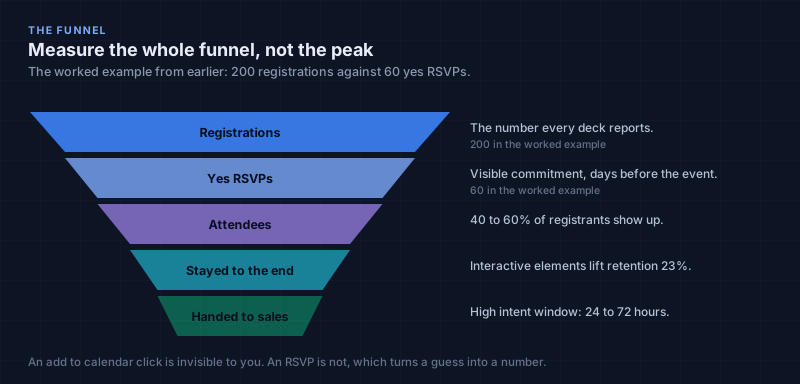
The second difference matters more for planning. An "Add to Calendar" click is invisible to you. An RSVP is not. Tracking RSVPs means you know who intends to come before the day arrives, which turns a guess into a number you can act on. If Wednesday's session has 200 registrations and 60 yes RSVPs, you know what you are actually running.
This is the reason calendar outreach and webinar promotion fit together so naturally. The channel with no spam folder is also the channel where committing is one click and the commitment is visible to the organiser.
The reminder sequence#
A single reminder loses to an ordinary Tuesday. One documented case reported a 25% increase in attendance after implementing an automated pre webinar reminder workflow.
The sequence that performs balances reinforcement against nagging:
| When | Purpose | What goes in it | |
|---|---|---|---|
| Confirmation | Immediately on registration | Acknowledge and prompt the calendar action | Event details, speakers, agenda, prominent add to calendar action |
| First reminder | About 1 week before | Reinforce the value, not the logistics | Tease key takeaways, unique insights, speaker intros, related resources |
| Final reminder | 1 to 2 days before | Recap and nudge | Agenda summary, expected outcomes, direct access link, downloadable materials |
| Pre event nudge | Morning of | Last mile | One line, the access link, confirmation it is starting soon |
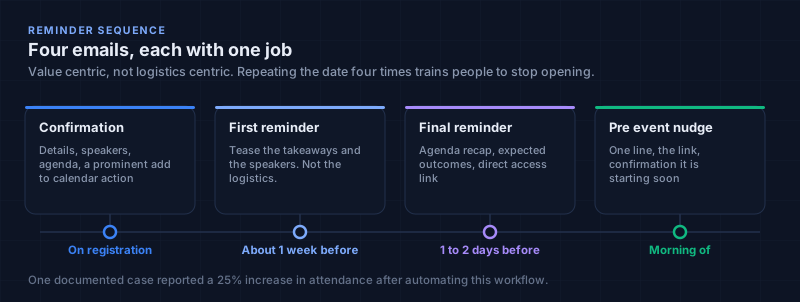
The content rule that separates a working sequence from an annoying one: each email should be value centric rather than logistics centric. Repeating the date four times trains people to stop opening. Teasing what they will actually learn primes them to show up for it.
Test the right thing#
A/B testing here is standard: subject lines, sender names, body copy, calls to action, send times, one variable at a time.
What matters more is which metric you optimise against. Open rate is useful for judging a subject line and nearly useless as a measure of a campaign whose goal is attendance. The metrics that reflect the actual objective are click through rate, which shows real engagement with the content, and registrant to attendee conversion, which is the goal itself. Reply rate is a strong intent signal where you can get it. Optimising for downstream metrics returns far more than chasing opens.
Worth flagging that this article's own source data cites follow up open rates of 39 to 50% as a sign of an engaged audience, and I would treat that number with the same caution. Pixel based opens now fire for image proxies and security scanners that never had a human behind them. That does not make the underlying point wrong, since engagement genuinely does matter, only the measurement. The longer argument is here.
Slide design is a retention problem, not an aesthetic one#
Once someone is in the room, the question changes from whether they will come to whether they will stay. Drop off is where attendance numbers quietly die, and dense slides are a leading cause.
Two principles carry most of the weight.
Visual hierarchy is arranging elements so their importance is obvious before anything is read. Size, colour, contrast, typography and spacing all do this work. Larger and bolder pulls the eye first; strategic colour marks the number that matters; generous white space gives the slide breathing room and measurably improves readability.
Cognitive load is the mental effort required to process what you are showing. The goal is to strip out everything that adds effort without adding understanding. In practice that means one clear idea per slide, and slides that complement the narration instead of duplicating it. The split attention effect is the specific mechanism: the brain struggles to process written text and spoken words at the same time, so a slide that is a script for the presenter to read actively competes with the presenter. Use images, charts and short phrases to illustrate the point rather than restate it. Every additional element on a slide costs something, so include only what earns its place.
Interaction is what keeps people in the room#
Webinars with interactive elements show 23% higher retention than those without. Interactivity is not a nice extra; it is the retention mechanism.
Polls break the rhythm of a presentation, surface immediate audience insight and give people a reason to stay present. Short quizzes do the same job.
Q&A is in demand: 92% of B2B attendees say they want a live Q&A. Two execution details change how well it works. Enable it throughout the session rather than saving it for the final five minutes, and use upvoting so the questions that surface are the ones most people want answered. Note also that 54% of audiences now prefer chat based Q&A to speaking over a microphone, which is worth knowing before you plan a session around raised hands.
Chat works as peer to peer space when it is moderated with intent. A moderator posting a question or a conversation starter keeps it alive; an empty chat box does nothing on its own.
Underneath all of it sits technical reliability. Audio problems, video problems and platform instability are a leading cause of drop off and the most avoidable one. Test the equipment, test the transitions, test the handoffs between speakers, and pick a platform with a track record. Pacing and a clear structure reduce cognitive load in their own right.
The follow up, segmented#
The webinar ending is the start of the part that produces revenue. Both attendees and no shows are prospects; treating them identically wastes most of the event's value.
Send a value first follow up to all registrants within 24 hours, with the recording and any promised materials. These emails get unusually high engagement, with open rates typically 39 to 50% and sometimes reaching 58%.
Then segment, because a generic blast leaves the value on the table. The useful groups are:
- Live attendees
- Partial viewers, who watched some of the session
- On demand viewers, who watched the replay
- High intent participants, who asked a question, voted in a poll or engaged in chat
High intent participants go to sales fast, ideally within 24 to 72 hours. Asking a question during a live session is a buying signal with a short half life.
Everyone else gets nurtured with content that extends the webinar topic rather than repeating it: a case study that goes deeper on the theme, a detailed write up, a trial or freemium entry point. This is a longer sales cycle and the follow up should behave like one.
No shows are a warm list, not a failure#
Registrants who did not attend are sometimes called ghost attendees, which undersells them. They raised their hand. They just did not convert on the day.
The rule that matters: the first message to a no show is never a hard sell. It is a value first recap framed as "here is what you missed," summarising the key takeaways with a link to the full recording. That positions you as useful rather than pushy.
If they engage with that recap, by clicking or replying, move them into a re engagement stream built for the purpose, addressing common objections and reinforcing the core value of the topic. Treated as a distinct warm pool rather than a lost cause, no shows recover a meaningful share of pipeline that would otherwise evaporate.
Measure the whole funnel, not the peak#
Webinar reporting tends to stop at the attendance number, which is the middle of the story. A holistic view means consolidating CRM, marketing automation and webinar analytics into one funnel:
- Pre webinar: registration rate, reminder open and click through rates
- During: registrant to attendee conversion (industry average around 56%), drop off points, and participation rates in polls and Q&A
- Post: replay views, resource downloads, lead to opportunity conversion, and SQL to opportunity conversion as a read on lead quality
Tracked over several events, these turn webinars from a recurring campaign into something you can forecast.
Where Tantra fits, and where it does not#
Tantra does not host webinars. It connects to the platform you already use, WebinarGeek or Zoom, and handles the parts on either side of the session.
On the promotion side, a campaign links to one webinar and the calendar invitation becomes the touch that puts the event on the prospect's actual agenda rather than in their inbox. RSVPs come back as yes, no or maybe, so you know the shape of your audience before the day. There is an opt in setting that registers a contact with the webinar provider automatically when they RSVP yes or maybe, which closes the gap between "said they are coming" and "is actually on the registration list." It is off by default and deliberately so, because turning it on means the provider emails them.
On the reporting side, the attendance data comes back from the provider, which is what makes the follow up segmentation possible: who registered, who attended, who did not. That mapping across both providers is the input to the follow up, not a vanity dashboard.
What Tantra does not do is the part that actually determines your numbers. It will not pick your topic, write your slides, moderate your chat or decide whether 11:00 AM on a Wednesday suits your audience. The scheduling evidence and the cognitive load principles above are yours to apply. Software can make the invitation land on a calendar and tell you truthfully who showed up. The reason they showed up is still your job.
Frequently asked questions#
What is a good registration to attendance rate for a B2B webinar?#
Between 40 and 60%, with roughly 56% as a common benchmark. Below 40% points at timing, reminder cadence or a topic and audience mismatch rather than at the platform.
What day and time should I run a B2B webinar?#
Wednesday or Thursday, at 11:00 AM, 1:00 PM or 2:00 PM in the attendee's local timezone. Tuesday performs well too. Treat this as a starting hypothesis: one documented audience had Friday at 10:00 AM ET outperform everything else.
How many reminder emails should I send?#
Four. Confirmation on registration, a value focused reminder about a week out, a final reminder one to two days before, and a short nudge on the morning of. An automated workflow of roughly this shape produced a 25% attendance increase in one documented case.
Why do registrants forget to attend?#
Usually because the event never entered their calendar. A registration lives in your database; until it exists on their schedule it is competing with everything else in their week. This is why an actual calendar invitation outperforms an "add to calendar" link, which still requires them to act.
How do I reduce drop off during the session?#
Interactivity. Webinars with polls, Q&A and chat retain 23% more of their audience. Enable Q&A throughout rather than only at the end, use upvoting, and remember that 54% of attendees prefer to ask in chat rather than on a microphone.
What should I send to people who did not attend?#
A value first recap framed as "here is what you missed," with key takeaways and the recording. Never a hard sell as the first touch. If they click or reply, move them to a re engagement sequence.
How fast should sales follow up with engaged attendees?#
Within 24 to 72 hours for high intent participants, meaning anyone who asked a question, answered a poll or engaged in chat. Those signals decay quickly.
Should I optimise reminder emails for open rate?#
No. Open rate is a reasonable read on a subject line and a poor measure of a campaign whose goal is attendance. Optimise click through rate and registrant to attendee conversion instead.
Conclusion#
The gap between registering and attending is made of small, boring, individually fixable things. A session scheduled for the wrong hour. An event that never made it onto a calendar. A reminder that repeated the date instead of the reason. Forty slides that competed with the speaker. A follow up sent to everyone identically, three days late.
None of them are strategy problems. Fix the scheduling with evidence, remove the step between registering and remembering, make the reminders about value, design for one idea per slide, enable interaction from the start, and segment the follow up by what people actually did. That is most of the difference between a 40% show rate and an 80% one.
The registration number was never the point. It was only ever a prediction, and predictions are worth what you do about them.
Key takeaways#
- Half your registrants do not attend. The B2B benchmark is 40 to 60%, around 56% typical, and 83% of B2B tech webinars draw under 50 people.
- Wednesday and Thursday, 11:00 AM or early afternoon, in the attendee's own timezone, where attendance has reached 82%.
- August is the weak month, observed as low as 42.9%.
- A calendar invitation beats an add to calendar link, because it removes the action and gives you an RSVP you can see.
- Four reminders, value led. One documented workflow lifted attendance 25%.
- Optimise click through and attendance conversion, not open rate.
- Interactivity retains 23% more of the room. 92% want live Q&A and 54% prefer to ask in chat.
- One idea per slide. Slides that duplicate the speaker compete with the speaker.
- Follow up within 24 hours and segment into attendees, partial viewers, replay viewers and high intent.
- High intent to sales within 24 to 72 hours. No shows get a recap, never a pitch.
Sources#
- Webinar benchmark and attendance rate data, aggregated industry reporting
- B2B technology webinar attendance study (share of events under 50 attendees)
- Day of week and time of day attendance analyses, multiple published benchmark sets
- Documented case study on automated pre webinar reminder workflows
- Audience engagement and retention research on polls, Q&A and chat
- Cognitive load theory and the split attention effect, applied to presentation design
- Post webinar follow up engagement benchmarks and lead handoff timing guidance
The figures here come from published industry benchmark sets rather than from Tantra's own campaign data, and benchmark sets disagree with each other more than their confident presentation suggests. Where sources conflicted, as they do on the best day of the week, the conflict is stated in the text rather than resolved by picking the more convenient number. Treat all of it as a hypothesis to test against your own events, which are the only data that describe your audience.
Try Tantra on accounts you already own
Omnichannel sequences across Gmail, LinkedIn and WhatsApp, plus Google Calendar invitation campaigns. Optional AI personalization on your own AI account or key.