Google Workspace deliverability: the setup manual and the error codes that tell you what broke
How to configure SPF, DKIM and DMARC on Google Workspace, warm a mailbox properly, and read the SMTP error codes that tell you what actually broke.
Tantra Growth Team18 min read
Most deliverability advice is written as though the problem were mysterious. It usually is not. Google tells you exactly what went wrong, in a numbered code, in the bounce message, and almost nobody reads it.
A team I worked with last year spent three weeks convinced their copy was the problem. They rewrote subject lines. They cut their sequence from five steps to three. They swapped their offer. Nothing moved, because nothing was wrong with the copy. Every message they sent was coming back with 550-5.7.26, which means, in plain English, "neither SPF nor DKIM passed and you have no DMARC policy." Their mail was being refused at the door. No human had ever seen a subject line to judge it.
That is the failure mode this article is about. Not the interesting, arguable parts of cold email, which I covered in the spam filter guide and the Primary inbox guide, but the boring, checkable, entirely solvable technical layer underneath them. This is the setup manual: what to configure, what the limits actually are, how to warm a mailbox without guessing, what Google will tell you about your own domain if you ask, and what each error code means when something breaks.
None of it is clever. All of it is required.
Quick Summary: the numbers that matter#
| Thing | The number | Why it bites |
|---|---|---|
| SPF records per domain | Exactly 1 | Two records is a parse error that breaks authentication for every service in both |
| SPF DNS lookup limit | 10 | Chaining vendors silently exceeds it and produces a permanent error |
| DKIM key length | 1024 minimum, 2048 preferred | Google generates 1024 by default in some consoles |
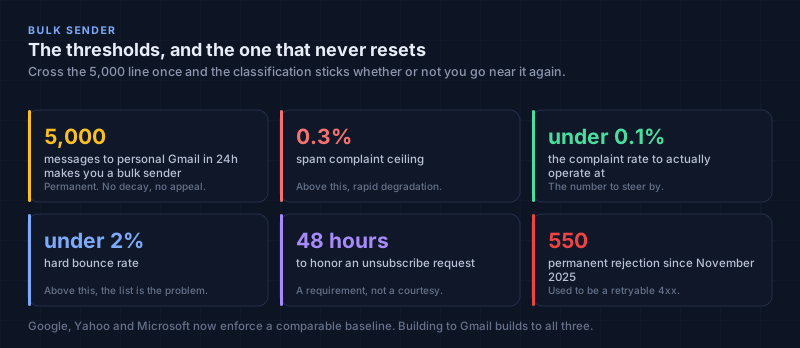
| Bulk sender threshold | 5,000 messages / 24h to personal Gmail | The classification is permanent once you cross it |
| Spam complaint ceiling | 0.3% | Above this, expect rapid degradation |
| Spam complaint target | Under 0.1% | This is the number to actually operate at |
| Hard bounce rate | Under 2% | Above this, your list is the problem |
| Unsubscribe honoring window | 48 hours | A requirement, not a courtesy |
| Postmaster Tools visibility | ~100+ daily messages to unique Gmail recipients | Below this you see nothing |
| Feedback Loop visibility | Complaint rate above 0.5% | It is an alarm, not a dashboard |
| Warmup ramp | 5 to 20/day, rising over 2 to 4 weeks | Volume spikes are the clearest spam signal there is |
| Steady state per inbox | 30 to 100/day, and I would stay near the bottom | Above 50 the risk climbs noticeably |
| Gmail enforcement since Nov 2025 | Permanent 550 rejections | Previously temporary 4xx, which forgave a lot |
The three records, and the one that actually breaks#
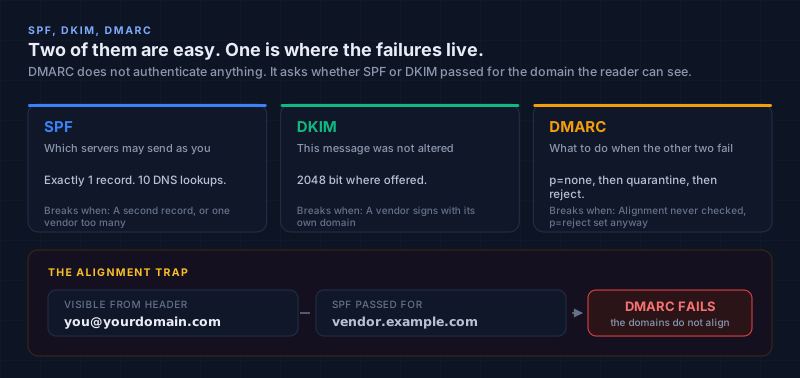
SPF, DKIM and DMARC are described everywhere as "the three pillars," which makes them sound equally likely to be your problem. They are not. Two of them are easy and one of them is where almost every real failure lives.
SPF: which servers may send as you#
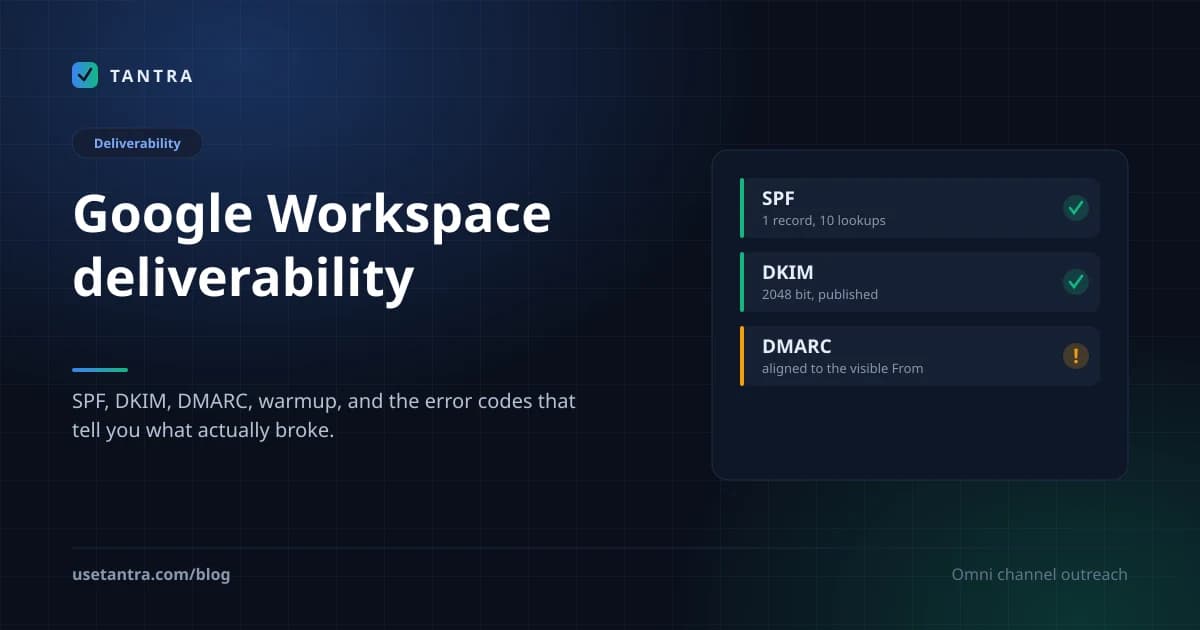
SPF is a single DNS TXT record at your domain root that lists who is allowed to send as you. For Google Workspace the core of it is include:_spf.google.com. Two rules matter more than the syntax. First, there can be exactly one SPF record per domain. Publishing a second one to "add" a vendor does not add anything; it produces a parse error that breaks authentication for every service listed in either record. Second, SPF evaluation is capped at 10 DNS lookups, and every include:, a: and mx: mechanism spends one. Stack a CRM, an ESP and two automation tools onto Google's include and you can cross that line while your record still looks perfectly reasonable to the eye. The result is a permanent error and a hard SPF failure.
DKIM: proof the message was not altered#
DKIM signs the message itself rather than authorising the server. Google holds a private key, signs every outbound message, and receivers verify it against a public key you publish at google._domainkey.yourdomain.com. You generate it in the Admin Console under Apps, Google Workspace, Gmail, Authenticate Email. Generate at 2048 bits where the console offers the choice. DKIM is the most reliable of the three because once the key is published correctly it simply keeps working.
DMARC: the policy, and the alignment trap#
DMARC is where things actually break, and the reason is a concept most guides mention and then fail to explain: alignment.
DMARC does not authenticate anything itself. It is a policy that says what to do when SPF or DKIM fails, published at _dmarc.yourdomain.com, with a p= tag set to none, quarantine or reject. The trap is that DMARC does not just ask "did SPF or DKIM pass." It asks "did SPF or DKIM pass for the domain in the From header the reader can see." A message can pass SPF perfectly for the vendor's domain and still fail DMARC, because the visible From address is yours and the passing domain was theirs. Those two must align.
This is the single most common broken setup I encounter. Somebody publishes a DMARC record because a checklist said to, never verifies alignment, and moves the policy to p=reject a month later. At that moment they instruct every receiving server on the internet to bin their legitimate mail. The record is present. The tool reports "DMARC: configured." The mail is being rejected on their own instruction.
What I do: publish DMARC at p=none with a rua= reporting address on day one. Leave it there for two to four weeks and actually read the aggregate reports, which will show every service sending as your domain, including the ones you forgot about. Fix what is misaligned. Only then move to p=quarantine, and only after that to p=reject. The phased rollout is not caution for its own sake. It is the only way to discover what you are about to break before you break it.
If you want the click by click version of all three, the help centre has it: set up SPF, DKIM and DMARC.
| Record | What it proves | Where it lives | How it usually fails |
|---|---|---|---|
| SPF | This server may send as this domain | One TXT record at the root | A second record; more than 10 lookups |
| DKIM | This message was not altered and came from this domain | TXT at google._domainkey.yourdomain.com | Key never published, or a vendor signs with its own domain |
| DMARC | What to do when the other two fail, plus reporting | TXT at _dmarc.yourdomain.com | Alignment never checked, then p=reject set anyway |
Bulk sender status, and why it is a one way door#
Google classifies you as a bulk sender once you send 5,000 or more messages to personal Gmail addresses in any 24 hour period.
Two things about that number are worth internalising. The first is that it counts personal Gmail addresses specifically, so a pure B2B list of corporate domains may never trip it. The second, and the one that surprises people, is that the classification is permanent. Cross the threshold once, on one unusual day, and you are a bulk sender from then on, whether or not your volume ever goes near it again. There is no decay and no appeal.
Once you are in that category, a set of requirements stops being advisory:
- Full authentication. SPF, DKIM and DMARC, all passing, all aligned.
- TLS on every SMTP connection. Unencrypted delivery gets rate limited (
4.7.29) or blocked outright (5.7.29). - Valid forward and reverse DNS. Every sending IP needs a PTR record resolving to a hostname whose A record points back to the same IP. A mismatch is
5.7.25. - One click unsubscribe on marketing and promotional mail, implemented as
List-UnsubscribeandList-Unsubscribe-Postheaders per RFC 8058. A link in the footer does not satisfy this. The header is what the mail client reads to render its own unsubscribe button. - Honor unsubscribes within 48 hours.
The enforcement posture changed in a way that matters. Before late 2025, most of these failures returned temporary 4xx codes, which meant the sending server would retry and you had room to notice and fix things. Since November 2025 Gmail issues permanent 550 rejections for persistent non compliance. A rejected message is not retried and is not queued. It is gone, and your only signal is a bounce you have to actually read.
Microsoft now enforces comparable rules for Outlook, and Yahoo has held a similar baseline since early 2024. Building to Gmail's requirements is effectively building to all three.
One note specific to how Tantra works, because it changes what you are responsible for. Tantra sends through your own Google Workspace mailboxes using a service account you authorise in your own admin console, so there is no shared IP pool and no vendor domain in the middle. That removes the entire class of alignment failures caused by a third party signing with its own domain, which is the most common DMARC problem there is. It also means the DNS records are yours, on your domain, and no platform can configure them for you. What we can do is scan them every day and tell you the moment one breaks, and put the one click unsubscribe headers on every outbound message so that requirement is never something you have to remember.
Warmup, in numbers rather than vibes#
A new mailbox has no reputation. Not a bad one, none at all, and sending volume into that vacuum is the clearest spam signal available to a filter. Warmup exists to build a sending history before you need one.
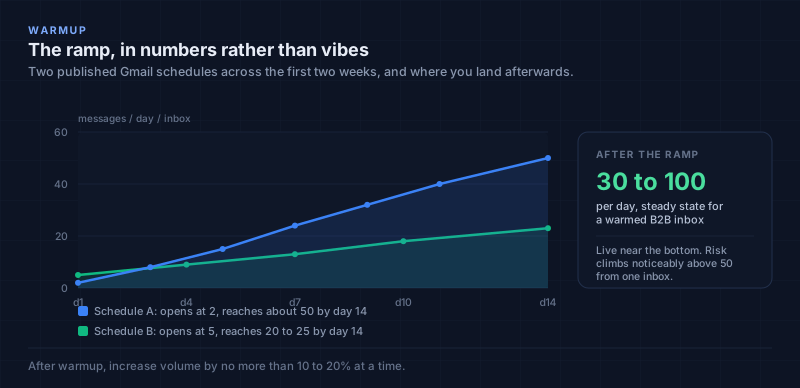
The published guidance clusters tightly enough to be useful. Start at 5 to 20 messages per day per inbox. Ramp over two to four weeks. A common Gmail schedule opens at two messages on day one and reaches roughly 50 per day by day fourteen; another widely used one starts at five and reaches 20 to 25 over the same period. After warmup, increase volume by no more than 10 to 20% at a time. Steady state for a warmed B2B inbox sits between 30 and 100 per day, and I would live near the bottom of that band rather than the top, because the risk climbs noticeably above 50 from a single inbox.
The number is the easy part. The signal quality is what actually builds reputation, and this is where automated warmup networks earn their mixed reputation. What a filter is looking for is evidence that humans want your mail: opens, replies, messages starred, messages dragged out of spam. Warmup services generate those interactions synthetically across pools of cooperating inboxes. It works to a degree for email, and it is worth knowing that the strongest version is not synthetic at all. Send your warmup mail to people who will genuinely read and answer it. Colleagues, existing customers, partners. Real conversations are the signal the synthetic version is imitating.
Two structural decisions matter as much as the ramp.
Never send cold outreach from your primary domain#
Cold email carries a complaint rate that ordinary business mail does not. Run it on your main domain and a bad campaign puts your invoices, your support replies and your contracts in the same reputational bucket. Use dedicated sending domains and keep the blast radius small.
Subdomains do not isolate you the way you think#
Splitting outbound across offers.company.com and newsletter.company.com feels tidy, but Gmail aggregates volume across subdomains up to the organisational domain. Two streams that each look modest can add up to a bulk sender footprint at company.com. If the point of separating them was to stay under a threshold, it did not work. Assign one domain family to one sending motion instead.
On the platform side, per mailbox daily and hourly caps are enforced rather than suggested, and the reservation is atomic, so two send jobs racing for the last slot of the day cannot both take it. The sending windows and limits doc covers how to set them. That handles the ceiling. The ramp itself, and the quality of the engagement during it, is still yours.
A note on open rate, since the research disagrees with us#
Nearly every deliverability guide, including the source material behind this article, lists open rate as a health metric and suggests something above 40% indicates a healthy campaign. I want to flag that rather than quietly reproduce it, because Tantra does not report open rates at all and I think the metric is misleading.
The short version: an "open" is inferred from a tracking pixel loading, and pixels now load for reasons that have nothing to do with a human reading anything. Apple Mail Privacy Protection pre-fetches them. Gmail proxies images. Corporate security gateways open and scan every inbound message within seconds of delivery. What you get is one number blending real readers, scanners and privacy proxies in proportions that vary by recipient domain, which means two campaigns are not comparable on opens even when the dashboard puts them in the same column.
Where the guidance is still right is the underlying point: engagement drives reputation. Filters do weigh whether humans interact with your mail. The disagreement is only about which measurement to trust as the proxy. Replies, filtered clicks and, on the calendar side, RSVPs are all things a recipient actually did. A pixel load is not.
The full argument, including what we log instead, is its own post.
Content, briefly, because it matters less than you think#
Modern filters are not keyword scanners. They are machine learning models weighing hundreds of signals, and context dominates vocabulary. "Free" in "free trial of our API" is not the same token as "FREE MONEY" and the model knows it.
So the useful content rules are short:
- No ALL CAPS, no
!!!, no fake urgency, no prize language. - Accurate subject lines and display names. Misleading either one is a phishing tell.
- Clean HTML. Never hide text or links for crawlers.
- Descriptive link text rather than "click here."
- Valid RFC 5322 structure, meaning single instance headers like
From:andSubject:appear exactly once. Malformed headers read as an anomaly worth investigating.
That is genuinely most of it. The deeper treatment of which words affect which decision, and why conflating spam vocabulary with Promotions vocabulary produces bad advice, is in the Primary inbox guide.
Google Postmaster Tools, the only view that is not a guess#
Everything else in this article you configure and then hope. Postmaster Tools is the one place Google tells you what it actually thinks of your domain, from its own infrastructure rather than a third party's sample.
It needs roughly 100 or more daily messages to unique Gmail recipients before it shows you anything, so it becomes useful once warmup is underway rather than on day one. What it reports:
| Panel | What to look for |
|---|---|
| Spam rate | The most important number on the page. Under 0.1% is healthy. Above 0.3% is dangerous |
| Domain reputation | High, Medium, Low or Bad. Google has been weighting domain over IP for years, so this is the headline |
| IP reputation | Matters more on dedicated IPs than on Google's shared infrastructure |
| Authentication | SPF, DKIM and DMARC pass rates. Anything below 100% is a misconfiguration, not noise |
| Encryption | TLS coverage |
| Delivery errors | Where your rejections are actually coming from |
| Compliance status | Whether you are meeting bulk sender requirements |
Two things to know so you read it correctly. The Feedback Loop dashboard only becomes visible once your complaint rate exceeds 0.5%, so an empty FBL panel is good news, not missing data. And Postmaster Tools sees Gmail only. For Outlook and Hotmail you need Microsoft SNDS, and Yahoo runs its own complaint feedback loop. A domain can look healthy in Postmaster while quietly failing at Outlook.
The error code decoder#
This is the section to bookmark. When something breaks, the bounce tells you what broke. Gmail prefixes temporary failures with 421 and permanent ones with 550.
| Code | Means | Do this |
|---|---|---|
550-5.7.26 | Neither SPF nor DKIM passed, or no DMARC policy exists | Verify all three records and check alignment before anything else |
550-5.7.27 | SPF failed | Check for a second SPF record and count your DNS lookups against the limit of 10 |
550-5.7.30 | DKIM failed | Regenerate the key in the Admin Console and republish the DNS record |
421-4.7.31 | DMARC record exists but has no p= policy tag | Add the policy tag. A record without one is not a policy |
550-5.7.32 | DMARC alignment failed | The From domain does not match the domain that passed SPF or DKIM. Fix the signing domain |
550-5.7.25 | Reverse DNS invalid | The sending IP has no PTR record, or it does not match the forward A record |
421-4.7.28 | Poor IP reputation | Cut volume hard, send only to engaged contacts, wait for recovery |
550-5.7.1 | IP blocked or blocklisted | Check RBLs, find what changed in recent sending, expect to re-warm |
4.7.29 / 5.7.29 | TLS missing | Rate limited, then blocked. Fix the connection encryption |
The habit worth building is simple: when deliverability drops, read a bounce before you touch the copy. The code names the layer. Three of these codes point at DNS, two at reputation, one at encryption, and none of them at your subject line.
The mistakes I see most#
| Mistake | What happens | Fix |
|---|---|---|
| Two SPF records | Authentication breaks for every service in both | Consolidate into one record |
| More than 10 SPF lookups | Permanent SPF error that looks fine to the eye | Audit and consolidate includes |
DMARC at p=reject without checking alignment | You instruct the internet to reject your own mail | Start at p=none, read reports, escalate slowly |
| Unsubscribe link only in the footer | Bulk sender non compliance | Add List-Unsubscribe and List-Unsubscribe-Post headers |
| Cold outreach on the primary domain | One bad campaign contaminates invoices and support mail | Dedicated sending domains |
| Splitting volume across subdomains to stay small | Gmail aggregates to the org domain anyway | One domain family per sending motion |
| Sending before Postmaster has data | Flying blind through the riskiest period | Warm up first, then read the panels |
Rewriting copy when the bounce says 5.7.26 | Weeks lost on the wrong layer | Read the error code first |
| Treating an empty FBL panel as broken | Chasing a non problem | It only appears above 0.5% complaints |
Frequently asked questions#
Do I need DMARC if SPF and DKIM already pass?#
Yes, and since 2024 it is required for bulk senders. Without a DMARC policy you can receive 5.7.26 even when the other two pass, because the receiving server has no instruction for what your domain wants done with failures.
Can I have separate SPF records for different vendors?#
No. One record per domain, with every sender added via include: inside it. A second record breaks both.
What happens if I cross the 5,000 message bulk threshold once?#
You are a bulk sender permanently. Volume dropping later does not reverse it. Assume the stricter requirements apply from that point on.
Is 0.3% or 0.1% the real spam complaint limit?#
0.3% is the ceiling where penalties begin. 0.1% is the number to operate at, and it is also the threshold tied to mitigation support. Treat 0.3% as the cliff edge rather than the target.
How long does warmup take?#
Two to four weeks of ramping to reach a normal sending volume. Reputation keeps building after that. There is no way to compress it, and services promising to are describing volume, not trust.
Why can I not see anything in Postmaster Tools?#
You are probably under roughly 100 daily messages to unique Gmail addresses. It is a volume threshold, not a configuration problem.
Does any of this help with Outlook?#
Mostly yes. Microsoft enforces comparable bulk sender rules and Yahoo has since early 2024, so building to Gmail's requirements covers the common ground. Outlook scores separately though, using a Spam Confidence Level from -1 to 9 where 5 or above routes to Junk, and Postmaster Tools cannot see any of it. Use Microsoft SNDS for that.
What a platform can and cannot do here#
Worth being explicit about the boundary, because this article is mostly a list of things no vendor can do for you.
Your DNS records live on your domain. Your Workspace subscription, its age and its payment history are yours. Warmup happens in your mailboxes, and the engagement quality during it depends on who you send to. Nobody sells a shortcut to any of that, and the tools that imply otherwise are describing volume automation.
What software should own is the part that is mechanical and easy to get wrong under pressure. Tantra scans every sending domain daily for SPF, DKIM, DMARC and blocklist status and writes it to a domain health report, so a record that breaks on a Tuesday is not discovered from a bounce on a Friday. It puts the RFC 8058 one click unsubscribe headers on every message rather than relying on anyone remembering. It validates addresses before enrollment and quarantines the questionable ones instead of sending, which is the direct lever on the bounce rate. It parses delivery status notifications to separate hard bounces from soft ones and suppresses permanently on hard bounces and complaints. And because it sends as your own mailboxes through a service account, there is no vendor domain in the From path to break DMARC alignment.
Configure the records yourself. Warm the mailboxes yourself. Let the tool hold the parts that are only ever a matter of discipline.
Conclusion#
The technical layer of deliverability is unglamorous and almost entirely deterministic, which is what makes it the best return on your time in this whole discipline. Copy is arguable. Targeting is a judgement call. Whether your DMARC record has a policy tag is not.
If you are starting from nothing: buy a dedicated sending domain, publish one SPF record with every sender inside it, generate a 2048 bit DKIM key, publish DMARC at p=none with a reporting address, and leave it there for a month while you read what comes back. Warm the mailbox from five messages a day to fifty over three weeks, sending to people who will actually reply. Connect Postmaster Tools once you have the volume for it to report. Then start your campaign, and when something goes wrong, read the bounce code before you touch a single word of copy.
That sequence is not exciting. It is just the part that works.
Key takeaways#
- One SPF record per domain, under 10 DNS lookups. A second record breaks both.
- DMARC alignment is where most setups actually fail. Publishing the record is not the same as passing it.
- Phase DMARC in.
p=nonefor two to four weeks, read the reports, then escalate. - Bulk sender status is permanent once you cross 5,000 messages a day to personal Gmail.
- Gmail issues permanent 550 rejections since November 2025. There is no retry to save you.
- Operate under 0.1% complaints and 2% hard bounces. 0.3% is the cliff, not the target.
- Warm up over two to four weeks and settle nearer 30 than 100 per inbox per day.
- Never send cold outreach from your primary domain, and know that subdomains aggregate upward anyway.
- Postmaster Tools is the only non guess, and it only sees Gmail.
- Read the error code first. It names the broken layer and it is almost never the copy.
Sources#
- Google, email sender guidelines
- Google, prevent mail to Gmail users from being blocked or sent to spam
- Google Workspace Admin Help, SPF, DKIM and DMARC setup
- Google, Gmail SMTP error messages
- Google Postmaster Tools
- IETF RFC 8058, signaling one click unsubscribe
- IETF RFC 5322, internet message format
- Microsoft SNDS
Volume and warmup figures are the consensus of published practitioner schedules rather than official Google guidance, because Google publishes no warmup curve. They are given as ranges for that reason. Every threshold attributed to Google above (the 5,000 message bulk classification, the 0.3% complaint ceiling, the 10 lookup SPF limit, the error codes) comes from Google's own documentation, and those documents change, so check them before building automation against any specific number.
Try Tantra on accounts you already own
Omnichannel sequences across Gmail, LinkedIn and WhatsApp, plus Google Calendar invitation campaigns. Optional AI personalization on your own AI account or key.