Email open tracking is broken. Here is what to measure instead
Pixels now fire for privacy proxies and security scanners, not readers. Why the metric broke, what it still costs, and the three signals to read instead.
Tantra Growth Team15 min readUpdated Aug 2, 2026
Almost every cold email tool leads with an open rate. It is the first number on the dashboard, the one people A/B test subject lines against, and the one that gets screenshotted in board decks. It is also, in 2026, the least trustworthy number in the whole report.
Tantra does not track opens at all, so this is a product decision as much as an industry observation. That is exactly why the reasoning is worth laying out in full rather than asserting. If you are evaluating tools, you should be able to check the argument rather than take it on faith.
The short version#
| The question you are really asking | What the open rate tells you | What to read instead |
|---|---|---|
| Did the mail get delivered? | Inferred from a pixel load, which fires for machines too | Bounce rate, plus a direct authentication and blocklist scan |
| Did a human see it? | Nothing reliable. Proxies and scanners load the pixel | No metric proves this. Stop trying to measure it |
| Did the message land? | An inflated number that is not comparable between lists | Reply rate, counting negative replies as signal |
| Did the offer land? | Not measured at all | Filtered click rate, and positive reply intent |
| What did the measurement cost? | A remote image request that spam filters already penalize | Nothing. Clicks, replies and RSVPs need no pixel |
The compressed version: an open is inferred from an invisible image loading, that image now loads for privacy proxies and corporate security scanners that no human is behind, and embedding it costs you deliverability on every message. You give up a real cost for a number you cannot act on.
How open tracking actually works#
There is no such thing as an open event in email. The protocol has no read receipt that recipients reliably send back. So every tool that shows you an open rate is doing the same trick: it embeds a tiny invisible image in the message body, usually a one pixel transparent GIF, hosted on the sender's tracking domain and given a unique URL per recipient. When a mail client renders the message, it fetches that image, the server logs the request, and the tool calls it an open.
That inference held up reasonably well for about fifteen years. It does not anymore, and the two reasons are independent of each other, which is why neither is going to reverse.
Why the measurement broke#
Privacy proxies fetch images before a human is involved#
Apple Mail Privacy Protection routes image loads through relays and fetches them ahead of time for users who turn it on, which is the default prompt on a fresh device. Apple is explicit that this happens whether or not the recipient engages with the message at all, and that it is on by default once the feature is enabled.
Gmail has proxied images through its own servers for over a decade. Google's own admin documentation describes it plainly: when users open messages, Gmail uses Google's proxy servers to serve any images in them.
Security gateways open every message on arrival#
Corporate mail security is worse for this metric than consumer privacy features are, because it is faster and more thorough. Products like Microsoft Defender for Office 365 and Mimecast scan inbound mail automatically, within seconds of delivery, before any person has looked at the inbox. Microsoft documents that Safe Links scans and rewrites URLs during mail flow and that URLs are checked prior to message delivery.
That behaviour is not a bug you can opt out of. It is the product working, and it is deployed across most of the enterprise mailboxes a B2B campaign targets.
Three populations, one number#
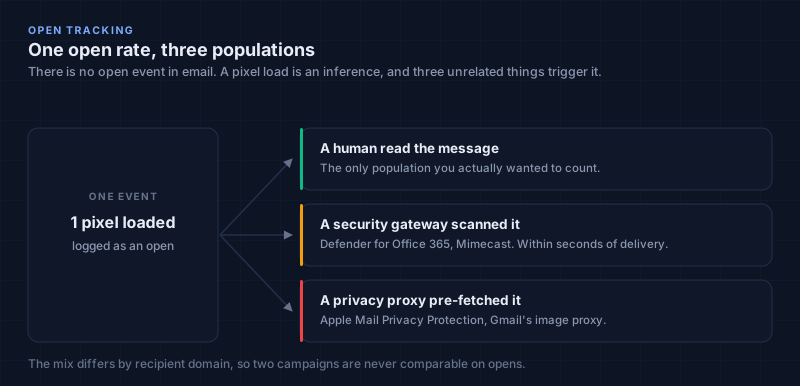
The result is an open rate that blends three different populations into one figure:
| What fired the pixel | What it actually means | Can you separate it after the fact? |
|---|---|---|
| A person opened and read the message | The only population you wanted to count | No |
| A security gateway scanned it on delivery | The message arrived. Nothing about interest | No |
| A privacy proxy pre-fetched it | The recipient has Mail Privacy Protection on | No |
You cannot pull them apart afterwards, and the proportions differ by recipient domain, so the metric is not even consistently wrong in the same direction. A campaign to a list of enterprise mailboxes and a campaign to a list of small business mailboxes are not comparable on opens, even though the dashboard puts them in the same column.
Optimizing subject lines against that number means optimizing against how aggressively your recipients' IT departments scan mail. That is the practical failure, and it is worse than a noisy metric, because the noise correlates with exactly the segment you probably care most about.
The deliverability cost never went away#
The measurement stopped working. The cost did not.
A pixel is a pattern filters already look for#
A tracking pixel is a remote image request to a domain that is not the domain in the From address, embedded in a message sent to someone who never asked to hear from you. Spam filters have treated that pattern as a signal for a long time, for the obvious reason that legitimate one to one email almost never contains one. Adding it means every message carries a small penalty in exchange for a number you cannot trust.
It quietly forces you into HTML#
This matters more than the pixel itself, and it is the part most people miss. A pixel needs an HTML body to live in, so open tracking rules out sending anything that looks like a message a person typed. Cold email works best when it reads like it came from a human, and a human writing to one person does not send a marketing template with a logo banner and a four link footer.
Once you have committed to an HTML body for the pixel's sake, every other marketing fingerprint becomes easier to justify. The pixel is the first domino. We wrote about the rest of that stack in how to land in the Gmail Primary inbox.
What Tantra sends instead#
Tantra takes the other side of that trade. Every outbound message runs through a sanitizer before it is sent, which strips scripts and styles, unwraps the styled spans the editor uses for merge tokens, and keeps only the href on links. What lands is close to what a person would have typed in Gmail.
Clicks and one click unsubscribe still resolve, because those live in the href. This is a deliberate "plain look, keep the signals that matter" choice rather than plain text sending.
The three signals Tantra logs instead#
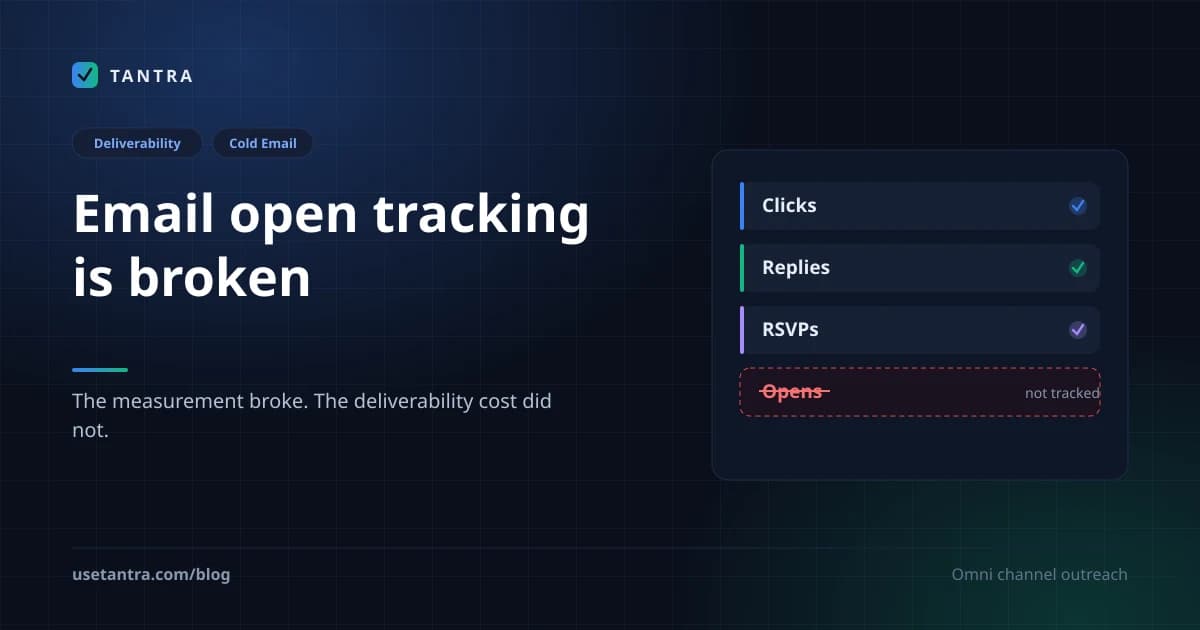
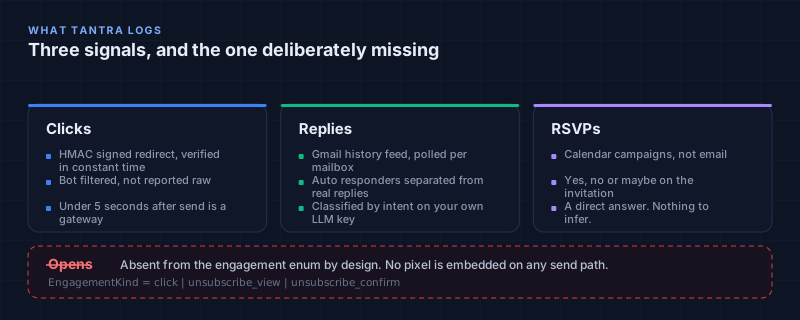
The engagement log has exactly three event kinds, and open is deliberately absent from the enum. It is not unimplemented. It is a comment in the schema file explaining why it will not be added.
Clicks#
Links in a sequence step are rewritten to a signed redirect. The token is HMAC signed and verified in constant time, so a click cannot be forged or replayed by editing the URL. You can point the redirect at your own subdomain with a CNAME instead of the shared host, which keeps the tracking domain aligned with the sending domain.
Clicks have the same bot problem opens do, so they get filtered rather than reported raw. The filter is deliberately biased toward false positives, on the reasoning that a real human counted as a bot costs you one data point, while a security scanner counted as a human pollutes the lead score for that contact and every aggregate it feeds.
The strongest rule is timing. A click that arrives less than five seconds after the message was sent is a gateway pre-fetch, because nobody reads a cold email and clicks a link that fast. Beyond that there is a user agent pattern list, held in a registry that refreshes weekly so new scanners can be added without a deploy. An IP range list lives in the same registry, but the matcher for it is not live yet, so today the filter is the timing rule plus user agents. Worth knowing precisely, rather than assuming the net is wider than it is. The full mechanism is documented in how click tracking works.
Replies#
Tantra polls each connected mailbox through the Gmail API and walks the history feed, on a cadence that tightens to every thirty seconds while a campaign is actively sending and relaxes as a mailbox goes quiet. Inbound messages are associated back to the enrollment that started the thread, and genuine replies are separated from auto responders.
Replies are then classified by intent, into categories like interested, not interested, a pricing objection, a timing objection, an out of office, or a referral. That runs on your own LLM provider key, and when no provider is configured it degrades to keyword patterns rather than failing the pipeline or silently billing you. The detection side is covered in reply detection.
RSVPs#
On the calendar side, campaigns do not send email at all in the usual sense. They create a Google Calendar event and add the prospect as an attendee, and Google's own invitation is what arrives. The response status on that invitation, yes, no, or maybe, is a direct answer from the recipient. There is nothing to infer. See tracking RSVPs.
What each signal can and cannot tell you#
| Signal | What triggers it | What it cannot tell you | Where to read it |
|---|---|---|---|
| Click | A recipient follows a rewritten link, and the click survives bot filtering | Whether they read the message. Plenty of people reply without clicking | Email analytics |
| Reply | An inbound message associates to the enrollment and is not an auto responder | Sentiment on its own, which is what the intent classifier is for | The threaded inbox |
| RSVP | A yes, no or maybe on a calendar invitation | Anything about email campaigns. This is the calendar engine only | Campaign report |
| Bounce | A delivery status notification from the receiving server | Whether the address was ever valid, if it is a soft bounce | Domain health and suppression |
How to read a campaign without an open rate#
The practical objection to dropping opens is that they were the top of the funnel. Without them, the argument goes, you cannot tell a deliverability problem from a copy problem, because a campaign with no replies looks identical either way.
That gap is real. The answer is to measure deliverability directly rather than infer it from a proxy metric, which is both more reliable and more actionable.
Tantra runs a daily scan of each sending domain that checks SPF, DKIM, and DMARC alignment and looks the domain up against public blocklists, writing the result to a domain health report. Bounces are parsed from the delivery status notifications the receiving server sends back, which distinguishes a hard bounce from a soft one and feeds the suppression list. Hard bounces and spam complaints suppress an address permanently.
So when a campaign goes quiet, the diagnosis runs in this order:
| What you are seeing | Check this first | What it usually means | What to do |
|---|---|---|---|
| No replies, high bounce rate | Bounce rate and suppression reasons | A list quality problem, not a copy problem | Validate addresses before enrollment |
| No replies, clean bounces, failing domain scan | Domain health report | Authentication or blocklist problem. Mail is not arriving | Fix SPF, DKIM and DMARC before touching copy |
| No replies, clean bounces, passing domain scan | Reply rate including negatives | Mail is arriving and being read. This is a copy or targeting problem | Rewrite the offer, not the subject line |
| Replies, but all negative | Reply intent breakdown | The message lands, the offer or the audience does not | Change the segment or the offer |
| Clicks but no replies | Filtered click rate versus raw | Interest without a reason to respond | Add a clear ask, check the call to action is single |
Notice that not one row needs an open rate, and that "not interested" replies are treated as a good outcome rather than a failure. A campaign generating negative replies is being read by humans. That is a much better position to be in than silence, and it is information an open rate would have hidden inside an average.
Your email analytics show sent volume, unique clicks and click through rate, replies and reply rate, bounces, and unsubscribes. There is no opens tile, on purpose.
Dropping one metric raises the obvious follow up question of what the full set should be. We laid that out separately as a three tier KPI framework, with 2026 benchmarks for deliverability, engagement and revenue, and the equation that turns them into a pipeline forecast.
Common mistakes#
Comparing your reply rate to someone else's open rate. They are not the same funnel stage and they are not measuring the same thing. An open rate includes machines. A reply rate does not.
Reading a low click rate as failure. Plenty of recipients reply without ever clicking a link, particularly on a short message with a single question in it. Click rate measures interest in the link, not interest in the offer.
Treating raw clicks as human. If a tool reports clicks without disclosing a bot filter, assume the gateway pre-fetches are in there. This is the same failure as open tracking, one step down the funnel, and it is why the filter here is biased toward throwing data away.
Adding a third party open pixel through a template. It is technically possible to paste one into a custom HTML body. It would work against your deliverability and against the plain, personal look the sanitizer exists to preserve, in exchange for the same untrustworthy number.
Benchmarking against published open rate averages. Industry benchmark reports still publish them, and the ones from 2021 onward are measuring a different thing than the ones before. Treat any open rate benchmark spanning that period as two incompatible datasets stapled together.
What a platform can and cannot do here#
Worth being explicit about the boundary, because a fair amount of this is outside any vendor's control.
Nobody can give you a reliable open rate. That is not a feature gap, it is a property of how mail clients now behave, and a tool promising otherwise is selling you a number that mixes readers with scanners. Nobody can tell you whether a specific person read a specific message. That capability left email when the proxies arrived.
What software should own is the mechanical part. Tantra keeps the pixel out of every message and sanitizes the body so it reads like normal mail. It filters clicks rather than reporting them raw, and tells you the rules it filters by. It scans your sending domains daily and writes the result somewhere you can see before a bounce tells you. It parses delivery status notifications to separate hard bounces from soft ones and suppresses permanently on hard bounces and complaints. And because it sends through your own Google Workspace mailboxes, there is no vendor domain in the From path to break alignment.
The judgement calls stay yours. Who you contact, what you offer them, and whether a 3% reply rate is good for your market are not things a dashboard can decide. See how the two engines work if you want the mechanics, or the full deliverability setup manual for the parts that live in your DNS rather than in any tool.
Frequently asked questions#
Can I turn open tracking on in Tantra?#
No. It is not a setting. The engagement event enum has three kinds, click, unsubscribe view and unsubscribe confirm, and no send path embeds a pixel.
Are open rates completely useless, or just noisy?#
Noisy in a way that is not correctable, which for most decisions amounts to useless. If the noise were random you could average it out. It is not random. It correlates with recipient domain, mail client and corporate security posture, so it moves with exactly the variables you are trying to compare campaigns across.
My other tool shows a 60% open rate. Is it lying?#
It is reporting pixel loads accurately and calling them opens. The number is real, the label is wrong. A large part of it is Apple Mail Privacy Protection and security gateways, and the proportion depends on who is on your list.
How do I know if someone read my email?#
You do not, and no tool can tell you. Reply and click are the closest available proxies, and both understate real readership, which is the honest direction for an error to run in.
Does removing the pixel actually improve deliverability?#
It removes one signal filters weigh, alongside many others. It is not a single lever that fixes an inbox problem. Authentication, list quality and sending volume matter more, which is why the platform scans domains daily and validates addresses before enrollment.
Will I lose historical continuity if I switch tools?#
Yes, for opens specifically. There is no way to backfill a metric that was never collected, and your previous tool's open numbers are not comparable to anything here. Reply rate and bounce rate carry over conceptually.
What about click tracking, does that hurt deliverability too?#
Link rewriting is a smaller signal than a remote image load, and unlike a pixel it is optional per campaign and points at a domain you can align to your sending domain with a CNAME. The trade is more favourable, but it is still a trade rather than free.
Do calendar campaigns have this problem?#
No, and that is the cleanest case in the product. A calendar invitation gets an explicit yes, no or maybe from the recipient. There is no inference step at all.
Is there any legitimate use for open tracking left?#
For warmed, opted in newsletter lists where you control the audience and only care about relative movement over time, a directional read is still possible. For cold outreach to enterprise mailboxes, which is what this platform is for, the population mix makes it unusable.
The tradeoff, stated plainly#
You lose a number that most of the market reports, which makes a side by side comparison with another tool awkward, and you lose it permanently rather than temporarily. If you have historical open rates from a previous tool, there is no continuity.
What you get is a sending profile that looks like normal mail, and three signals that mean what they say. For cold outreach specifically, where every deliverability decision compounds across the whole list, a metric you cannot trust is worse than no metric at all. It is not neutral. It occupies the space where a real diagnosis should be, and it charges you deliverability for the privilege.
Key takeaways#
- An open is an inference from an image load, and email has no real read receipt to replace it.
- Privacy proxies fetch images before a human is involved. Apple states it downloads remote content regardless of engagement.
- Security gateways scan inbound mail within seconds of delivery, which is the larger distortion for B2B lists.
- The three populations cannot be separated afterwards, and their proportions vary by recipient domain, so campaigns are not comparable.
- The pixel still costs deliverability even though it stopped measuring anything.
- The pixel forces an HTML body, which is the bigger hidden cost, because it pulls the whole marketing template in behind it.
- Clicks, replies and RSVPs are all things a recipient did. Opens are absent from the engagement enum by design.
- Filter clicks or they carry the same problem. Under five seconds after send is a gateway, not a person.
- Measure deliverability directly with authentication scans and bounce parsing rather than inferring it from a proxy metric.
- Negative replies are a good outcome. They prove the mail is landing and being read.
Sources#
- Apple, Mail Privacy Protection and privacy
- Google Workspace Admin Help, set up an image URL proxy allowlist
- Microsoft, complete Safe Links overview for Defender for Office 365
- Google, email sender guidelines
- IETF RFC 8058, signaling one click unsubscribe
Product behaviour described here reflects the shipped code at the time of writing, including the specific limits of the click bot filter. Vendor documentation changes, so check the primary sources above before building automation against any particular behaviour.
Try Tantra on accounts you already own
Omnichannel sequences across Gmail, LinkedIn and WhatsApp, plus Google Calendar invitation campaigns. Optional AI personalization on your own AI account or key.