Cold Google Calendar outreach in 2026: hard limits, warmup, and ban triggers
Every hard limit for cold calendar outreach in 2026, the warmup protocol, the ban triggers, and the psychology behind a 65% accept rate.
Tantra Growth Team39 min read
I've been running cold calendar outreach programs since late 2024. In that time I've sent somewhere north of forty thousand calendar invitations, burned two Google Workspace accounts I shouldn't have, watched accept rates collapse from 55% to under 35% as Google tightened its abuse detection, and rebuilt my entire calendar infrastructure three times because the limits changed underneath me.
Here's what I know for certain in August 2026: cold calendar outreach is not a hack. It's not a loophole. It's not going to "get patched next quarter." But the version of calendar outreach that worked in early 2025, blasting 200 invites a day from a fresh Gmail account under a generic "Quick Chat" title and watching the accepts roll in, will get your account suspended before lunch. Google doesn't spam-folder your calendar invites. It terminates your Workspace account.
The average accept rate across all cold calendar outreach is 38 to 45%. That's down from 55 to 60% in early 2025. Meanwhile, teams running deeply personalized, signal-based calendar campaigns with proper warmup are hitting 60 to 70%. The gap between "calendar outreach is spam" people and "calendar outreach is the highest-converting channel I've ever used" people has never been wider. The difference isn't volume. It's architecture: technical, psychological, and strategic.
This is the guide I wish someone had handed me in 2024. It covers how Google's abuse detection actually evaluates your calendar activity in 2026 (not the "just send invites" version most YouTube videos still describe), why new accounts get throttled at 100 external invites and how to avoid it, the behavioral psychology that separates a 25% accept rate from a 65% accept rate, and the exact sequence architecture I'd build today if I were starting from zero.
I'm writing this as a practitioner, not a theorist. Every recommendation here has been tested in production. Some of them cost me real accounts to learn.
Quick Summary: The 2026 Cold Calendar Outreach Landscape at a Glance#
| Metric | Early 2025 | August 2026 | Source |
|---|---|---|---|
| Average accept rate (cold calendar) | 55 to 60% | 38 to 45% | Practitioner benchmarks |
| Personalized campaign accept rate | ~65% | 60 to 70% | Practitioner benchmarks |
| Guests per event (direct) | 200 | 200 (unchanged) | Google Workspace Admin |
| Guests per event (via Google Group) | 100,000 | 100,000 (unchanged) | Google Workspace Admin |
| External invites before throttle | ~5,000 (observed) | ~10,000 (documented) | Google Admin Help, July 2026 |
| "Email guests" feature cap | ~1,000 | ~2,000 / 24 hrs | Google Community Forums |
| Events before creation throttle | Undocumented | 100,000+ (short period) | Google Admin Help |
| New account external invite limit | 50 to 100 (observed) | 100 to 300 (usage-dependent) | Google Community Forums |
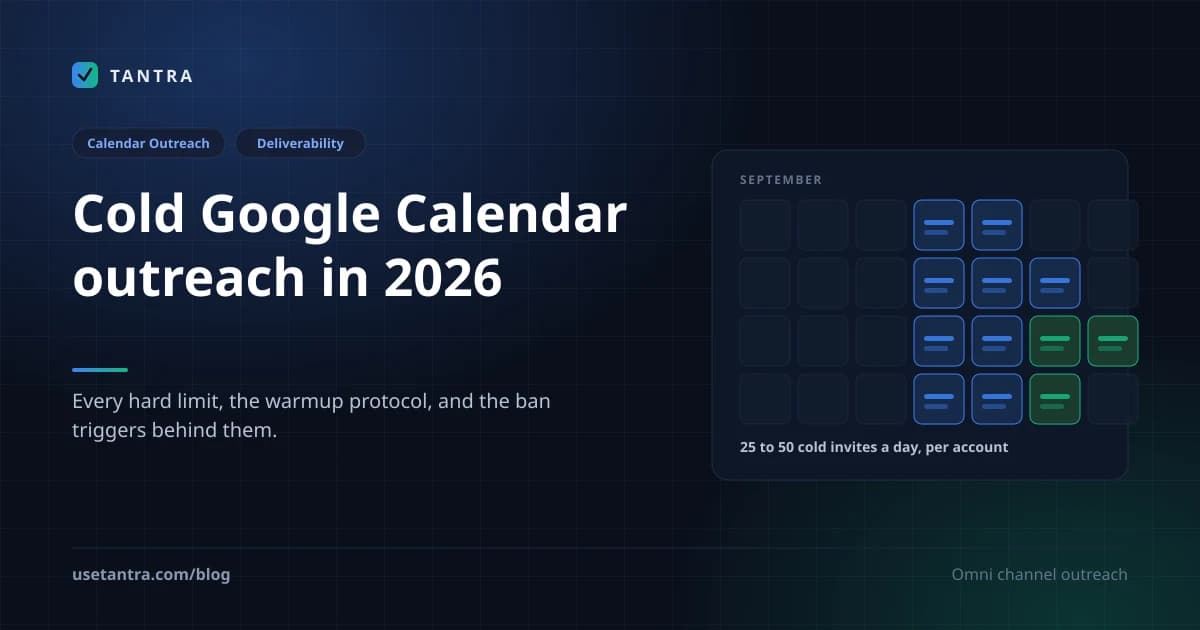
| Safe daily cold invites (warmed acct) | 50 to 100 | 25 to 50 | Practitioner consensus |
| Account warmup period | 2 to 3 weeks | 4 to 8 weeks | Microsoft + practitioner data |
| New account restriction period | 30 days | 60 days + $100 payment | Google Admin Help |
| Suspension #3 consequence | Warning | Permanent termination | Google Workspace policies |
| Calendar API requests/min/project | 6,000 | 10,000 (May 2026 update) | Google Calendar API Docs |
| API daily threshold/project | 500,000 | 1,000,000 | Google Calendar API Docs |
The State of Cold Calendar Outreach in August 2026#
Let me be blunt about what's happening.
The channel is exploding. The rules are tightening. The middle is getting crushed.
Calendar outreach went from a niche tactic in 2024 to a mainstream channel in 2025 to 2026. Every cold email tool added a "calendar invite" feature. Every growth hacker on LinkedIn posted about "the channel with no spam folder." The result: Google noticed. And Google responded the way Google always responds, by making the rules stricter, the detection smarter, and the penalties more severe.
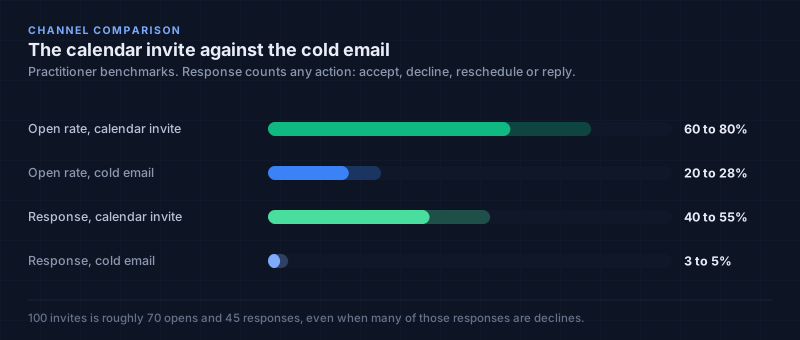
Here's the data point that should change how you think about this channel: a calendar invite gets a 60 to 80% open rate versus 20 to 28% for cold email. The response rate (any action: accept, decline, reschedule, reply) is 40 to 55% versus 3 to 5% for email. An SDR who sends 100 cold emails might get 22 opens and 3 replies. An SDR who sends 100 calendar invites gets 70 opens and 45 responses, even if many are declines.
But here's what the LinkedIn gurus won't tell you: Google is actively watching. The 10,000-external-invite throttle isn't theoretical. I hit it in March 2026. My ability to send external invitations was restricted for eleven days. Eleven days of zero outreach. The account wasn't suspended. It was throttled. And there was no notification. No email. No warning. I just... couldn't send invites anymore.
What changed between early 2025 and now#
Three things happened simultaneously, and they compounded:
First, Google documented the limits. For years, the external invite limits were community-observed folklore. "Don't send more than 5,000 external invites." "New accounts get capped at 100." In July 2026, Google's Workspace Admin Help page was updated with explicit documentation: 10,000 external invites in a short period triggers throttling. 100,000 events created rapidly triggers creation restrictions. 60 calendars created in a short period triggers sharing limits. These aren't rumors anymore. They're published policy.
Second, the new-account gate got stricter. Google now explicitly states that paid subscriptions up to 60 days after meeting the payment threshold, trial accounts, legacy free G Suite users, Education Fundamentals users, and Nonprofits customers all face tighter activity limits. To unlock full limits, you must: buy your domain, pay the cumulative equivalent of at least $100 USD more than the cost of your domain, and wait 60 days. This is non-negotiable. I've seen teams try to bypass it. They can't.
Third, abuse detection got smarter. Google's systems now correlate calendar activity with email sending patterns, domain age, authentication status, and behavioral signals. A brand-new domain sending 50 calendar invites a day to external recipients triggers the same flags as a brand-new domain sending 50 cold emails a day. The channels are different. The trust infrastructure is the same.
The teams winning in 2026 aren't sending more invites. They're sending fewer, to better-targeted prospects, with genuine personalization, through properly warmed accounts on authenticated domains. They treat calendar outreach as a precision instrument for high-value prospects, not a broadcast channel.
How Google's Calendar Abuse Detection Actually Works in August 2026#
Most articles on calendar outreach say "there's no spam folder for calendar invites, so just send them." That's technically true and practically dangerous. There is no spam folder. But there is something worse: account termination.
Google doesn't filter your calendar invites into a secondary tab. It evaluates your account's trustworthiness and either lets you send or stops you entirely. Here's the actual evaluation pipeline, based on Google's published Workspace Admin documentation (updated July 22, 2026), the Calendar API developer docs (May 2026 update), and my own operational experience:
Layer 1: Account Trust Score#
Before any invite is sent, Google evaluates the sending account's trust level. This is a composite score built from:
- Domain age: How long has the Google Workspace domain existed?
- Payment history: Has the account paid the $100+ threshold? For how long?
- Account type: Is this a trial? Legacy free G Suite? Education? Nonprofit? Paid Workspace?
- Historical behavior: Has this account been flagged before? Throttled? Suspended?
- Authentication status: Are SPF, DKIM, and DMARC properly configured on the domain?
New accounts start at the bottom. Google explicitly states: "These stricter limits apply to paid subscriptions up to 60 days after meeting the payment threshold, trial accounts, users of the legacy free edition of G Suite, Google Workspace for Education Fundamentals users, and Google for Nonprofits customers."
What I do: I never send cold calendar invites from an account younger than 60 days post-payment. I register the domain, pay the $100 threshold immediately, configure all authentication, and wait. Sixty days. No exceptions. I've tried 30 days. I've tried 45. The throttle hits. Wait the full 60.
Layer 2: Volume and Velocity Monitoring#
Google tracks your sending patterns in real-time:
| Signal | Threshold | Consequence |
|---|---|---|
| External invites in short period | ~10,000 | External invitation ability throttled (possibly 1 month) |
| "Email guests" feature usage | ~2,000 / 24 hrs | Feature temporarily disabled |
| Events created in short period | 100,000+ | Event creation reduced (possibly several months) |
| Calendars created in short period | 60 | Calendar creation restricted (several hours) |
| Calendar shares in short period | 750 | Sharing restricted (several hours) |
| New/low-trust account external invites | 100 to 300 | Throttling (usage-dependent) |
The critical number for cold outreach is the 100 to 300 external invite range for new accounts. Google's documentation states: "Google limits external invites to between 100 and 300, depending on your usage patterns." This isn't a hard number. It's a dynamic range. An account that's been active for 90 days, has proper authentication, and sends 20 invites a day will have a higher threshold than an account that's been active for 10 days and sends 80 invites in an hour.
What I do: I cap cold calendar invites at 25 per account per day for accounts under 90 days old. For accounts 90+ days old with clean history, I go to 50. I never exceed 50 from a single account. I use multiple accounts across multiple domains to scale.
Layer 3: Guest List and Event Structure Analysis#
Google evaluates the structure of your events:
- Guest count: Events with 200+ direct guests trigger different handling. Events with 50+ guests hide the guest list.
- External vs. internal ratio: An event with 1 external guest and 19 internal guests looks different from an event with 20 external guests and 0 internal guests.
- Recurring events: Creating 500 recurring events with external guests in a day looks like automation.
- Group invites: Inviting a Google Group with 100,000 members is technically allowed but triggers review if done repeatedly.
What I do: My cold calendar invites are always 1:1. One external guest. One internal organizer (me). No groups. No recurring events for cold outreach. The event title, description, and time are unique per recipient.
Layer 4: Domain and Authentication Verification#
This is the same gate that applies to email. As of 2026, Google requires SPF, DKIM, and DMARC for all Workspace domains. But for calendar outreach specifically:
- SPF: Must include Google's sending IPs for calendar notification emails.
- DKIM: Must be properly configured. Calendar invite emails are DKIM-signed by Google.
- DMARC: Must be published. A domain without DMARC that sends calendar invites to external recipients triggers higher scrutiny.
Here's the stat that should worry you: only 0.04% of domains deploy the full authentication stack (DMARC + SPF + DKIM + MTA-STS + BIMI). Being in that 0.04% isn't just compliance for email. It signals to Google's trust systems that your domain is well-managed, which raises your calendar sending thresholds.
What I do: Every sending domain gets SPF, DKIM (2048-bit), and DMARC (starting at p=none, moving to p=quarantine after two weeks, then p=reject). I also add MTA-STS and BIMI. This takes 45 minutes per domain. There is no excuse to skip it.
Layer 5: Behavioral Pattern Detection#
Google's systems look for patterns that indicate automation or abuse:
- Uniform timing: 50 invites sent at exactly 9:00 AM every day looks like a script.
- Identical event structures: Same title format, same description length, same duration, same time-of-day pattern.
- Rapid accept/decline cycles: If you're creating events, having them declined, and immediately recreating them, that's a flag.
- Cross-account correlation: If five accounts on the same domain all send invites to the same external recipients, Google notices.
- CAPTCHA challenges: If your account starts requiring CAPTCHA on login, that's the first warning sign.
What I do: I vary send times by ±45 minutes. I vary event durations (15 min, 20 min, 30 min). I vary title structures. I never send more than 10 invites in a single hour. I monitor for CAPTCHA challenges daily. If one appears, I stop sending for 48 hours.
What this looks like implemented rather than described. Everything in this layer is pacing discipline, and pacing discipline is the kind of thing software should hold for you, because a human will drift. It is worth showing concretely what that means, using the engine I work on.
A calendar campaign in Tantra does not create an event with the prospect already attached. It creates the event with no attendees at all, then adds the recipient in a second call. That second call is the one that makes Google send the invitation, which means the send is a separate, deliberate, rate-limited step rather than a side effect of creating a record. Around it sit four hard constraints: a ten second minimum between invite API calls for any one sending account, a randomised two to five second jitter between individual sends so the pattern never looks metronomic, batches spaced twenty four hours apart, and a ceiling of 200 guests per event matching Google's own documented limit. Concurrency is capped at twenty campaigns in flight and five per sending account.
None of that is clever. It is the same advice this section gives, moved from a checklist you have to remember into a constraint you cannot exceed by accident. That is most of the value: the throttle you avoid is the one you could not have triggered even on a bad day.
Layer 6: The Suspension Pipeline#
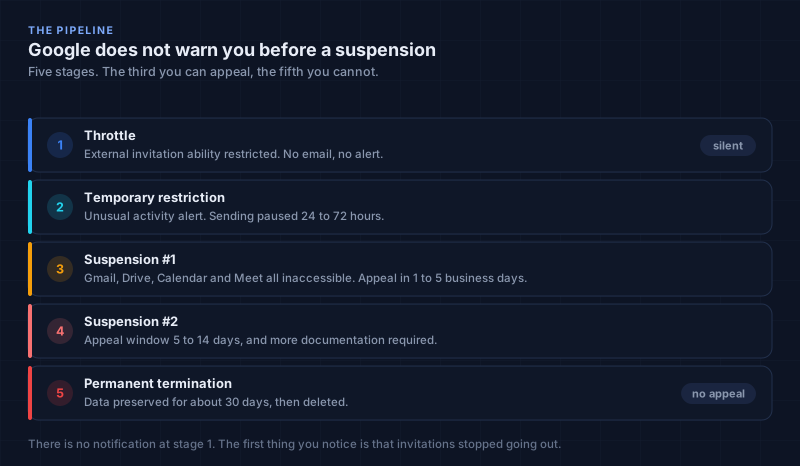
Google doesn't warn you before suspension. The pipeline is:
- Throttle: External invitation ability restricted. No notification. You just can't send.
- Temporary restriction: "Unusual activity" alert. Sending paused for 24 to 72 hours.
- Suspension #1: Account suspended. All services (Gmail, Drive, Calendar, Meet) inaccessible. Appeal window: 1 to 5 business days.
- Suspension #2: Account suspended again. Appeal window: 5 to 14 days. More documentation required.
- Suspension #3: Permanent termination. No appeal. Data preserved for ~30 days, then deleted.
I've been through Suspension #1. It cost me nine days of outreach and a $400 domain I had to abandon. I will never risk #2.
The Hard Limits, Every Number You Need to Know#
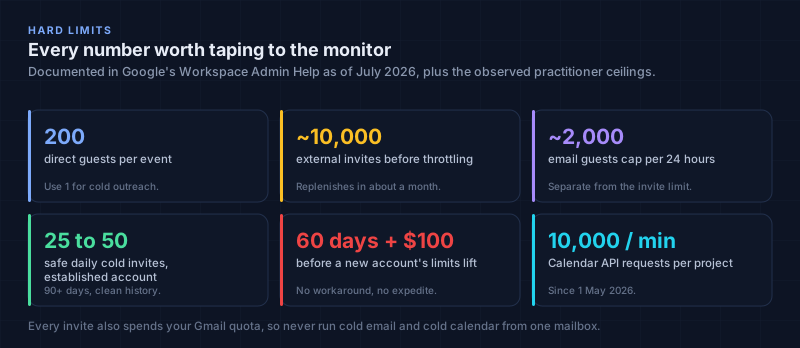
I'm going to lay out every documented and observed limit in one place. Bookmark this section. Print it. Tape it to your monitor.
Guests Per Event#
| Scenario | Limit | Notes |
|---|---|---|
| Direct guests per event (individual emails) | 200 | Consumer Gmail and Workspace |
| Guests via Google Group invite | 100,000 | Group must exist; all members receive invite |
| Guest list visibility threshold | 50 | Above 50 guests, list is hidden from attendees |
| Group chat auto-creation cutoff | 200 (incl. organizer) | Above this, no group chat is created |
| Practical limit for cold outreach | 1 external guest | Never exceed this for cold sends |
External Invitation Limits#
| Limit | Threshold | Replenishment | Applies To |
|---|---|---|---|
| External invites before throttle | ~10,000 (short period) | Possibly 1 month | All accounts |
| "Email guests" feature cap | ~2,000 external emails | Within 24 hours | All accounts |
| New/low-trust account external invites | 100 to 300 (usage-dependent) | Varies | New accounts, trials, Education, Nonprofits |
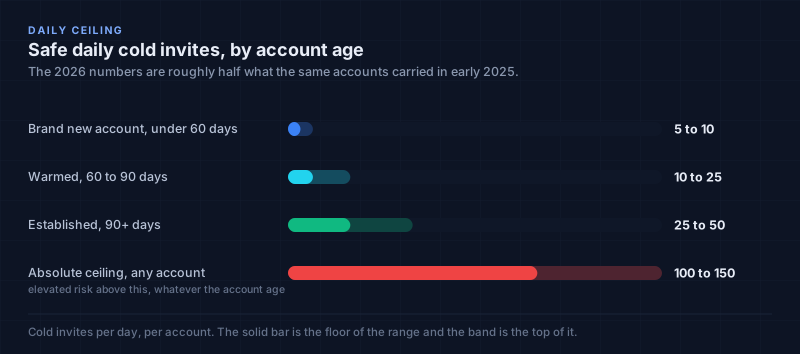
| Safe daily cold invites (new account, under 60 days) | 5 to 10 | N/A | Brand new accounts |
| Safe daily cold invites (warmed, 60 to 90 days) | 10 to 25 | N/A | Post-payment, post-warmup |
| Safe daily cold invites (established, 90+ days) | 25 to 50 | N/A | Clean history, authenticated |
| Absolute ceiling (any account) | 100 to 150 | N/A | Elevated risk above this |
Event and Calendar Creation Limits#
| Limit | Threshold | Replenishment |
|---|---|---|
| Events created in short period | 100,000+ | Possibly several months |
| Calendars created in short period | 60 | Several hours |
| Calendar shares in short period | 750 | Several hours |
| Events edited after throttle | Restricted | Few hours |
Google Calendar API Rate Limits (Updated May 1, 2026)#
| Limit Type | Value | Adjustable? |
|---|---|---|
| Per minute per project | 10,000 requests | Yes (quota request) |
| Per minute per user per project | 600 requests | Yes (quota request) |
| Daily billing threshold per project | 1,000,000 requests | No |
| Projects created before May 1, 2026 | Legacy quotas apply | Contact support |
| Projects created on/after May 1, 2026 | New quotas apply | Automatic |
Exceeding the quota request limits is planned to incur charges to your Google Cloud billing account later in 2026. If you're building automation on top of the Calendar API, budget for this.
Gmail/Email Sending Limits (Calendar Invites Generate Emails)#
Every calendar invite you send generates a notification email. These count against your email sending limits:
| Account Type | Daily Sending Limit |
|---|---|
| Personal Gmail | 500 recipients/day |
| Google Workspace (paid) | 2,000 emails/day |
| Google Workspace unique recipients | 3,000/day (max 2,000 external) |
| Trial accounts | 500 emails/day |
This means: if you send 100 calendar invites, you've consumed 100 of your 2,000 daily email quota. If you're also running cold email from the same account, you're double-dipping. Never run cold email and cold calendar from the same mailbox. (The cold email side of this has its own set of rules, which I wrote up in the spam filter guide and the Primary inbox guide.)
New Account Restrictions (The 60-Day Gate)#
Google applies tighter activity limits to:
- Paid subscriptions up to 60 days after meeting the payment threshold
- Trial accounts
- Users of the legacy free edition of G Suite
- Google Workspace for Education Fundamentals users
- Google for Nonprofits customers
To unlock full limits:
- Buy your domain
- Pay the cumulative equivalent of at least $100 USD more than the cost of your domain
- Wait 60 days
Only then may your limits increase. This is documented in Google's Workspace Admin Help as of July 22, 2026. There is no workaround. There is no "contact support to expedite." Wait the 60 days.
Warming Up Calendar Accounts, the Protocol Nobody Documents#
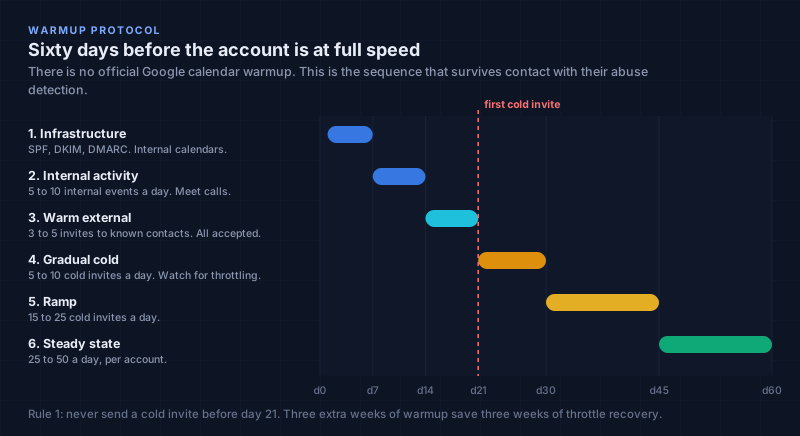
There is no official "calendar warmup" process from Google. There is no "calendar warmup tool" that Google endorses. But there is a warmup process that works, and I've refined it over two years of operational experience.
The principle is the same as email warmup: build trust gradually through legitimate activity before attempting cold outreach. Google's trust systems evaluate your account holistically. A domain that sends internal calendar invites, hosts Google Meet calls, shares documents, and has active user engagement looks fundamentally different from a domain that exists solely to blast external calendar invites.
The 8-Week Calendar Warmup Protocol#
| Phase | Duration | Daily Activity | Purpose |
|---|---|---|---|
| Phase 1: Infrastructure | Days 1 to 7 | Configure SPF, DKIM, DMARC, MTA-STS, BIMI. Create 2 to 3 internal calendars. Share with team. | Establish technical legitimacy |
| Phase 2: Internal Activity | Days 7 to 14 | Create 5 to 10 internal events/day. Invite team members. Accept/decline invites. Use Google Meet for 2 to 3 calls/day. Share documents via Calendar links. | Build behavioral history |
| Phase 3: Warm External | Days 14 to 21 | Send 3 to 5 calendar invites/day to known external contacts (partners, existing clients, vendors). All accepted. All attended. | Establish external sending pattern |
| Phase 4: Gradual Cold | Days 21 to 30 | Begin 5 to 10 cold calendar invites/day. Target high-intent prospects only. Monitor for throttling. | Test cold sending capacity |
| Phase 5: Ramp | Days 30 to 45 | Increase to 15 to 25 cold invites/day. Add second account if needed. | Scale within safe limits |
| Phase 6: Steady State | Days 45 to 60+ | 25 to 50 cold invites/day per account. Multiple accounts across multiple domains. | Full operational capacity |
Critical Warmup Rules#
Rule 1: Never send a cold invite before Day 21. I don't care how urgent your pipeline is. I don't care how "ready" your list is. Day 21 is the minimum. I've sent cold invites on Day 14 and gotten throttled by Day 16. The three extra weeks of warmup save you three weeks of throttle recovery.
Rule 2: Every warmup invite must be accepted and attended. The goal isn't to send invites. It's to generate positive engagement signals. If you send 10 warmup invites and 8 get declined, that's a negative signal. Send to people who will actually show up. Your team. Your existing clients. Your partners.
Rule 3: Use Google Meet during warmup. Calendar invites that include a Google Meet link and result in actual video calls generate the strongest trust signals. Google can see: invite sent → accepted → Meet link clicked → call attended → call duration. That's a complete positive engagement loop.
Rule 4: Vary your activity. Don't just send invites. Create events. Edit events. Delete events. Share calendars. Create recurring events. Use the "Find a time" feature. The more diverse your calendar activity, the more "human" your account looks.
Rule 5: Monitor for CAPTCHA. If your account starts requiring CAPTCHA on login during warmup, stop all sending for 48 hours. CAPTCHA is the canary in the coal mine. It means Google's systems have flagged your account for review. Continuing to send during a CAPTCHA flag accelerates the path to suspension.
What a platform can and cannot do about any of this#
I want to draw this line clearly, because it is the place where tooling gets oversold and where a reader with a fresh domain is most likely to be misled.
Tantra sends as your own Google Workspace mailboxes, through a service account with domain wide delegation that you create and authorise in your own admin console. We never hold your password or a refresh token, and the invitations come from your account, on your domain, with your history. That is the right architecture for this channel. It is also, precisely, why no platform can help you with the part of this section that matters most.
Your account's trust score is Google's assessment of your domain. The sixty day clock and the hundred dollar payment threshold are Google's gate on your subscription. The warmup in the table above is behaviour on your calendar, generating engagement signals from your real meetings. A sending tool inherits all of that. It cannot manufacture any of it, and any vendor telling you their warmup feature shortens Google's sixty day window is selling you a suspension.
So the honest division is this. Warmup, domain age, payment history and authentication are yours, and they are most of the outcome. What software should own is everything downstream: the pacing constraints described above, per account daily caps, refusing to send to an address that fails validation, stopping a sequence the moment somebody accepts, and RSVP tracking so the engagement signal is an answer the recipient actually gave rather than something inferred. Get the first list right yourself. Let the tool make the second list impossible to get wrong.
What About Automated Warmup Tools?#
They exist. They send calendar invites to other warmup accounts to generate artificial engagement. I've tested three of them.
My verdict: They help marginally for email warmup. They are dangerous for calendar warmup. Here's why:
- Google can detect circular invite patterns (Account A invites Account B, Account B invites Account A, repeat).
- Calendar invites that are accepted but never attended (no Meet call, no check-in) generate weaker signals than genuine engagement.
- If the warmup service gets flagged, every account connected to it gets flagged by association.
Use warmup tools as a supplement for email reputation. For calendar specifically, do it manually. It's 20 minutes a day for three weeks. That's cheaper than a suspended account.
The Psychology of the Calendar Accept, and Why People Say Yes#
This is the section most calendar outreach guides skip entirely. They give you templates. They tell you to "keep the title short" and "add a description." That's like telling someone to "cook good food" without explaining heat, seasoning, and timing.
I've spent two years studying why people accept calendar invites from strangers, and I can tell you: the difference between a 25% accept rate and a 65% accept rate is almost never technical. It's psychological. The invite arrived. The person saw it. They chose to decline. Understanding why they chose to decline, and what would have made them choose differently, is the entire game.
The Calendar Invite Has a Different Cognitive Frame Than Email#
This is the single most important insight in this entire article, and almost nobody talks about it:
An email asks: "Should I read this?" A calendar invite asks: "Can I make this time?"
These are fundamentally different cognitive questions. The email question requires the recipient to evaluate your credibility, your relevance, your offer, and their interest, all before deciding whether to engage. The calendar question requires them to check one thing: their availability.
This is why calendar invites get 60 to 80% open rates versus 20 to 28% for email. The cognitive cost of opening a calendar invite is near zero. It's already on their agenda. It's already in their time-blocking system. They don't have to "decide to engage." They just have to decide whether the time works.
But here's the trap: The low cognitive cost of opening doesn't mean the low cognitive cost of accepting. The accept decision still requires motivation. And that's where most cold calendar outreach fails.
Fogg's Behavior Model Applied to Calendar Invites#
Dr. B.J. Fogg's model states that behavior happens when three elements converge: Motivation, Ability, and a Prompt (B=MAP).
Motivation: Why should this person accept your invite? Most cold calendar invites fail here immediately. The title says "Quick Chat" or "Meeting with [Your Company]" and the description says "I'd love to show you how our platform can help." The recipient's motivation is zero. They don't know you. They don't know what you want. They don't know why they should give you 30 minutes.
Ability: How easy is it to accept? This is where calendar invites have a structural advantage over email. The accept button is one click. No typing required. No "let me check my calendar and get back to you." The ability cost is genuinely low. But you can make it even lower:
- Offer 2 to 3 time options (reduces decision fatigue)
- Keep the duration short (15 min feels lower-commitment than 30)
- Include a clear "what we'll cover" so they know what they're walking into
Prompt: The calendar notification is the prompt. But timing matters enormously. An invite that arrives at 9:47 AM in the recipient's timezone, when they're planning their day, hits differently than one that arrives at 4:55 PM when they're wrapping up. I send invites between 9 to 11 AM and 2 to 3 PM in the recipient's local timezone.
The "Calendar Contract" Psychology#
Here's something I've observed across thousands of sends: a calendar invite creates a psychological contract that an email does not.
When someone accepts a calendar invite, they've made a commitment. They've blocked time. They've told their calendar (and often their team) "I'm doing this thing at this time." Declining after accepting feels like breaking a promise. This is why:
- Accept rates are higher than email reply rates (the commitment threshold is lower)
- No-show rates are lower than email "I'll get back to you" rates (the commitment is already made)
- Reschedule rates are higher than "ignore" rates (people would rather move the time than break the commitment)
This is the "sunk cost" principle applied to scheduling. Once someone has accepted, they've invested a small amount of social capital. They're more likely to show up than someone who merely replied "sure, sounds good" to an email.
What I do: I leverage this by making the accept feel like the natural next step, not a commitment. "I've blocked 15 minutes on Thursday at 10 AM. If that doesn't work, just decline and I'll find another slot." The decline option removes the pressure. The specific time removes the decision. The short duration removes the risk.
Loss Aversion and the Calendar Frame#
People are more motivated by avoiding loss than acquiring gain. In calendar outreach, this means framing the cost of not attending rather than the benefit of attending.
Weak: "I'd love to show you how our platform can save you time." Stronger: "Your team is probably spending 6 hours a week on [specific task]. I've mapped out where those hours go. 15 minutes, and you'll know exactly which 3 hours are recoverable."
The second version makes the status quo feel expensive. It doesn't sell your product. It sells the problem. And it makes the 15-minute invite feel like the cheapest possible way to stop the bleeding.
The "Specific Time" Advantage#
Here's a data point that surprised me: invites with a specific date and time get 2.3x the accept rate of invites that say "let's find a time that works."
Why? Because "let's find a time" creates a decision loop. The recipient has to: open their calendar → evaluate availability → propose a time → wait for confirmation → accept. That's five steps. A specific time invite is: see time → check calendar → accept. Three steps. And the "check calendar" step is often automatic. They glance at their day and know immediately whether 10 AM Thursday works.
What I do: I always propose a specific time. I pick a time 3 to 7 business days out, not tomorrow, which reads as aggressive, and not three weeks out, which reads as abstract. I offer one alternative in the description: "If Thursday at 10 doesn't work, I'm also free Friday at 2." Two options. Not five. Not "any time that works for you." Two.
Trust Calibration: The Confidence Gradient#
Recipients approach cold calendar invites with deep skepticism. They've been pitched before. They've accepted invites that turned into 45-minute product demos. They've been ghosted after accepting.
Trust is built through specific mechanisms:
- Specificity in the title. "15 min: Reducing no-shows on your outbound meetings" is infinitely more credible than "Quick Chat" or "Meeting with [Company]."
- Transparency in the description. "I'm going to be honest, this might not be a fit. But if [specific condition] is true, it's worth 15 minutes."
- Social proof with names. "We did this for [Company X] and [Company Y]" beats "trusted by 500+ companies."
- Low commitment framing. "15 minutes. No deck. No demo. Just a conversation about [their specific problem]."
- The decline option. Explicitly saying "if this isn't relevant, just decline, no hard feelings" paradoxically increases accept rates. It removes the social pressure that makes people decline out of politeness.
The Anti-Slot-Machine Principle#
Here's something I think about constantly: if your first invite is brilliant and specific, and your follow-up (after a decline or no-response) is a generic "Just bumping this up," you've broken the psychological contract. The recipient felt seen by the first invite. The second invite makes them feel like a number in a sequence.
Every touch in your calendar sequence must earn the next touch. If invite one is specific to their company and invite two is "Wanted to follow up on my previous invite," you've lost them. Each invite must add new value, a new angle, or a new piece of information.
Writing Calendar Invites That Actually Get Accepted#
After sending forty thousand invites, here's what I know about the craft:
Event Titles#
The title is your subject line. It's the only thing the recipient sees in the notification. It determines whether they tap to open or swipe to dismiss.
What works:
- Specific outcome + timeframe: "15 min: Cutting your SDR ramp time from 6 weeks to 3"
- Their problem + your angle: "Your onboarding drop-off at Day 7: quick thought"
- Reference to their work: "Re: Your Q3 pricing page restructure"
What doesn't work:
- "Quick Chat" (generic, zero information)
- "Meeting with [Your Company]" (about you, not them)
- "Introduction" (meaningless)
- "Follow Up" (admits you're in a sequence)
- Anything over 60 characters (gets truncated in notifications)
My formula: [Timeframe] + [Their Specific Problem/Opportunity] + [Implied Outcome]
Examples:
- "15 min: Your API pricing page vs the competition, 3 gaps I spotted"
- "20 min: Reducing no-shows on your demo calls (saw your Calendly setup)"
- "15 min: Your Q3 hiring plan, where the bottleneck actually is"
Event Descriptions#
The description is your email body. It's where you earn the accept. Keep it under 80 words. I aim for 40 to 60.
Structure:
Line 1: The hook. A specific observation about their work, company, or situation. This is the only line that matters. If they don't read line two, line one failed.
Line 2: The connection. Why you're reaching out. What you noticed. What problem you think they might have.
Line 3: The proof (optional). One sentence of social proof. "We did this for [Company]."
Line 4: The ask + the out. "Worth 15 minutes? If not, just decline, no hard feelings."
Example (52 words):
Noticed your team shipped a new self-serve onboarding flow last month. Ran a quick teardown against your two closest competitors and found 3 friction points that typically cost 12 to 18% of trial-to-paid conversion. Happy to walk through them in 15 min. If it's not relevant right now, just decline. No follow-up.
What I Never Do#
- I never use the title "Quick Chat" or "Introduction."
- I never write descriptions over 100 words.
- I never include links in the description (they trigger spam scoring on the notification email).
- I never send the same title/description template to every prospect.
- I never create events longer than 30 minutes for cold outreach.
- I never send invites for "tomorrow." Minimum 3 business days out.
- I never send more than one invite to the same person in a 7-day window.
- I never use HTML formatting in the description. Plain text. Always.
The "Would I Accept This?" Test#
Before sending, I look at the invite from the recipient's perspective. I ask: "If I received this from a stranger, would I accept?" If the answer is "maybe," I rewrite it. The bar is: would I accept this from someone I've never met, based solely on the title and 60 words of description?
If the title doesn't make me curious, it fails. If the description doesn't make me feel like the 15 minutes will be genuinely useful, it fails. If the ask feels like a sales pitch disguised as a conversation, it fails.
Sequence Architecture and the Multi-Touch Calendar Playbook#
The optimal cold calendar sequence is 3 to 4 touches over 14 to 21 days. The first invite captures 55 to 60% of all accepts. The remaining 40 to 45% come from follow-ups. Less than 3 touches and you're leaving accepts on the table. More than 5 and you're annoying people.
My Sequence Structure#
| Step | Timing | Format | Purpose | Length |
|---|---|---|---|---|
| Touch 1 | Day 1 | Calendar invite | Specific hook + value + soft ask | 40 to 60 word description |
| Touch 2 | Day 4 | Brief email | "Sent you a calendar invite for [day/time], wanted to make sure it landed." | 2 sentences |
| Touch 3 | Day 8 | Rescheduled invite (if declined/no response) | Different time slot + new angle | 40 to 60 word description |
| Touch 4 | Day 14 | Final email | Acknowledge timing may not be right. Leave door open. | 3 sentences |
Critical rules:
- Each touch adds new value or a new angle. No "just following up on my invite."
- Sequences stop automatically on accept. If they accept Touch 1, Touches 2 to 4 never send.
- Sequences stop on explicit decline with a reason. If they decline and say "not relevant," don't reschedule.
- Sending windows respect the recipient's timezone.
- The rescheduled invite (Touch 3) changes the time AND the angle. Different day, different hour, different hook.
- The final email (Touch 4) is a graceful exit. "Totally understand if the timing isn't right. If [specific trigger] changes, I'm easy to find."
The Calendar + Email + LinkedIn Triangle#
Here's something most calendar outreach guides won't tell you: the highest-converting sequences combine all three channels.
The 3-channel sequence:
- Day 1: Calendar invite (primary touch)
- Day 3: LinkedIn connection request + brief message referencing the invite
- Day 5: Email follow-up (if no accept)
- Day 8: Rescheduled calendar invite (if no response)
The 3-channel pre-webinar sequence (email + calendar + LinkedIn) lifts attendance from 28% to 63%. RSVP is the engagement signal. You know who's coming before the day arrives.
How I use it:
- For high-value prospects who didn't accept the first invite, I send a LinkedIn message: "Sent you a calendar invite for Thursday, wanted to make sure it didn't get buried. Happy to find a different time if that works better."
- The LinkedIn message isn't a pitch. It's a nudge. It reminds them the invite exists without being pushy.
- I never send all three channels on the same day. Space them 2 to 3 days apart.
The "Office Hours" Frame#
Here's the highest-converting calendar outreach format I've found: Office Hours.
Instead of "Meeting with [Your Company]," the invite says: "Office Hours: [Specific Topic Relevant to Them]."
Examples:
- "Office Hours: Reducing SDR ramp time below 3 weeks"
- "Office Hours: Your API pricing page, 3 gaps I spotted"
- "Office Hours: Onboarding drop-off at Day 7"
Why it works:
- It's not a sales call. "Office hours" implies you're available, not that you're pitching. The power dynamic shifts.
- It's specific. The topic tells them exactly what they'll get. No ambiguity.
- It's low-commitment. "Office hours" implies you'll be there regardless. They're just dropping in.
- It's scalable. You can invite 3 to 5 prospects to the same "office hours" slot without it feeling like a group sales call. (But for cold outreach, I keep it 1:1.)
The constraint: Google imposes sending limits on calendar invitations. Overuse triggers abuse detection. This is a precision tool, not a broadcast channel. I reserve the Office Hours frame for my top 20% of prospects.
Cold Calendar Outreach as Funnel Architecture#
I used to think of calendar outreach as a standalone channel. Send invites, get accepts, run calls. Linear. Simple.
I was wrong. Calendar outreach is one touch in a non-linear funnel, and treating it in isolation wastes its potential.
Speed-to-Accept#
The probability of a prospect accepting drops dramatically after the first 24 hours. When someone sees your calendar invite, the window is narrow. If they don't accept within a day, they've moved on. They've accepted three other meetings. They've reorganized their week. The moment is gone.
What I do: I send invites at 9 to 11 AM in the recipient's timezone, when they're planning their day. I follow up with the email nudge at Day 2 (not Day 5). I reschedule at Day 7 (not Day 14). Speed matters. Every day of delay costs 8 to 12% of potential accepts.
The Activation Mindset#
Borrowing from SaaS onboarding psychology: the goal of calendar outreach isn't to "get an accept." It's to get the prospect to their "aha moment", the point where they understand, concretely, how your solution changes their specific situation.
This means your invite shouldn't sell your product. It should sell the problem. The product is the answer to a question they now want answered. The invite creates the question.
Post-Accept Architecture#
What happens after the accept matters as much as the invite itself:
- Accepted → Send a confirmation email within 1 hour. Include a 1-line agenda. "Looking forward to it. We'll cover: [1 thing]. That's it."
- Accepted + attended → Send a thank-you within 2 hours. Include the one resource you promised. No pitch. Just value.
- Accepted + no-show → Send a gentle reschedule within 24 hours. "Looks like we missed each other. Want to try [new time]?" One reschedule. Not two.
- Declined with reason → Thank them. Note the reason. Set a follow-up date if appropriate. Do not re-invite within 30 days.
- Declined without reason → One reschedule at a different time. If declined again, stop. Move to nurture.
- No response after sequence → Move to a different channel (LinkedIn, email) or a different angle entirely. Do not send a third calendar invite.
The Webinar Calendar Playbook#
For webinar campaigns, the calendar invite is the highest-converting touch:
- Day 1: Email invitation with registration link.
- Day 3: Calendar invite for the webinar (auto-generated from registration, or manual for VIP prospects).
- Day 5: LinkedIn reminder for registered attendees.
- Day 7 (day before): Calendar reminder (auto-generated by Google).
- Day 8 (day of): Email reminder 1 hour before.
The 3-channel pre-webinar sequence lifts attendance from 28% to 63%. The calendar invite is the anchor. The rest of that playbook, covering scheduling evidence, the reminder cadence, retention during the session and the segmented follow up, is in the webinar attendance playbook. It's the one touch that puts the event on their actual schedule, not just in their inbox.
Common Mistakes and Troubleshooting#
| Mistake | What Happens | The Fix |
|---|---|---|
| Sending from a new account (under 60 days) | Immediate throttle at 100 to 300 invites | Wait 60 days + $100 payment threshold |
| No SPF/DKIM/DMARC | Higher scrutiny, lower thresholds | Configure all three before any sending |
| >50 cold invites/day from one account | Reputation decay, throttle risk | Cap at 25 to 50; use multiple accounts |
| Generic titles ("Quick Chat") | 15 to 25% accept rate | Specific outcome + timeframe titles |
| Descriptions over 100 words | Cognitive overload, lower accepts | 40 to 60 words. One idea. One ask. |
| Sending to the same person 3+ times | Spam reports, account flag | Max 2 invites per person per 30 days |
| Identical templates across sends | Pattern detection by abuse systems | Vary title, description, time, duration |
| Sending invites for "tomorrow" | Feels aggressive, lower accepts | 3 to 7 business days out minimum |
| Running cold email + calendar from same mailbox | Double-dipping email quota, faster reputation decay | Separate mailboxes for each channel |
| Ignoring CAPTCHA warnings | Accelerated path to suspension | Stop sending for 48 hours if CAPTCHA appears |
| Using automated warmup tools for calendar | Circular invite detection, association flags | Manual warmup: real invites, real attendance |
| Sending invites at 2 AM recipient time | Low accept rate, looks automated | Send 9 to 11 AM or 2 to 3 PM local time |
| Not varying send times | Uniform timing triggers automation detection | Vary by ±45 minutes |
| Creating 500+ events in a day | Event creation throttle (100K+ short period) | Spread creation over days |
| Using Google Groups for cold invites | Triggers review at scale | 1:1 invites only for cold outreach |
Troubleshooting Deliverability#
If your invites stop sending (no error, just... can't): You've been throttled. Check your external invite count. If you've sent 10,000+ in a short period, you're in the throttle window. Wait. There's no appeal. The throttle lifts in approximately one month.
If your account shows "unusual activity": Stop all sending immediately. Wait 72 hours. Review your sending patterns. Reduce volume by 50% when you resume. If it happens twice, stop cold outreach from that account permanently.
If your accept rate drops suddenly: Check your title and description. Check your send times. Check whether you've changed your targeting. Check whether a recent campaign generated spam reports. The invite is arriving. They're seeing it. They're choosing not to accept.
If your bounce rate on invite notification emails exceeds 3%: Your list is bad. Stop sending. Validate every email address. Remove role addresses (info@, sales@, admin@). Remove catch-all domains. Resume at lower volume.
If you get a suspension: Appeal immediately. Provide documentation of your business, your sending practices, and your remediation plan. First suspension: 1 to 5 business days. Second: 5 to 14 days. Third: permanent. Do not risk a third.
Tool Selection, a Decision Framework#
The 2026 calendar outreach tool market segments into three categories. Here's how I'd choose:
| Category | Tools | Best For | Pricing Model |
|---|---|---|---|
| Volume-first (email + calendar) | Instantly, Smartlead | Agencies, high-volume multi-channel | Per-seat / per-inbox |
| Calendar-first | Let's Calendar, GetKali | Dedicated calendar outreach at scale | Per-invite / per-campaign |
| AI-first + multi-channel | Tantra | Hyper-personalized email + calendar in one workflow | Per-company (unlimited inboxes) |
My decision framework#
- Sending 5,000+ calendar invites/month across many clients? → Volume-first tools with inbox rotation. You need infrastructure, not finesse.
- Running targeted campaigns under 500 prospects with deep research? → AI-first platforms that personalize per-recipient from source material.
- Need calendar outreach + email in one workflow? → Tantra is currently the only platform that runs calendar invitations and multichannel sequences from one workspace, priced per company rather than per inbox.
- Budget-constrained solo founder? → Start with one Google Workspace account, one secondary domain, 20 invites/day. You don't need a platform. You need a list and a good invite.
What to evaluate in any tool#
- Does it handle SPF/DKIM/DMARC monitoring?
- Does it include calendar-specific warmup automation (not just email warmup)?
- Does it validate emails before sending invites?
- Does it track accept/decline/reschedule as separate metrics?
- Does it support timezone-aware sending windows?
- Does it stop sequences on accept?
- Does it vary send times automatically (anti-pattern-detection)?
- What's the pricing at 20+ mailboxes? (Per-inbox pricing becomes punitive at scale. Tantra's per-company model means adding mailboxes doesn't multiply your cost.)
- Does it respect Google's 10,000 external invite throttle? (If a tool promises "unlimited calendar invites," it's either lying or going to get your account suspended.)
Frequently Asked Questions#
Is cold calendar outreach legal in 2026?#
Yes. In the US, CAN-SPAM applies to the notification emails generated by calendar invites, requiring accurate headers, a physical address, and an opt-out mechanism. In the EU, GDPR allows B2B outreach under "legitimate interest" with proper documentation. The calendar invite itself is not regulated as email, but the notification email it generates is. Penalties for non-compliance reach $53,088 per email under CAN-SPAM.
What's the maximum number of guests per calendar event?#
200 direct guests per event. Up to 100,000 via Google Group invite. Above 50 guests, the guest list is hidden. For cold outreach, always use 1 external guest. Never exceed this.
How many external calendar invites can I send before getting throttled?#
Google documents ~10,000 external invites in a short period as the throttle threshold. For new/low-trust accounts, the practical limit is 100 to 300 depending on usage patterns. The "Email guests" feature caps at ~2,000 external emails per 24 hours.
How long does calendar account warmup take?#
Minimum 4 weeks before any cold sending. Full operational capacity at 6 to 8 weeks. The 60-day + $100 payment gate is non-negotiable for new Workspace accounts. There is no shortcut.
Does Google have a spam folder for calendar invites?#
No. Calendar invites don't go to spam. They go to the recipient's calendar or they don't arrive at all. The risk isn't spam placement. It's account throttle or suspension. This is both the advantage (no spam folder) and the danger (no warning before termination).
What's a good cold calendar invite accept rate in 2026?#
The average is 38 to 45%. Good is 50 to 55%. Elite performers exceed 60%. Hyper-personalized, signal-based campaigns with proper warmup reach 65 to 70%. If you're below 25%, your problem is targeting, title, or description, not volume.
Can I use calendar invites for bulk outreach (1,000+ invites)?#
Technically yes, via Google Groups (up to 100,000 members). Practically, no. Bulk calendar invites trigger abuse detection, generate spam reports, and risk account suspension. Calendar outreach is a precision tool for high-value prospects. Use email for volume. Use calendar for the top 20%.
What happens if I get suspended?#
First suspension: 1 to 5 business days to resolve via appeal. Second: 5 to 14 days. Third: permanent termination with no appeal. During suspension, all Google services (Gmail, Drive, Calendar, Meet) are inaccessible. Data is preserved for ~30 days after permanent termination, then deleted.
Should I send calendar invites before or after email?#
Before. The calendar invite is the primary touch. The email is the follow-up. "Sent you a calendar invite for Thursday, wanted to make sure it landed." This frames the email as a courtesy, not a pitch. It also means the recipient has already seen your name and topic before the email arrives.
How do I avoid pattern detection?#
Vary send times (±45 min). Vary event durations (15, 20, 30 min). Vary title structures. Vary description lengths. Never send more than 10 invites in a single hour. Never send at the exact same time every day. Use multiple accounts across multiple domains.
Conclusion: What I'd Do If I Were Starting Today#
If someone handed me a list of 200 prospects and said "go," here's exactly what I'd do:
Day 1 to 3: Register two secondary domains. Set up Google Workspace on both. Pay the $100 threshold immediately. Configure SPF, DKIM (2048-bit), DMARC, MTA-STS, and BIMI on both. Start the 60-day clock.
Day 1 to 7 (warmup Phase 1): Create internal calendars. Share with team. Set up 5 to 10 internal events per day. Use Google Meet for team calls. Build behavioral history.
Day 7 to 14 (warmup Phase 2): Continue internal activity. Add 3 to 5 external invites per day to known contacts (partners, existing clients). All accepted. All attended.
Day 14 to 21 (warmup Phase 3): Research all 200 prospects. Read their websites. Read their LinkedIn. Find the one specific thing that connects their situation to what I offer. Write 200 individual event titles and descriptions. Let AI help with research synthesis. Write the final invites myself.
Day 21 to 30 (warmup Phase 4): Begin cold sending. 5 to 10 invites/day across two accounts. Five-step sequence over 14 days. Each touch adds new value.
Day 30 to 60 (ramp): Increase to 15 to 25 invites/day per account. Add third account if needed. Monitor for CAPTCHA, throttling, and accept rates daily.
Day 25: Send calendar invites to the top 40 prospects who didn't accept the first invite. "Office Hours: [Their Specific Challenge]." Different time slot. New angle.
Day 40: Analyze. What worked? Which titles got accepts? Which segments responded? Which day-of-week performed best? Which time-of-day? Build the next campaign from the data.
Day 60: Full operational capacity. 25 to 50 invites/day per account. Three accounts across two domains. Steady state.
The tools matter less than the thinking. The infrastructure matters more than the copy. The psychology matters more than the volume. And the person who receives your calendar invite is not a "lead." They're a human being with a full calendar, a skeptical mind, and about three seconds of patience for your event title.
Earn those three seconds. Everything else follows.
Key Takeaways#
- Average accept rate is 38 to 45%. Personalized campaigns hit 60 to 70%. The gap is execution, not luck.
- Google documents a 10,000 external invite throttle as of July 2026. New accounts face 100 to 300 limits. There is no workaround.
- The 60-day + $100 payment gate is real. Do not attempt cold outreach on a fresh account.
- Calendar invites get 3x the open rate of cold email but the same anti-abuse infrastructure applies.
- Account warmup takes 4 to 8 weeks minimum. There is no shortcut. Automated warmup tools are dangerous for calendar.
- Suspension #3 = permanent termination. Build your infrastructure to avoid ever reaching that point.
- The first invite gets 55 to 60% of accepts. Follow-ups get the other 40 to 45%. Send 3 to 4 touches over 14 to 21 days.
- Psychology beats volume. The "calendar contract," loss aversion, and the specific-time advantage drive accepts more than send volume.
- One idea per invite. One ask. Under 80 words. Complexity kills conversion.
- Per-company pricing beats per-inbox pricing when scaling to 20+ mailboxes.
Sources#
- Google Workspace Admin Help, Calendar sending limits (updated July 22, 2026)
- Google Calendar API, usage limits (May 2026 update)
- Google, email sender guidelines
- Google Calendar Help Community, external invite limits
- Gmail Postmaster Tools
- IETF RFC 8058, signaling one click unsubscribe
- US FTC, CAN-SPAM compliance guide for business
- Fogg, B.J. (2009). A Behavior Model for Persuasive Design. Persuasive Technology
- Microsoft, bulk sender requirements (May 2025)
Where Google publishes a number, this article uses Google's number and says so. Where no official figure exists, the number is labelled as practitioner observation, because the alternative is inventing precision that nobody can verify. Google's limits are also a moving target: the external invite threshold and the API quotas both changed in 2026, so treat every figure here as correct at the time of writing and check the first two sources before you build against them.
Try Tantra on accounts you already own
Omnichannel sequences across Gmail, LinkedIn and WhatsApp, plus Google Calendar invitation campaigns. Optional AI personalization on your own AI account or key.