How to land in the Gmail Primary inbox during cold outreach
Gmail makes two decisions about your email. The stop words that matter, sorted into three buckets, and the compliance trade off nobody mentions.
Tantra Growth Team42 min read
This is part two of a series. Part one, Cold email marketing in 2026 with AI, covers the spam decision and the psychology behind replies. This piece covers what happens after you clear that bar.
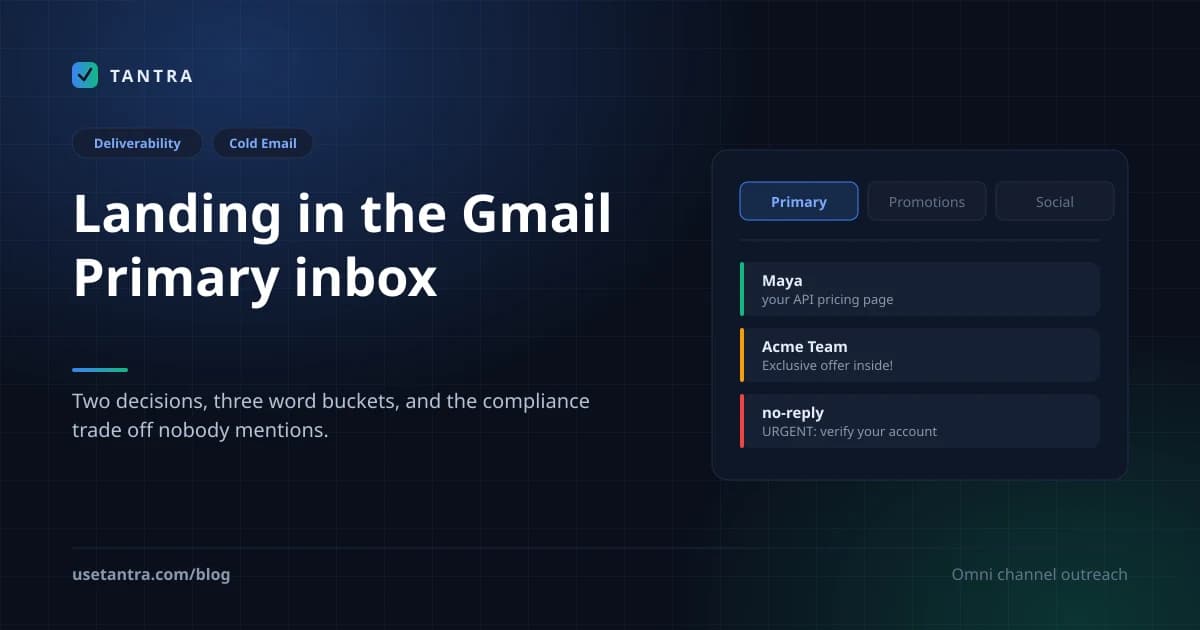
A founder once forwarded me a screenshot of his outbound dashboard and asked, half-joking, whether I could "fix the Promotions tab." Open rates were fine. Authentication was clean. SPF, DKIM, DMARC all green. Spam rate in Postmaster Tools sat a hair under 0.05%. By every metric he could see, the program was healthy. And yet his carefully researched, plain-text, one-link emails were quietly filing themselves into Promotions for most of the list, and he was convinced that was the reason his reply rate sat at 2%.
So he did what everyone does. He found a blog post with a list of "words that send you to spam," deleted every word on it from his templates, and re-sent. Nothing moved. Then he found a different list, deleted those words too, and re-sent. Still nothing. By the third list he was emailing me, slightly desperate, asking if maybe there was a master list somewhere that the gurus keep to themselves.
There isn't. And the reason his word-deletion exercise changed nothing is the same reason this article exists: Gmail makes two separate decisions about your email, words are only one input to the second decision, and the second decision is something Gmail will never report back to you. I spent the better part of 2024 learning that the hard way, and the whole exercise taught me more about deliverability than the previous five years combined.
This is the long version. It covers the two decisions, how the tab classifier actually behaves, the full map of signals that push you toward Primary or Promotions or Spam, the word lists you came for, sorted into the three buckets they actually belong to, because conflating those buckets is the mistake, a before-and-after rewrite clinic, the one compliance trade-off that almost no "Primary inbox hack" list will ever mention, how to measure a tab Google refuses to report, and the strategic question you should answer before you touch any of this: is chasing Primary even the right goal for your program?
A note on how I'm writing this. I'm a practitioner, not a Google engineer. I don't know the exact feature weights in Gmail's tab classifier, and neither does anyone outside Google. Where something is officially documented I'll say so. Where it's a strong, widely-replicated practitioner observation I'll label it that way. Where the honest answer is "nobody knows, so measure it yourself," I'll say that too, and I'll be especially careful with the word lists, because that is exactly the place where confident-sounding advice goes to die. The word lists below are real and useful. They are also directional, not deterministic, and the moment you treat them as a checklist of banned words you have misunderstood what a modern classifier is. I'll explain why before I give them to you, because the "why" is the part that actually changes how you write.
Quick Summary#
| Question | Honest answer |
|---|---|
| Is there a switch or header that forces Primary? | No. None exists. |
| Is there a master list of "banned words" that sends you to Promotions? | No. Words are contextual signals, not rules. Format and recipient history dominate. |
| Do SPF/DKIM/DMARC put me in Primary? | Not directly. They govern the spam decision, not the tab. |
| What's the single strongest lever for Primary? | A prior reply from that recipient. It turns a broadcast into a conversation. |
| Does plain text guarantee Primary? | No. It biases toward Primary; history still wins. |
| Should I remove List-Unsubscribe to look less "marketing"? | Never. It risks the spam decision and breaks bulk-sender rules. |
| Are the "spam words" and the "Promotions words" the same list? | No, and this matters. Scam vocabulary risks Spam; marketing vocabulary biases Promotions; jargon kills replies. Three lists, three decisions. |
| Can I see my own tab placement in Postmaster Tools? | No. Measure externally with seed accounts. |
| Is landing in Promotions a failure? | Usually no. Promotions is not Spam. Many buyers check it on purpose. |
| Do all recipients even have tabs? | No. Many power users disable them, then the question is moot. |
The Two Decisions Nobody Separates#
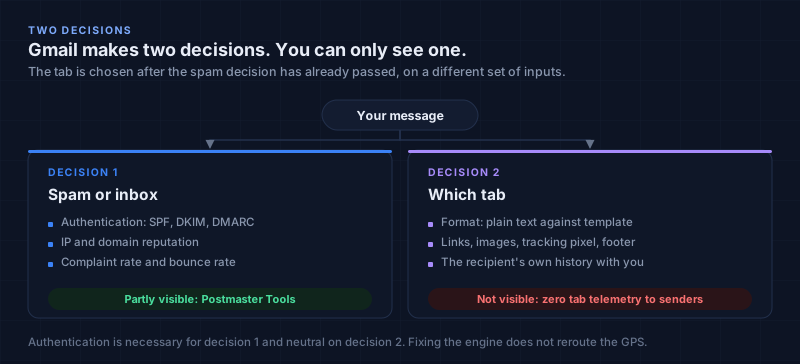
The reason so much time gets wasted on this topic, and the reason my founder friend deleted three word lists to no effect, is a conflation. People feel their email "isn't landing" and reach for authentication, or warmup, or a thesaurus, all of which are real levers, but for the wrong decision. Authentication, reputation, and complaint rate decide whether your mail reaches the mailbox at all. They are necessary. They are not sufficient for Primary placement, because the tab is chosen after the spam decision has already passed. Fixing the engine does not reroute the GPS.
Here is the cleaner mental model I now use.
Decision 1, Spam vs. Inbox. Inputs: authentication (SPF, DKIM, DMARC), IP and domain reputation, complaint and bounce rate. Worst outcome: SMTP rejection or spam folder. Senders can partially see this via Postmaster Tools (spam rate, reputation tier). This is the decision the companion article solves.
Decision 2, Which tab. Inputs: content format (plain text vs. HTML template), link and image density, tracking pixels, list-mail fingerprints, word and phrase patterns, tone, and, most heavily, the recipient's own history with you and with mail that looks like yours. Worst outcome: Promotions or Updates. Senders cannot see this at all. There is zero tab telemetry exposed to senders. This is the decision this article solves.
Notice that words sit inside Decision 2, not Decision 1, and even inside Decision 2 they are one input among many. That single fact explains my founder friend's entire frustrating week. He was editing words to move a tab, while leaving the format (a templated body), the structure (a brand footer), and the relationship (a brand-new cold domain with zero reply history) exactly as they were. The words were the smallest lever in the room, and he was pulling it while ignoring the three large ones. The word lists later in this article will help you, but only after you understand that they are the trim, not the structure.
There is a second conflation inside the second one, and it's the quietest trap of all: the Primary tab only exists for recipients who have tabs enabled. A meaningful slice of the people you actually want to reach, executives, engineers, founders, heavy Gmail power users, turn tabs off and live in a single unified inbox. For them, your email is not "in Promotions" or "in Primary." It is in the inbox, competing chronologically against everything else. I learned this when a seed test I ran showed one email in Promotions on three accounts and in a unified inbox on two others, and I nearly "fixed" a problem that, for those two accounts, did not exist.
That fact should recalibrate your entire investment in tab-chasing and in word-chasing both. If a portion of your best prospects don't use tabs, then the only thing that matters for them is whether the email is worth opening, which is a copy and targeting problem, not a categorization problem and not a vocabulary problem. The tab, and the words that influence it, only matter for the subset of recipients who both have tabs on and don't check Promotions. That subset is real and large, but it is not everyone, and treating it as everyone is how teams burn weeks optimizing a dimension that half their audience doesn't have.
How the Tab Classifier Actually Works (Documented vs. Inferred)#
Let me be precise about what is known, because the gap between "documented" and "inferred" is exactly where the bad word lists live.
What Google documents: Gmail sorts incoming mail into categories using automated systems. Users can enable or disable tabs, and they can manually move a message between tabs, including an "Always move messages like this to Primary" action that retrains the classifier for that specific user. Categorization considers your usage patterns, meaning the recipient's own behavior with similar mail is an explicit input. That last sentence is the load-bearing one. It is the official explanation for the experience every sender has had: the identical email, with the identical words, lands in Primary for one person and Promotions for another, and neither of you did anything different on the sending side. The words were the same. The history was different. History won.
What is strongly inferred and practitioner-verified, but not officially spelled out: the classifier reads the same cues a human would, formatting, link count, image ratio, the presence of a brand header and an unsubscribe footer, the vocabulary and rhythm of the copy, the tone, and the relationship history between sender and recipient, and it behaves like a collaborative filter. The aggregate behavior of many Gmail users on messages that resemble yours sets a prior; the individual recipient's behavior then adjusts it. This is why a brand-new cold domain sending a templated blast full of marketing vocabulary gets a strong "Promotions" prior, and why a domain that a particular recipient has replied to gets pulled toward Primary regardless of which words it uses.
What is not documented anywhere, and what you should refuse to trust: exact feature weights, any numeric threshold ("keep links under N," "this word adds X% Promotions risk"), and any header that requests a tab. And, critically for this article, any claim that a specific word, by itself, deterministically sends you to a specific tab. Gmail exposes no tab data to senders, so any precise number attached to a word was produced by seed testing on one specific list, in one specific format, to one specific set of seed accounts. It describes that experiment, not your recipients, and it almost never isolates the word from the format it appeared in. I keep this rule because I have watched teams re-architect sending programs around a single seed-test screenshot that did not generalize, and I have been the person who did that more than once.
Here is the mental model that replaces the "banned words" myth, and it is the key to reading every list in this article correctly. A modern classifier does not hold a list of forbidden tokens. It holds a probability distribution it learned from billions of messages, and each word, phrase, and formatting choice nudges the message's position within that distribution. A word is a "signal" only in context: the word "free" inside an otherwise plain, personal, one-to-one note is a faint nudge; the word "free" inside an HTML template with a logo, three links, a footer menu, and a tracking pixel, sent in a 4,000-message blast from a cold domain, is part of a chorus that the classifier recognizes instantly as a campaign. The unit of optimization is not the word. The unit of optimization is the whole email's resemblance to a personal note from one human to another. Words are one input to that resemblance. Format, structure, pacing, and history are the others, and in my experience they usually weigh more.
The practical upshot is almost tautological once you see it: the more your email looks and behaves like a personal note, the more Gmail files it like one; the more it looks and behaves like a campaign, the more it is filed like one. The word lists below are simply the vocabulary layer of that principle. Use them to remove the obvious marketing tells from your copy. Do not expect them to override a templated format or a cold relationship. They won't, and believing they will is the expensive mistake.
The Full Signal Map, What Pushes You Where (Beyond Words)#
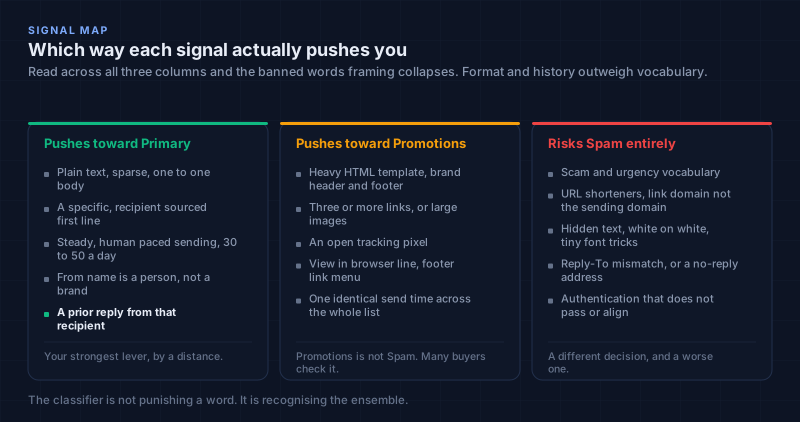
I'm putting the signal map before the word lists on purpose, because if you read the words first you'll over-index on them. The table below is the broader context the words live inside. "Direction" is which outcome the signal tends to push toward; "confidence" is how I'd bet on it, honestly. Read it as one principle wearing many outfits: personal-looking mail gets filed as personal mail; campaign-looking mail gets filed as campaign mail; scam-looking mail gets rejected.
Content and formatting signals#
| Signal | Tends to push toward | Confidence | Why |
|---|---|---|---|
| Plain-text, sparse, 1:1 conversational body | Primary | High (observed) | Mimics personal mail |
| Heavy HTML template with brand header/footer | Promotions | High (observed) | Reads as marketing collateral |
| Three or more links, or large embedded images | Promotions | High (observed) | Classic campaign markers |
| High image-to-text ratio, or image-only email | Promotions / Spam | High (observed) | Personal notes are not image-only |
| Open-tracking pixel | Promotions + spam risk | High (observed) | Marketing infrastructure fingerprint |
| "View in browser" line, footer link menu | Promotions | High (observed) | Bulk-mail signature |
| URL shorteners / link domain ≠ sending domain | Spam risk | Moderate to high (observed) | Obfuscation reads as phishing |
| Hidden text, white-on-white, tiny font tricks | Spam | High (official-adjacent) | Evasion behavior |
| Salesy preheader / preview text | Promotions | Moderate (observed) | Preheader is part of the marketing envelope |
Structural and copy signals (the layer the word lists live in)#
| Signal | Tends to push toward | Confidence | Why |
|---|---|---|---|
| Marketing/retail vocabulary (deals, urgency, offers) | Promotions | Moderate to high (observed) | Matches the corpus of promo mail |
| Scam/urgency/phishing vocabulary | Spam | High | Different decision; see bucket 2 below |
| Corporate jargon and vague value claims | Reply-kill (and mild Promotions bias) | Moderate (observed) | Reads as generated/templated |
| Self-centered opener ("I / we / our platform" first) | Reply-kill | High (observed) | Fails the recipient's first-line test |
| Multiple asks / multiple CTAs in one email | Reply-kill + Promotions | Moderate to high (observed) | Reads as a campaign, also decision paralysis |
| A specific, recipient-sourced observation in line 1 | Primary + reply | High (observed) | Reads as a human who did homework |
| Sentence fragments, varied length, one idea | Primary | Moderate to high (observed) | Human rhythm; also passes stylometric detection |
Header and identity signals#
| Signal | Tends to push toward | Confidence | Why |
|---|---|---|---|
List-Unsubscribe + List-Unsubscribe-Post headers | Slightly Promotions | Debated | See the compliance trade off below |
| Visible "Unsubscribe here" link in the body | Promotions | Moderate to high (observed) | Bulk-mail fingerprint |
Precedence: bulk / campaign-ID headers | Promotions | Moderate (observed) | Self-declares as bulk |
| From name = brand ("Acme Team") vs. a person ("Maya, Acme") | Promotions vs. Primary | Moderate (observed) | Person reads as person |
| Reply-To ≠ From, or no-reply address | Spam / Promotions | Moderate to high (observed) | One-way broadcast fingerprint |
| Clean SPF/DKIM/DMARC alignment | Neutral on tabs | High (by logic) | Fixes Decision 1, not Decision 2 |
| BIMI / brand logo | Neutral on tabs | Speculative | Affects display and trust, not categorization |
Sending-pattern signals#
| Signal | Tends to push toward | Confidence | Why |
|---|---|---|---|
| Sudden bulk volume spike from a domain | Promotions | Moderate to high (observed) | Looks like a blast |
| Steady, low, human-paced sending (30 to 50/day) | Primary | Moderate to high (observed) | Looks like a person |
| Identical send time stamped across the whole list | Promotions | Moderate (observed) | A person doesn't send 4,000 at once |
| Weekend / off-hour clustering | Promotions | Low to moderate (observed) | Campaign scheduling signature |
| Recipient has previously replied to you | Primary | Very high (official-adjacent + observed) | Conversation signal; your strongest lever |
| Recipient manually moved you to Primary once | Primary, for that user | High (official) | Per-user retraining |
| AI-generated, merge-tag-heavy, uniform copy | Promotions | Moderate to high (observed + stylometric tie) | Matches the marketing patterns the classifier learned on |
Read across all four tables and the "banned words" framing finally collapses. A word like free appears among the structural and copy signals as a moderate Promotions nudge, but the same word inside an HTML template with a tracking pixel and a footer menu, sent on the pattern of a 4,000-message spike is no longer a nudge, it's a confirmation. The classifier isn't punishing the word. It's recognizing the ensemble. That is why deleting words from a templated blast does nothing, and it is the entire reason the next section is organized the way it is.
The Word Lists You Came For, in the Three Buckets They Actually Belong In#
This is the section most readers scroll straight to, so let me put the warning label on the bottle one more time, plainly: these are not banned-word lists. Gmail does not have a list that says "if the email contains exclusive, send to Promotions." What these lists are is a catalog of marketing, scam, and jargon fingerprints, vocabulary that, in aggregate and in context, correlates with the kind of mail that lands in Promotions, in Spam, or in the trash-by-ignoring. The "confidence" column tells you how reliable the correlation is; the "say/do this instead" column is the part that actually changes your results, because a list of fears without alternatives is just noise.
One more structural point, because it is the difference between using these well and using them badly: a single flagged word in an otherwise personal email is usually fine. It is the cluster and the format that tip the decision. So do not run your copy through these tables like a linter and panic at one hit. Read the whole email aloud. If it sounds like a person wrote it to one other person, a stray "free" will not save a bad email or sink a good one. If it sounds like a campaign, no amount of synonym-swapping will fix it; you need to change the format and the relationship, per the signal map above. With that understood, here are the three buckets.
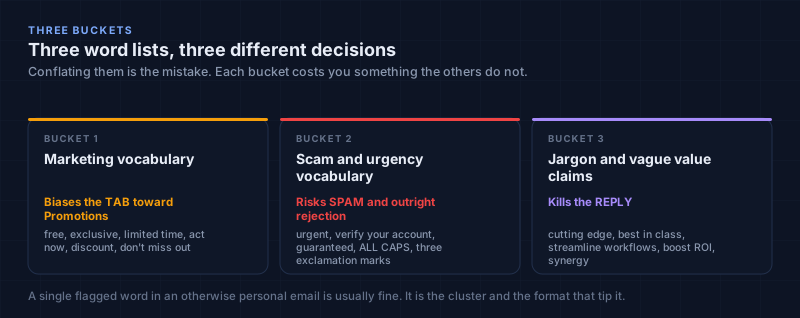
Bucket 1: Marketing vocabulary (biases the tab toward Promotions)#
These are the retail and campaign tells. On their own they nudge; in a templated blast they confirm. Confidence is "observed correlation," not a measured threshold, I will not put a percentage on any of these because no verifiable percentage exists.
| Word / phrase (the fingerprint) | Why it's a signal | Conf. | Say / do this instead |
|---|---|---|---|
| Limited time · Today only · Ends soon · 24 hours left | Manufactured urgency = promo mail | High | If it's genuinely time-bound, state the real reason plainly: "we close the beta cohort Friday, 4 seats left" |
| Exclusive offer · Special deal · % off · Discount · Coupon · Voucher · Redeem · Claim | Retail transaction vocabulary | High | Name the real terms like a human: "I can do $X for the first 90 days if it's a fit" |
| Free · 100% free · No credit card · No card required | Classic lead-magnet / promo markers | Moderate to high | Describe what they actually get: "no card needed to start the trial" |
| Buy now · Shop now · Order now · Click here · Sign up now · Subscribe | Hard transactional CTAs | High | A soft, specific ask: "want me to send the two-pager?" |
| Guarantee · Risk-free · Money-back | Trust-badge vocabulary (also spam-adjacent when stacked) | Moderate | Only keep if literally true; otherwise cut |
| Bonus · Act now · Hurry · Don't miss out · While supplies last · Clearance · Flash sale | Retail scarcity vocabulary | High | Cut. These are store-window words, not person-to-person words |
| Promotion · Promo · Newsletter · Opt-in · Unsubscribe (in the body) | Self-declares as bulk mail | High | Keep the unsubscribe mechanism in the header (see the compliance trade off); don't print the word in the body |
| We're excited to announce · Thrilled to share · Introducing · Big news | Press-release cadence | Moderate to high | State the thing plainly: "we shipped X on Tuesday" |
| Dear [Name] · Hi there · To whom it may concern · Dear Sir/Madam | Mass-mail salutations | High | "Hi [first name]," or just "[first name]," |
| I hope this email finds you well · I hope you're doing well | Template filler; also an AI tell | High | Cut it; open with the observation |
| ALL CAPS words · multiple!!! · emojis in subject/body (B2B cold) | Shouting = campaign or scam | High | Never in cold B2B |
Bucket 2: Scam and urgency vocabulary (risks Spam and rejection, not just the tab)#
This is the bucket the companion article owns, and I'm repeating the most relevant entries here because readers searching for "words that send you to spam" land on this page, and the honest thing is to show them that this list is more dangerous than the Promotions list. A Bucket 1 word costs you a tab you can't measure. A Bucket 2 word can cost you the spam decision, your reputation, and in some cases a legal problem. Treat these as "never," not as "edit carefully."
| Word / phrase (the fingerprint) | Why it's dangerous | Conf. | Say / do this instead |
|---|---|---|---|
| $$$ · Earn $ · Make money fast · Extra income · Work from home · Be your own boss | Income-opportunity spam corpus | High | Never in B2B cold; if it's your actual offer, you have a different problem |
| Urgent · Your account suspended · Verify your password · Update your payment · SSN · Bank details | Phishing / account-compromise corpus | High | Never. These are impersonation tells |
| Congratulations you won · Claim your prize · You've been selected | Lottery / advance-fee corpus | High | Never |
| As seen on TV · Doctor recommends · Cure · Lose X lbs · Miracle · (misused) FDA | Regulated-claims spam corpus | High | Never unless you are in that industry with compliant copy and legal review |
| The stack: "free" + "guarantee" + "no obligation" + "risk-free" together | The cluster, not the word, reads as scam | High | Use at most one, only if true, in plain language |
| Hidden text · white-on-white · 1px font · image-only body · sketchy shortlinks | Evasion / obfuscation behavior | High | Never; these are behaviors, not words, and they trigger Decision 1 hard |
Bucket 3: Jargon and vague value claims (kills the reply; mild Promotions bias)#
This bucket is the one almost no "stop word" list includes, and it's the one that, in my experience, costs more replies than the other two combined, because these words don't get you filtered, they get you ignored. They also overlap heavily with the stylometric AI detection markers from the companion article, which is why removing them helps two goals at once. A reader's eye glazes over "leverage our robust platform to streamline your workflow," and a glazed eye does not reply, and a non-reply keeps you in Promotions forever (because, remember, a reply is the strongest Primary lever there is).
| Word / phrase (the fingerprint) | Why it kills the reply | Conf. | Say / do this instead |
|---|---|---|---|
| Leverage · Synergy · Paradigm · Bandwidth · Circle back · Touch base · Deep dive · Move the needle · Low-hanging fruit | Consultant jargon; signals "template" | High | Plain verbs: use, combine, model, time, follow up, talk, look at, fix, start with |
| Best-in-class · World-class · Next-level · Cutting-edge · Innovative solution · Robust · Seamless | Empty superlatives; also AI tells | High | A specific, provable claim with a number or a name |
| Help companies like yours · Increase efficiency · Streamline your workflow · Save time and money · Boost your ROI | Vague value with no specificity | High | Name the exact task, the exact number, the exact team: "your SDRs spend ~10 hrs/wk on [task]" |
| I / We / Our platform / Our company (as the first word of the email) | Self-centered open; fails the first-line test | High | Open with them: their page, their post, their number, their change |
| Just checking in · Bumping this · Any thoughts? (as a follow-up with no new value) | Adds nothing; trains the recipient to ignore you | High | Each follow-up carries a new angle, a new data point, or a new asset |
| Long paragraphs · multiple asks · multiple links | Cognitive load + campaign shape | High | One idea, one ask, one link, under ~125 words |
Patterns, not just words (the layer above the lists)#
Because readers will inevitably treat the tables above as a linter, here is the layer that matters more than any single row: the patterns that make a word dangerous or harmless.
- The cluster rule. One flagged word in a personal note is noise. Five flagged words in a templated body is a signal. Optimize the density, not the individual token.
- The format multiplier. Every Bucket 1 word is roughly twice as "loud" inside an HTML template with a footer and a tracking pixel as it is in plain text. Fix the format first; the words get quieter automatically.
- The position rule. A marketing word in the subject line or first line weighs more than the same word buried in a PS. The classifier, like a human, front-loads its read.
- The rhythm rule. Uniform sentence length and heavy transitional phrases ("Furthermore," "Additionally," "Moreover") are AI/campaign tells even when no single word is "wrong." Vary your rhythm.
- The history override. A recipient who has replied to you will put a Bucket-1-laden email in Primary anyway, because the conversation signal outweighs the vocabulary. This is the most important row in the entire article and it is not a word at all.
The synthesis: the words you remove should be the obvious marketing and scam tells (Buckets 1 and 2) and the glazing jargon (Bucket 3). But the reason your email lands in Primary is not the absence of those words. It is the presence of the things on the other side of the "say this instead" column, a specific observation, plain language, one ask, a human rhythm, delivered in a plain-text format, at a human pace, to a person you have a reason to be writing to. Remove the bad words and you stop tripping the classifier. Add the good signals and you start earning the tab. They are not the same action, and most "stop word" advice quietly pretends they are.
Rewrite Clinic, One Email and Three Decisions#
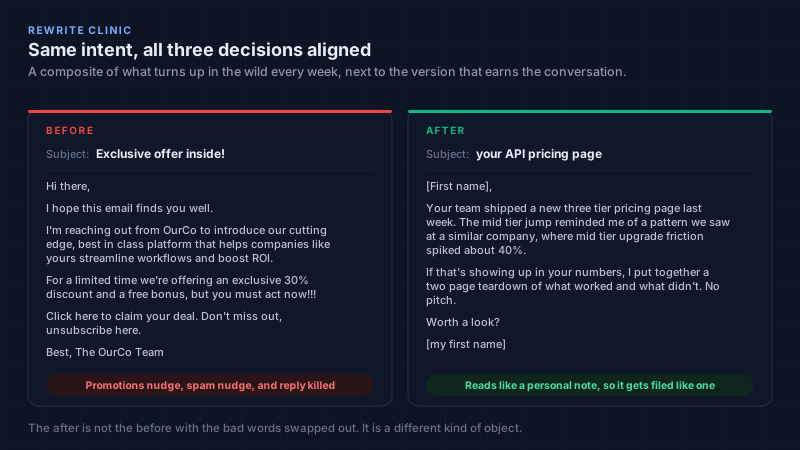
The fastest way to internalize the three buckets is to watch them get stripped out of a real (composite) email. Left column is what I see in the wild every week, annotated by which decision each element hurts. Right column is the same intent, rewritten so that all three decisions break in your favor. The annotations are the point.
The "before", annotated#
Subject: Exclusive offer inside! 🚀 [Bucket 1 "exclusive" + emoji: Promotions nudge in the most-weighted position]
Hi there, [Bucket 1 mass salutation: Promotions + reply-kill]
I hope this email finds you well. [Bucket 1 filler + AI tell: reply-kill]
I'm reaching out from [OurCo] to introduce our cutting-edge, best-in-class platform [Bucket 3 self-centered open + empty superlatives + AI tell: reply-kill]
that helps companies like yours streamline workflows and boost ROI. [Bucket 3 vague value: reply-kill]
For a limited time we're offering an exclusive 30% discount and a free bonus [Bucket 1 cluster (limited time + exclusive + discount + free): strong Promotions confirmation]
but you must act now!!! [Bucket 1 urgency + Bucket 2 caps/!!!: Promotions + spam nudge]
Click here to claim your deal. [Bucket 1 hard CTA + "click here": Promotions]
Don't miss out, unsubscribe here. [Bucket 1 scarcity + visible body unsubscribe: Promotions fingerprint]
Best, The [OurCo] Team [brand signature + likely HTML template/footer: Promotions format]
That email is fighting all three decisions at once, and notice that deleting the words alone would not save it, the format, the brand signature, the self-centered structure, and the cold relationship would still file it as a campaign. The words are the symptom.
The "after": same intent, three decisions aligned#
Subject: your API pricing page [recipient-specific, lowercase, no marketing word]
[First name], [person-to-person salutation]
Your team shipped a new three-tier pricing page last week, the mid-tier jump from $X to $Y reminded me of a pattern we saw at [similar co], where mid-tier upgrade friction spiked about 40%. [Bucket-3 antidote: a specific, recipient-sourced observation + a real number; this single sentence does more for the tab and the reply than deleting twenty "bad" words]
If that's showing up in your numbers, I put together a two-page teardown of what worked and what didn't. No pitch. [reciprocity before the ask; plain language; "no pitch" lowers perceived risk]
Worth a look? [one soft ask, two words, near-zero ability cost]
[my first name] [a person, not a brand; plain text; no footer; no pixel]
Read the two back to back and the principle from the classifier section becomes visible: the "after" isn't the "before" with the bad words swapped out. It's a different kind of object. It resembles a personal note, so it gets filed like one, and, because it's also genuinely more reply-worthy, it earns the conversation that pulls the thread into Primary for good. The word lists got you the absence of tells; the rewrite got you the presence of a human. You need both, and the second is the one most "stop word" articles never teach.
The Compliance Tension Nobody Wants to Admit#
This is the section that makes this article worth publishing, because it is the one a "10 hacks for the Primary inbox" list will skip every time, and skipping it is how good domains get burned. It also directly intersects the word lists: the most tempting "Promotions word" to delete is the unsubscribe link, and deleting it is exactly the wrong move.
Here is the uncomfortable mechanics. Google's bulk-sender rules officially require a working one-click unsubscribe, the List-Unsubscribe header plus the RFC 8058 List-Unsubscribe-Post header, for senders above roughly 5,000 messages a day, and they strongly reward it below that threshold. Skipping it endangers Decision 1, the spam decision, which is the catastrophic one. A complaint-rate spike or a compliance failure pushes you toward spam and SMTP rejection, and that is orders of magnitude worse than a tab you cannot even measure.
But, and this is the part the hack lists never say out loud, the presence of unsubscribe mechanics and bulk-mail headers is itself one of the signals the tab classifier associates with marketing mail (you can see it in the header and identity signals table above). And the visible "Unsubscribe here" hyperlink in the body is a Bucket 1 fingerprint in the word lists above. So the two decisions pull in opposite directions on this single lever. Optimizing the tab pushes you toward removing the very thing that keeps you compliant and out of spam. That is a real, structural tension, not a theoretical one, and pretending it isn't is how people give bad advice with a straight face, including, sometimes, the people publishing the word lists, who will quietly tell you to drop the unsubscribe line "to look more personal." Do not listen to them.
The honest resolution, the one I actually run in production, has three parts:
First, never drop List-Unsubscribe to chase Primary. Full stop. The downside, meaning compliance failure, spam placement, reputation damage, and real legal exposure under CAN-SPAM, CASL, and GDPR, dwarfs the upside, which is a tab placement you cannot observe and that half your best prospects don't even use. This is the one item on the entire list, word lists included, that I treat as non-negotiable.
Second, reduce the other marketing fingerprints instead, the ones that are not legally required, which is most of Bucket 1 and all of the content and formatting rows in the signal map. Kill the HTML template. Kill the brand footer with the four-link menu. Kill the "view in browser" line. Kill the logo banner. Kill the open-tracking pixel. And keep the required unsubscribe mechanism in the header, which is invisible in the body, rather than as a visible "Unsubscribe here" hyperlink at the bottom of the message, where your legal review allows it. The header-based one-click satisfies the requirement; the visible body link is mostly a tab and fingerprint liability. (Verify this with counsel for your specific regions. That sentence is a practitioner observation, not legal advice.)
Third, accept that at true bulk scale, a portion of your mail will live in Promotions no matter what you do, and that this is fine, which brings us to the reframe further down. The point of understanding the tension is not to win the tab at all costs. The point is to stop paying for the tab with the one lever that protects you from the actually-bad outcome.
The Playbook, Ranked by Impact × Confidence#
If a client handed me a cold list tomorrow and said "get us into Primary," here is the order I'd work in. The ranking is impact multiplied by how sure I am it works, not how popular the tactic is on social media, and notice that "scrub the word list" is not at the top, for all the reasons above.
1. Stop optimizing the first email for Primary. Optimize it for the reply. This is the highest-leverage insight in the whole article, and it is also the one that makes the tab problem partly dissolve. A reply converts a one-way broadcast into a two-way conversation, and Gmail files conversations in Primary. So a short, plain-text, 1:1 opener whose only job is to provoke a one-word reply, "Worth a quick look?", solves the tab problem and the reply-rate problem with the same sentence. I spent years treating these as two separate optimization targets. They are the same target.
2. Send plain text. No template, no logo, no footer menu, no tracking pixel, one link at most. This single move silences more Bucket 1 and formatting signals than deleting every word on every list ever published, because it removes the format that amplifies the words.
3. Write like a person, not a campaign, and use the word lists as a final pass, not a first draft. Draft the observation and the ask first, in your own voice. Then run the three buckets over it as a sanity check: any retail urgency left? any empty superlative? any self-centered open? Strip those. But do not start from a template and try to "de-word" it into humanity; you cannot. The humanity has to be in the first draft.
4. Pace like a human. Thirty to fifty emails a day per mailbox, in the recipient's timezone, with no blast spikes. A domain that trickles looks like a person; a domain that erupts looks like a campaign, and the classifier has seen ten million campaigns that looked exactly like that.
5. Use a real-sounding sender identity from a properly authenticated secondary domain. First name, or first name plus company, on a domain with clean SPF/DKIM/DMARC alignment. This does not move the tab directly, authentication is neutral on tabs, but it builds the trust that produces the engagement that, over time, improves categorization.
6. For your top 5 to 10% of accounts, earn the manual move. A genuinely useful first touch occasionally gets a "move to Primary / always do this" from the recipient, and once that happens, that one human is permanently Primary for you. You cannot ask for this at scale. But for a short list of strategic accounts, after a real exchange, it sometimes happens on its own, and when it does it is worth more than any word you could delete.
7. Keep List-Unsubscribe in the header and out of the body, where your legal review permits it, per the compliance trade off above. You remove a visible Bucket 1 fingerprint without touching compliance. Small move, real effect, zero downside.
8. Add a second channel that has no tabs at all. A calendar invitation lands on the recipient's agenda. There is no Promotions tab for calendar events; there is no tab classifier for an event sitting on a Tuesday at 3 PM. For the high-intent prospects who did not bite on the email, the calendar channel sidesteps the entire categorization problem instead of fighting it, and no word list, however well scrubbed, can do that. Worth being concrete about what that looks like in practice, since "add a channel" is easy to say. In Tantra a calendar campaign does not send an email that contains an invitation. It creates the event on your own calendar and adds the prospect as an attendee, and Google's own invitation notification is what arrives. That is why the tab classifier never runs on it: the object being delivered is an event, not a message. The engagement signal is the RSVP rather than an open or a click, which also means the thing you are measuring is an answer the recipient actually gave. The constraint is real though, and I would rather say it than sell it: Google rate limits invitation sending and treats bulk invites as abuse, so this is a channel for your best few hundred prospects, not a replacement for the list.
This is the reason Tantra runs email and calendar outreach from the same sequence: not as a gimmick, but because the calendar is the one surface where the second decision does not get made at all.
Is Chasing Primary Even the Right Goal?#
Before you spend another hour scrubbing vocabulary, run your situation through this matrix. The strategic reframe underneath it is the most important sentence in the article: Promotions is not Spam. People check Promotions, buyers comparing vendors check it especially, sometimes more deliberately than Primary, because they go there expecting to evaluate things. The catastrophic outcomes are Spam and SMTP rejection. Promotions is a perfectly good room in the house; it is just not the room you pictured.
| Your situation | Right goal | Why |
|---|---|---|
| 1:1 founder or SDR outreach to fewer than ~200 high-value accounts | Primary is worth pursuing | Volume is low enough to do plain-text, human-paced, reply-baiting properly, and to write genuinely human copy, not de-worded templates |
| Agency blasting 50,000+ a month across many clients | Inbox (any tab) plus low complaints | You cannot human-pace or hand-write that volume; Promotions is an acceptable, checkable home; spend your energy on Bucket 2 (don't hit spam) and on reply intent |
| Webinar or event invitations | Calendar plus Promotions is fine | The calendar invite is the real delivery; the email is the reminder |
| Nurture and newsletter-style follow-ups | Promotions or Updates is correct | Fighting categorization here means fighting the user's own filing system |
| Prospects who have already replied once | You are already in Primary | Stop worrying about the tab and the words; invest in the conversation |
The trap is treating tab placement as a vanity metric the way open rate was a vanity metric, and treating the word list as the dial that moves it. Open rate told you a pixel loaded. Tab placement, even when you measure it with seeds, tells you where a message filed, not whether it worked. And a clean word list tells you that you avoided tells, not that you earned attention. The metric that actually decides outcomes is the reply, and more specifically the reply intent, the difference between "send pricing," "not now, try Q4," and "talk to my colleague instead." Optimize for those, and the tab largely takes care of itself for the people who matter.
Measuring the Unmeasurable#
Because Gmail gives senders zero tab telemetry, the only honest way to know where you land, and therefore the only honest way to know whether your word and format changes did anything, is to look from the outside, with accounts you control. This is unglamorous, it is manual, and it is the entire reason most of the confident numbers you read online (including confident numbers about words) are not as confident as they look.
Build a seed panel. I keep a small panel of real Gmail accounts in three deliberate states: brand-new and never engaged, warmed and occasionally engaged, and previously-replied-to. I send each campaign to all three and record the tab per account. The result is immediate and humbling: the replied-to seed lands in Primary, the brand-new seed lands in Promotions, and the warmed seed flips back and forth. That single test proves the thesis of the classifier section, that recipient history dominates, and it tells you exactly where to put your effort (earning the reply, which is step 1 of the playbook below) instead of where you have been putting it (reformatting the footer and re-thesaurus-ing the copy for the fortieth time). A platform like Tantra keeps the sending side clean enough for this test to be meaningful, proper auth, no open pixels, per-recipient copy, but no platform can read the tab for you, because no platform can. Anyone who claims their dashboard shows your Primary rate is showing you their seeds, not your recipients.
Use the seed panel to test words honestly. This is the part that turns the word lists from folklore into something you can actually trust for your program. Send variant A (with a given Bucket 1 phrase) and variant B (with the "say this instead" version) to identical seed states and record the tab and the reply. If B wins on both, keep the change. If B wins the tab but not the reply, you optimized a vanity dimension, note it and move on. If neither moves, the word wasn't the lever; the format or the list was. This is how you build a private, evidence-based word list for your own sending, which is the only kind of word list that is actually true.
Use seed-based inbox-placement tools for a directional read. GlockApps, Litmus, and Email on Acid approximate tab placement through their own Gmail seed networks. Genuinely useful for a cross-provider, directional sense of how a campaign files. The caveat is the same one I keep repeating: those are their seeds in their states, not the humans on your list. Directional, not definitive, and definitely not a source of precise "this word = X%" claims.
Know what not to trust. Mail-Tester-style scores measure spam signals (Decision 1, Bucket 2 territory), not tabs, a perfect score there says nothing about whether you file to Primary. Open rate alone says nothing about tabs, and the pixel that produces it is itself a Promotions and spam signal, so optimizing open rate can actively push you the wrong way on both decisions at once. I track open rate the way I track the weather: I glance at it, I don't steer by it.
Track the only thing that truly closes the loop: reply rate and reply-intent by segment. If a word or format change raises replies, keep it. If it leaves replies flat, you just optimized a dimension your buyers do not pay you for. I have retired more "wins" on this rule than I care to count.
One caveat on running this test from inside a sending platform rather than by hand. The seed panel only tells you something if the mail you send to it is identical in every respect to the mail your prospects get, including the headers. If your tool rewrites links through a shared tracking domain, injects a footer, or sends the seed batch through a different mailbox than the campaign, you are measuring the tool, not the copy. Tantra sends through your own Google Workspace mailboxes and composes every message the same way on every path, whether it is a sequence step, a warmup send, or a manual reply, and it adds no open pixel at all. A seed send and a real send are the same object. Whatever platform you use, verify that before you trust a single result.
Myth-Busting#
| The myth | The reality |
|---|---|
| "Add this header / use this word to force Primary." | No such mechanism exists. Full stop. |
| "There's a master list of banned words that sends you to Promotions." | No master list. Words are contextual signals; format and history dominate. The lists in this article are correlational fingerprints, not rules. |
| "Deleting spam words from my template will fix the tab." | Deleting words from a templated, cold, blast-paced email changes little, because the format and relationship are the louder signals. Fix those first. |
| "Plain text guarantees Primary." | It biases toward Primary. No guarantee. Recipient history still dominates. |
| "Removing List-Unsubscribe gets you into Primary." | It risks the spam decision and violates bulk-sender rules. Never do it. Keep it in the header. |
| "The Promotions words and the spam words are the same list." | They overlap but they are not the same. Scam vocabulary risks Spam (Decision 1); marketing vocabulary biases Promotions (Decision 2); jargon kills the reply. Three lists, three decisions. |
| "BIMI or a logo helps Primary placement." | No evidence. It affects display and trust, not categorization. |
| "If I'm in Promotions, my campaign failed." | Promotions is not Spam. Many buyers check it on purpose. Measure replies. |
| "Postmaster Tools shows my tab placement." | It does not. It shows reputation and spam rate only. |
| "Everyone sees tabs, so the tab is everything." | Many users disable tabs; for them the question does not exist. |
| "A high Mail-Tester score means I'll hit Primary." | That score is about spam signals, a different decision entirely. |
How This Connects to the Rest of Your Outreach#
The reason I wrote this as a companion piece rather than folding it into the spam-filters article is that the tab question sits exactly between reaching the inbox and earning the reply, and it borrows its answers from both. Everything that gets you past the spam filter in the companion piece, clean authentication, disciplined volume, validated lists, complaint rate under 0.08%, is the floor you stand on here, and it is also what keeps Bucket 2 (the dangerous words and behaviors) from ending your program. None of it chooses your tab, but none of your tab work matters if you are not past the floor.
And everything that earns the reply in that piece, one idea, plain text, a specific observation, reciprocity before the ask, a low-commitment close, the avoidance of jargon and empty superlatives, is also, almost for free, the set of choices that bias a message toward Primary and that clear the three word buckets. That overlap is the quiet good news of 2026 outreach. You are not juggling four separate optimization problems anymore (deliverability, tabs, words, replies). You are solving one problem, does this read like a real human wrote it to one specific other human, in a plain format, at a human pace?, and the four downstream outcomes fall out of the same work. The tab is the least important of the four, and the word list is the least important lever inside the tab, which is exactly why this article keeps telling you to stop optimizing for them directly and to optimize for the reply instead.
The one place the tab logic adds something genuinely new is the channel question. Email has a tab classifier and a vocabulary sensitivity. Calendar has neither. A prospect who will never see your message because it filed to Promotions and they never check Promotions will see a calendar invite for "Office hours: your API pricing page," because it lands on the agenda, not in a tab, and no word in it is being scored against a marketing corpus. That is not a workaround or a hack; it is a structurally different surface, and for the highest-value prospects on a list that refuses to put you in Primary, it is the move that ends the argument. This is the practical reason a platform that treats email and calendar as two engines in one sequence, the way Tantra does, has an honest structural advantage on this exact problem: when the second decision goes against you on one surface, the other surface simply does not make it. The trade there is that calendar has its own limits and its own way of punishing you for ignoring them, which I covered separately in the calendar outreach guide.
Frequently Asked Questions#
Can I pay Google, or set a header, to guarantee Primary?#
No. There is no paid tier, no header, and no account setting that does this. Anyone selling that is selling folklore.
Is there a definitive list of words that send cold email to Promotions?#
No definitive, Google-published list exists, and Gmail exposes no tab data that would let anyone build a verified one. The honest version is a set of marketing vocabulary fingerprints that correlate with Promotions placement in context, Bucket 1 in this article, and even those are nudges, not rules. Format and recipient history weigh more than any single word.
What words should I avoid in cold email, then?#
Three different sets, for three different reasons. Avoid retail/marketing vocabulary (limited time, exclusive, discount, free, click here, buy now, act now) because it biases the tab. Avoid scam/urgency vocabulary ($$$, verify your password, you won, account suspended) because it risks Spam and rejection, this is the dangerous one. Avoid corporate jargon and vague value claims (leverage, synergy, best-in-class, help companies like yours, boost your ROI) because it kills the reply. Each set has a "say this instead" column in the word lists above.
Does authentication put me in Primary?#
Not directly. SPF, DKIM, and DMARC govern the spam-versus-inbox decision. They are a prerequisite for any good placement, but passing them does not select your tab.
Why does the same email, with the same words, land in Primary for some and Promotions for others?#
Because the recipient's own history with you, and with mail that resembles yours, is an input to the classifier. A prior reply is the strongest single factor you can produce, and it outweighs vocabulary.
Will removing the unsubscribe link help me reach Primary?#
It might nudge the tab slightly, and it will also risk the spam decision, break bulk-sender rules, and expose you to CAN-SPAM / CASL / GDPR liability. The trade-off is absurdly lopsided. Keep the unsubscribe in the header and remove the other marketing fingerprints instead.
Should I ask recipients to move me to Primary?#
At scale, no, it is low-yield and it reads as a template. For a handful of strategic accounts after a genuine conversation, it is a legitimate, low-pressure ask, and the manual "always move to Primary" action retrains that one user permanently.
Is Promotions bad for cold outreach?#
Not categorically. It is suboptimal relative to Primary for 1:1 sales mail, and it is acceptable, sometimes correct, for campaign-style mail. The real enemy is Spam, not Promotions.
How do I actually know where I am landing, and whether my word changes worked?#
With seed accounts you control, ideally testing word/format variants side by side, plus seed-based placement tools for a directional read. There is no sender-side tab report, and there never has been.
Does any of this matter if my prospects have tabs turned off?#
Then the tab question, and the word list's effect on the tab, is moot for them, and the only thing that matters is whether the email is worth opening. Conveniently, the words you'd remove to win the reply (Bucket 3) are the same ones that help there.
The Honest Bottom Line#
You cannot command Gmail's Primary tab, and the sooner you make peace with that, the sooner you stop spending energy on a dimension you cannot see and half your best prospects do not use. You also cannot command it with a thesaurus. The word lists in this article are real and worth using, strip the retail urgency, strip the scam vocabulary, strip the jargon, but understand them for what they are: the trim, not the structure. The structure is a plain-text, one-idea, one-ask email that opens with a specific observation about them, sent at a human pace from a properly authenticated domain, ideally followed by a calendar invite for the prospects who matter most.
And more cleverly than any of that, you can design the first email to earn the reply that pulls the whole thread into Primary for anyone who engages, which is the rare case where the tab lever, the reply lever, and the "good writing" lever are all the same lever, and the word list is just the part that stops you from tripping on your way to pulling it.
Where you genuinely cannot humanize, true bulk scale, agency volume, campaign-style nurture, accept Promotions as a perfectly good room and keep your energy on the two things that actually decide outcomes: being not-spam (respect Bucket 2 absolutely), and being worth-replying-to (respect Bucket 3, because ignored mail is the most expensive mail there is). The trade-off to remember, the one I will keep repeating because it is the one that burns domains, is on List-Unsubscribe: keep it, in the header, every time, and take your fingerprint reduction from the things that are not legally required. Chasing a tab you cannot measure by removing the one thing that keeps you out of spam is the most expensive mistake in this whole discipline, and it is almost always sold to you as a hack, sometimes dressed up as a word list.
Earn the reply. The tab, where it exists and where it matters, will follow.
Key Takeaways#
- Gmail makes two decisions. Spam-vs-inbox (you can see it) and tab placement (you cannot). Optimizing one does not fix the other.
- There is no master "banned word" list. Words are contextual signals; format and recipient history dominate. Treat every word list, including this one, as directional, not deterministic.
- Three word buckets, three decisions. Marketing vocabulary biases Promotions; scam vocabulary risks Spam; jargon kills the reply. Don't conflate them.
- The cluster and the format matter more than the token. One flagged word in a personal note is noise; five in a templated blast is a confirmation. Fix the format first.
- The strongest Primary lever is a prior reply. It turns a broadcast into a conversation, and conversations file to Primary, and it outweighs vocabulary.
- Plain text biases toward Primary but does not guarantee it. It also silences more signals than deleting words ever will, because it removes the format that amplifies them.
- Never remove
List-Unsubscribeto chase a tab. Keep it in the header; cut the fingerprints that aren't legally required. - Authentication is neutral on tabs. SPF/DKIM/DMARC fix Decision 1, not Decision 2.
- Measure tabs externally with a seed panel, and use it to A/B test words honestly, since Gmail gives senders zero tab telemetry.
- Promotions is not Spam, and many prospects disable tabs entirely. Track reply intent, not tab placement, not word counts.
- The calendar channel has no tab classifier and no vocabulary scoring. For high-value prospects who won't see your email, it sidesteps the second decision by design.
Sources#
- Google Help, categorize your emails with tabs
- Google, email sender guidelines
- IETF RFC 8058, signaling one click unsubscribe
- Google Postmaster Tools
- Opara, C. (2025). Stylometric detection of AI generated phishing emails. Expert Systems with Applications
- GlockApps, inbox placement and seed testing
- Email on Acid, inbox placement testing
- Fogg, B.J. (2009). A Behavior Model for Persuasive Design. Persuasive '09
- US FTC, CAN-SPAM compliance guide for business
- Microsoft, bulk sender requirements and deliverability
A note on why there are no percentages in this article. Gmail exposes no tab telemetry to senders, so no word level or signal level percentage is independently verifiable. Older "spam trigger word" studies measured spam and open behaviour in earlier filter generations and do not generalise to 2026 tab placement. Every claim here is labelled observed, official, or speculative for that reason, and the three bucket structure is the honest substitute for a single ranked stop word list.
Try Tantra on accounts you already own
Omnichannel sequences across Gmail, LinkedIn and WhatsApp, plus Google Calendar invitation campaigns. Optional AI personalization on your own AI account or key.