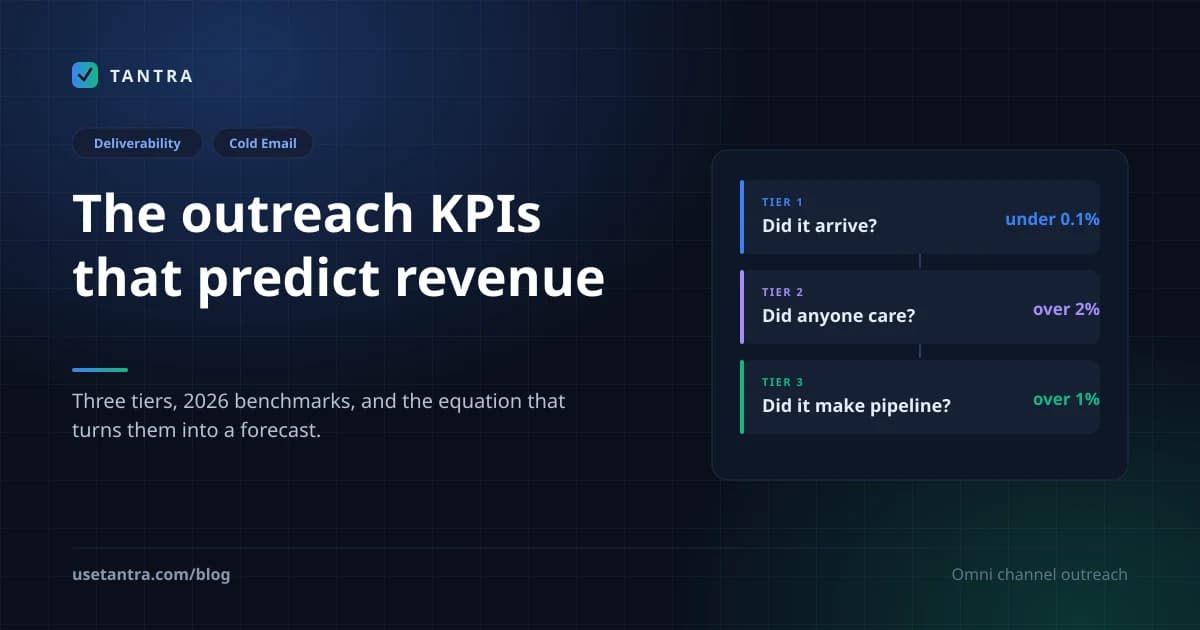
Cold email marketing in 2026 with AI: how spam filters actually work
How spam filters evaluate email in 2026, why AI written copy gets flagged, and the psychology that separates a 2% reply rate from 15%.
Tantra Growth Team32 min read
I've been running cold email programs since 2016. In that time I've sent somewhere north of two million emails, burned two domains I shouldn't have, watched reply rates collapse from 8% to under 4%, and rebuilt entire outreach operations three times because the rules changed underneath me.
Here's what I know for certain in June 2026: cold email is not dead. But the version of cold email that worked in 2023 will get your domain rejected at the SMTP level before a single human eye sees your message. Gmail doesn't spam-folder you anymore. It refuses your mail at the door.
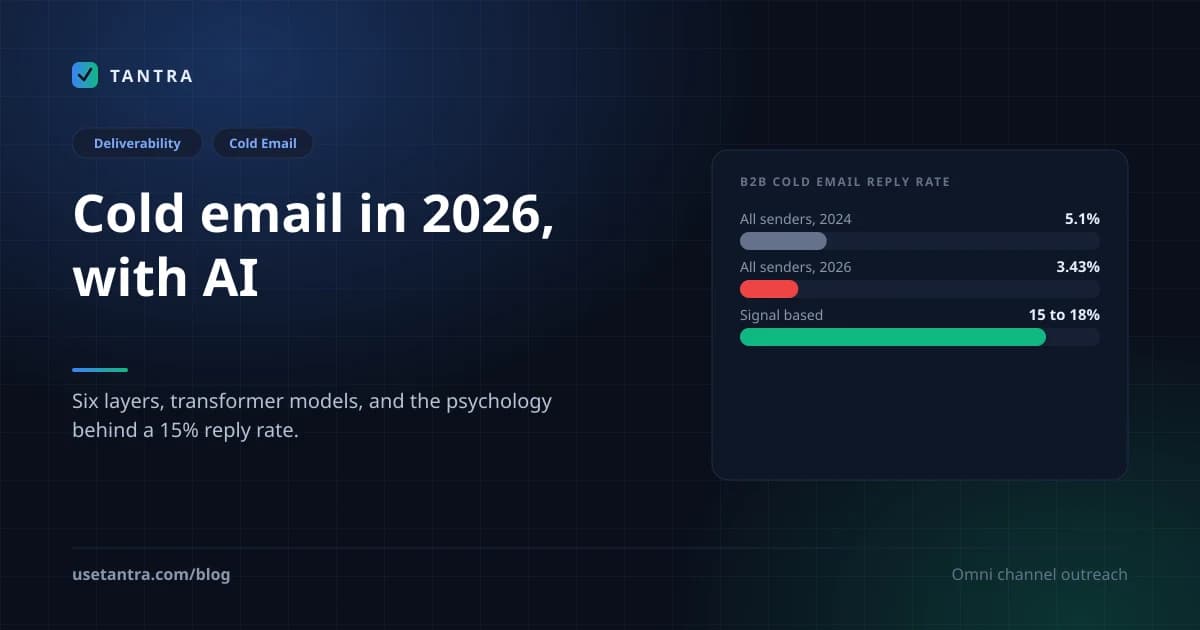
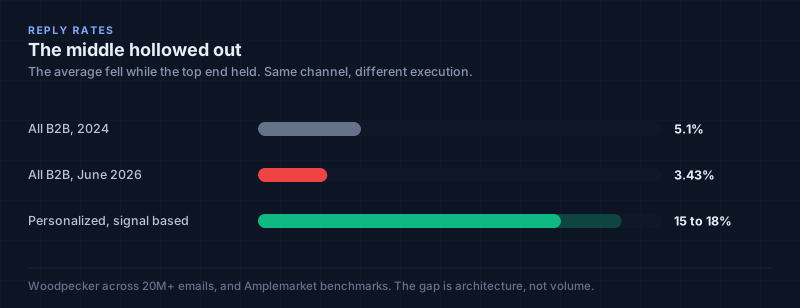
The average reply rate across all B2B cold email is 3.43%. That's down from 5.1% in 2024. Meanwhile, teams running deeply personalized, signal-based campaigns are hitting 15 to 18%. The gap between "cold email is dead" people and "cold email is printing money" people has never been wider. The difference isn't volume. It's architecture: technical, psychological, and strategic.
This is the guide I wish someone had handed me in 2019. It covers how spam filters actually evaluate your email in 2026 (not the 2019 keyword-scanning version most articles still describe), why AI-generated copy gets flagged and how to use AI without triggering detection, the behavioral psychology that separates a 2% campaign from a 15% campaign, and the sequence architecture I'd build today if I were starting from zero.
I'm writing this as a practitioner, not a theorist. Every recommendation here has been tested in production. Some of them cost me real money to learn.
Quick Summary: The 2026 Cold Email Landscape at a Glance#
| Metric | 2024 | June 2026 | Source |
|---|---|---|---|
| Average reply rate (all B2B) | 5.1% | 3.43% | Woodpecker, 20M+ emails |
| Personalized campaign reply rate | ~9% | 15 to 18% | Amplemarket benchmarks |
| Gmail spam complaint safe threshold | 0.3% | 0.08% recommended | Google Sender Guidelines |
| Authentication required | Recommended | Mandatory (SPF+DKIM+DMARC) | Google, Yahoo, Microsoft |
| AI-generated share of all spam | ~30% | 51%+ | Industry reports |
| Domain warmup timeline | 2 to 4 weeks | 3 to 8 weeks | Microsoft documentation |
| Safe daily send per mailbox | 100 to 200 | 50 to 100 | Practitioner consensus |
| Emails that never reach any inbox | ~10% | 17% | Martal analysis |
The State of Cold Email in June 2026#
Let me be blunt about what's happening.
Volume is up. Effectiveness is down. The middle has hollowed out.
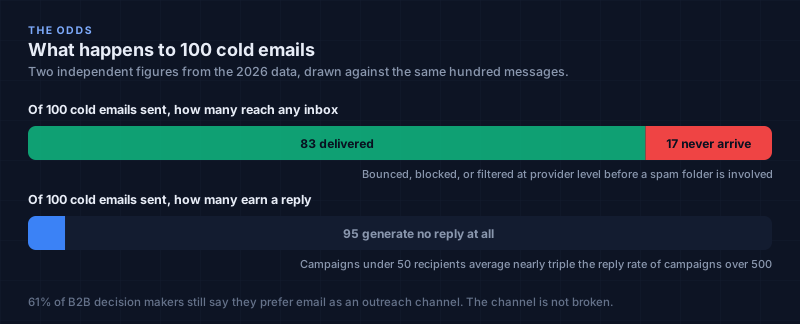
95% of cold emails fail to generate a single reply. 17% never reach any inbox at all. They bounce, get blocked, or vanish into provider-level filtering before a spam folder is even involved. Of the emails that do arrive, open rates have stabilized around 27.7%, and only a fraction of those opens convert to replies.
But here's the data point that should change how you think about this channel: campaigns sent to fewer than 50 recipients average nearly triple the reply rate of campaigns sent to 500+. And 61% of B2B decision-makers still say they prefer email as an outreach channel. The channel isn't broken. The execution is.
What changed between 2024 and now#
Three things happened simultaneously, and they compounded:
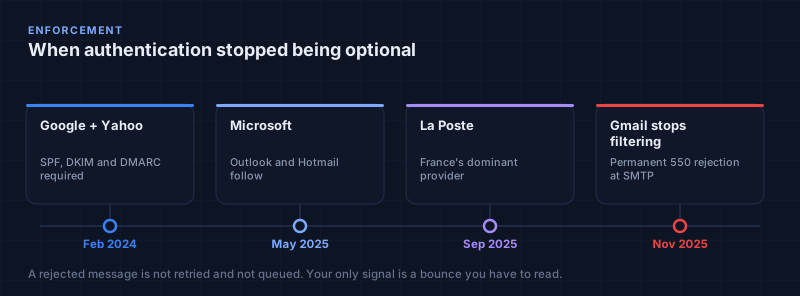
First, Gmail went from filtering to rejecting. In November 2025, Google stopped quietly routing non-compliant mail to spam. It began refusing messages at the SMTP protocol level. Your email doesn't get a bad placement. It doesn't exist. If your SPF, DKIM, or DMARC records are missing, misconfigured, or failing alignment, Gmail's servers respond with a hard reject before any content analysis even begins. Yahoo enforced similar rules starting February 2024. Microsoft followed in May 2025. La Poste (France's dominant provider) joined in September 2025.
Second, filters learned to read. Gmail's RETVec system and transformer-based content models now analyze your email the way a human would, evaluating sentence intent, semantic coherence, and writing style rather than scanning for trigger words. These models were trained specifically against the flood of AI-generated spam that now constitutes over half of all unwanted email.
Third, AI made it trivially easy to send garbage at scale. When everyone can generate 500 "personalized" emails in ten minutes using ChatGPT, the average quality of cold email collapses. Providers responded by training their filters against the statistical fingerprints of machine-generated text. The result: AI-written emails that aren't human-edited score 15 to 30% lower on spam filter tests than hand-written equivalents.
The teams winning in 2026 aren't sending more. They're sending less, to better-targeted lists, with genuine personalization, through bulletproof infrastructure. They treat cold email as a precision instrument, not a shotgun.
How Spam Filters Actually Work in June 2026#
Most articles on this topic describe a world that stopped existing in 2022. They talk about "spam trigger words" and "avoiding ALL CAPS." That's not how filtering works anymore. Not even close.
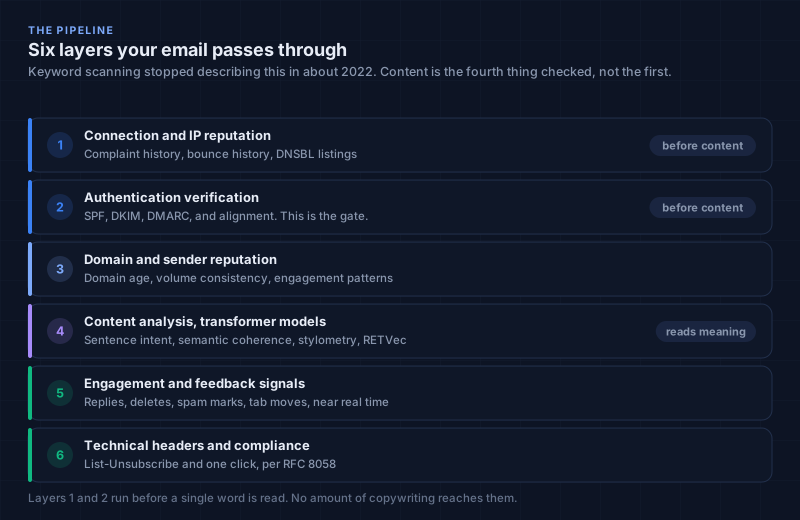
Here's the actual evaluation pipeline your email passes through, based on Google's published sender guidelines, Microsoft's bulk sender documentation, and the RETVec research paper:
Layer 1: Connection and IP Reputation#
Before your email content is read, the receiving mail server checks the sending IP's reputation. This is a score built over months of sending behavior: complaint rates, bounce rates, volume patterns, and whether the IP appears on any DNS blocklists (DNSBLs).
Shared IPs carry collective risk. If another sender on your IP gets flagged, your reputation takes collateral damage. Dedicated IPs isolate your reputation but require careful warmup because they start at zero.
What I do: I monitor DNSBL listings daily and resolve any listing within 24 hours. Tantra runs a daily domain health scan that checks every sending domain for SPF, DKIM, DMARC, and DNSBL listings, scoring each so you can see a problem forming before it costs you a domain.
Layer 2: Authentication Verification#
This is the gate. As of 2026, four major providers mandate authentication for bulk senders (defined as 5,000+ emails per day):
| Provider | Enforcement Date | What's Required |
|---|---|---|
| Google + Yahoo | February 2024 | SPF + DKIM + DMARC |
| Microsoft (Outlook/Hotmail) | May 2025 | SPF + DKIM + DMARC |
| La Poste (France) | September 2025 | SPF + DKIM + DMARC |
What each protocol does:
- SPF (Sender Policy Framework): A DNS TXT record listing which IP addresses are authorized to send email from your domain. If the sending IP isn't on the list, the check fails.
- DKIM (DomainKeys Identified Mail): A cryptographic signature added to each email header. The receiving server uses your public key (published in DNS) to verify the message wasn't altered in transit. Minimum 1024-bit key; 2048-bit recommended.
- DMARC (Domain-based Message Authentication, Reporting & Conformance): A policy record that tells receivers what to do when SPF or DKIM fails (quarantine or reject). It also generates aggregate reports showing you who's sending email as your domain, critical for detecting spoofing.
Here's the stat that should worry you: only 0.04% of domains deploy the full authentication stack (DMARC + SPF + DKIM + MTA-STS + BIMI). Being in that 0.04% isn't just compliance. It's a competitive advantage. When 99.96% of domains have weaker authentication, providers trust the ones that don't.
What I do: Every sending domain gets SPF, DKIM (2048-bit), and DMARC (starting at p=none for monitoring, moving to p=quarantine after two weeks of clean reports, then p=reject). I also add MTA-STS for transport security and BIMI for logo display in Gmail. This takes about 45 minutes per domain. There is no excuse to skip it.
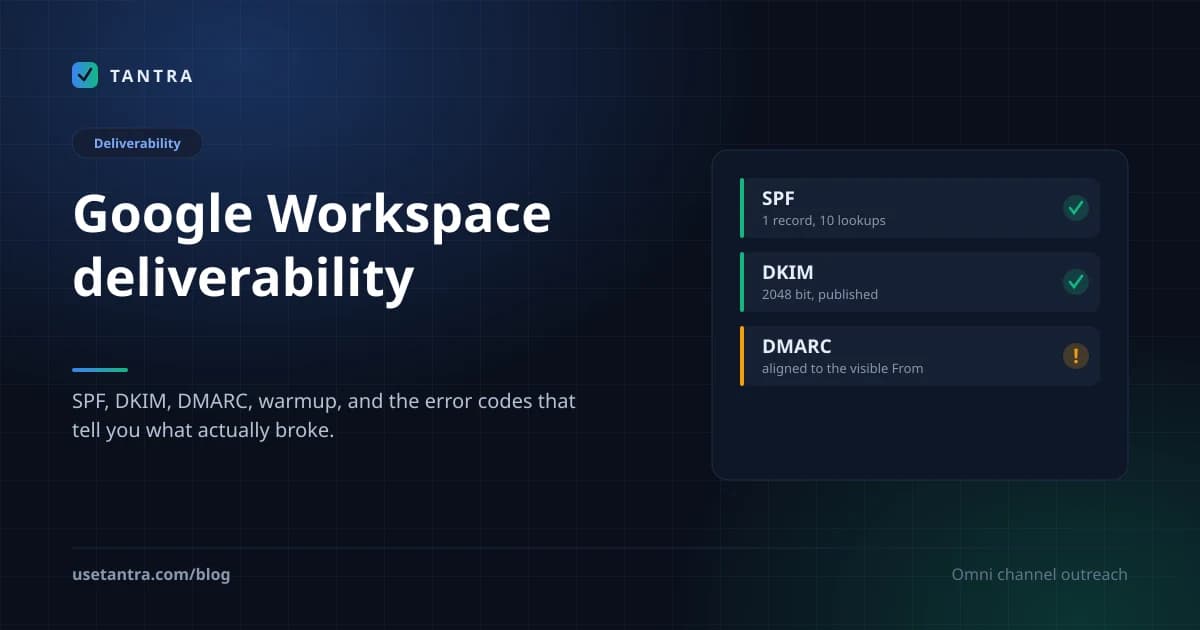
The part that trips people is not publishing the records, it is DMARC alignment, plus the SPF lookup limit that breaks a record which still looks correct. I wrote the full setup and the error code decoder up separately in the Google Workspace deliverability manual.
Layer 3: Domain and Sender Reputation#
Google tracks your domain's historical behavior as a composite reputation score. The inputs include:
- Spam complaint rate (the single most important signal)
- Bounce rate (hard bounces especially)
- Engagement patterns (do recipients open, reply, delete, ignore?)
- Sending consistency (sudden volume spikes look like spam)
- Domain age (newer domains start with lower trust)
A new domain starts at zero. A burned domain carries negative history that can take months to rehabilitate. This is why I never send cold email from my primary corporate domain. I register secondary domains such as getbrand.com, brandhq.com and trybrand.io, and treat them as disposable assets.
Layer 4: Content Analysis (AI/ML Models)#
This is where 2026 differs radically from every year before it.
Gmail uses transformer-based models, the same architecture powering ChatGPT and Gemini, to analyze email content. These models don't scan for keywords. They evaluate:
- Sentence intent: Is this email trying to sell something, inform, or deceive? The model understands purpose, not just vocabulary.
- Semantic coherence: Does this read like a human wrote it for another specific human? Or does it read like a template with variables inserted?
- Stylometric patterns: A 2025 study published in Expert Systems with Applications demonstrated 96% accuracy detecting AI-generated emails using 47 stylometric features, including imperative verb count, clause density, first-person pronoun frequency, and transitional phrase distribution.
- Visual text patterns via RETVec: Google's Resilient & Efficient Text Vectorizer renders text as image-like representations, making it immune to character-level obfuscation (typos, emoji substitution, zero-width characters). RETVec improved Gmail's spam detection rate by 38% while reducing false positives by 19.4%.
In early 2026, Google launched Gemini-powered features that summarize, prioritize, and filter emails before users see them. This creates a new layer: even if your email passes spam filtering, Gemini may summarize it into a single line or deprioritize it below emails it deems more relevant.
What this means practically: Your email isn't competing against spam filters anymore. It's competing against an AI that decides whether your message is worth showing to a human.
Worth separating two things that get conflated constantly, because the rest of this article depends on the distinction. Passing the spam filter and landing in the Primary tab are two different decisions, made by two different systems, on two different sets of inputs. Everything in this section is about the first one. The second one, including which words actually bias you toward Promotions and the compliance trade off that comes with chasing it, is the subject of part two.
Layer 5: Engagement and Feedback Signals#
Gmail monitors what recipients do with your email in near-real-time:
- Did they open it?
- Did they reply?
- Did they delete it without reading?
- Did they mark it as spam?
- Did they move it to Promotions?
- Did they star it or label it?
These behavioral signals feed back into your sender reputation continuously. A campaign that generates high open rates but zero replies tells Gmail your content is engaging but not valuable. A campaign that generates spam complaints tells Gmail you're unwanted. Both hurt you.
Layer 6: Technical Headers and Compliance#
- List-Unsubscribe header (RFC 8058): Required for bulk senders. Must enable one-click unsubscribe without requiring the user to log in or visit a page.
- Spam complaint rate: Must stay below 0.1%. Google's 2026 guidance recommends 0.08% as the safe operating threshold. At 0.3%, Gmail begins hard rejection. Your mail bounces at the SMTP level.
- Feedback loops: Microsoft's SNDS and Gmail's Postmaster Tools provide complaint data. Monitor them daily.
Using AI Without Getting Flagged#
Here's the uncomfortable truth I've learned the hard way: the same technology that helps you scale outreach is the technology filters are specifically trained to catch.
AI-generated cold emails score 15 to 30% lower on spam filter tests than hand-written equivalents. In 2026, AI-powered spam filters using NLP are sophisticated enough to detect cookie-cutter templates even without explicit trigger words. The filters aren't looking for "Dear Sir/Madam" anymore. They're looking for the statistical fingerprint of machine-generated text.
What makes AI text detectable#
The research identifies specific stylometric markers:
- Unusually uniform sentence length (AI writes in rhythmically consistent patterns)
- Overuse of transitional phrases ("Furthermore," "Additionally," "Moreover," "In today's landscape")
- Low first-person pronoun frequency (AI rarely says "I" with conviction)
- High imperative verb density (AI loves telling you to "Discover," "Unlock," "Transform")
- Predictable clause structures (subject-verb-object, repeated)
- Absence of typos, colloquialisms, sentence fragments, or idiosyncratic phrasing
- Low perplexity and high predictability, each next word is statistically likely
How I use AI in my outreach#
The goal isn't to avoid AI. It's to use AI for the parts where it's genuinely better than humans, and keep the final voice unmistakably human.
Step 1: AI for research. Have it summarize the prospect's website, recent LinkedIn posts, company news, job changes, tech stack, and role-specific challenges. This is where AI saves hours. A good research pass on 50 prospects that would take me a full day takes an AI agent twenty minutes.
Step 2: AI for structural drafting. Let it suggest an angle, a hook, a paragraph structure. Use it as a first-draft generator, not a final-draft writer.
Step 3: Human finalization. This is non-negotiable. I rewrite the opening line. I add a specific observation that only someone who actually read their website would notice. I change a sentence fragment. I add a typo I'd naturally make. I make it sound like I typed it quickly because I was genuinely curious about their work.
Step 4: Pattern variation. If every email in my sequence has identical paragraph structure, filters notice. I change sentence count between emails. I change opening style. I change length. Email one might be four sentences. Email three might be nine. The variation itself signals humanity.
This is exactly how Tantra's AI personalization works. It reads each recipient's own website and writes that person's subject line and body from what it finds. It's not inserting a first name into a template. It's generating from source material. But the platform is designed so the output reads as researched rather than generated, and that distinction is exactly what filters are learning to draw.
The test I run: Before sending any campaign, I paste the email into an AI detection tool. If it scores above 40% "likely AI-generated," I rewrite it. The target is under 20%. This takes thirty seconds per email and has saved me from multiple deliverability disasters.
The Technical Foundation You Cannot Skip#
I'm going to be opinionated here because I've watched too many teams lose months of work to preventable technical failures.
No amount of great copy matters if your technical setup fails authentication. Period. You can write the most brilliant, personalized, psychologically perfect cold email in history, and if your DMARC record is missing, Gmail will reject it at the SMTP level. The human never sees it. Your effort was zero.
Domain Setup#
Rule 1: Never send cold email from your primary domain. Register secondary domains. If a secondary domain gets burned, and it will eventually, your company email remains unaffected. Your investors still get your updates. Your customers still get their invoices.
Rule 2: Authenticate before you send a single email. SPF, DKIM (2048-bit), and DMARC on every sending domain. This takes 45 minutes. I've seen teams skip it and lose three weeks of warmup because their first 200 emails bounced.
Rule 3: Add the extras. MTA-STS for transport security. TLS-RPT for reporting. BIMI for logo display. These aren't required, but they signal to providers that you're a serious, well-managed sender.
Warmup Protocol#
A new domain needs 3 to 4 weeks minimum before sending cold email, and mailbox warmup should run alongside it. Microsoft's documentation states full deliverability takes 4 to 8 weeks depending on volume. There is no shortcut. I've tried. Every "instant warmup" hack I've attempted has resulted in worse deliverability than doing it properly.
| Week | Daily Volume per Mailbox | Focus |
|---|---|---|
| 1 | 5 to 10 emails | Send to known contacts, internal team, colleagues |
| 2 | 15 to 25 emails | Add engaged prospects, reply to every response |
| 3 | 30 to 50 emails | Begin cold sends to small, validated lists |
| 4+ | 50 to 100 emails (max) | Full cold outreach at steady state |
The safest sending limit for cold outreach in 2026 is 50 to 100 emails per mailbox per day. I cap at 30 per inbox for new domains and ramp to 50 over six weeks. Exceeding this consistently accelerates reputation decay.
What I've learned about warmup tools: They help, but they don't replace genuine engagement. The best warmup is sending real emails to real people who reply. Automated warmup services that send emails to other warmup services create artificial engagement patterns that sophisticated filters can detect. Use them as a supplement, not a replacement.
List Hygiene#
Run syntax validation, MX record checks, and role-address detection before enrollment. A bad list burns domains faster than bad copy. I quarantine anything questionable: catch-all domains, role addresses (info@, sales@, admin@), and anything that fails MX verification. Tantra's platform runs these checks automatically before enrollment, quarantining rather than sending.
How this works in Tantra. Tantra sends through your own Google Workspace mailboxes using a service account with domain wide delegation, so there is no per user OAuth token to expire and no shared IP pool where someone else's complaints become your problem. Per mailbox limits are enforced rather than suggested: a daily ceiling and an hourly ceiling, reserved atomically so two send jobs racing for the last slot of the day cannot both win it. Contact validation runs before enrollment and quarantines the questionable addresses instead of sending to them. None of that replaces the domain and warmup work above, and no platform can do that part for you. It only means the pieces software can enforce are enforced by default. See how sending works and connecting your Google Workspace.
The cost of a bad list isn't just bounces. It's the reputation damage from sending to addresses that don't exist. Every hard bounce tells Gmail your list quality is poor. Ten hard bounces in a day from a new domain can set your warmup back a week.
The Psychology of Cold Email, and Why People Reply#
This is the section most cold email guides skip entirely. They give you templates. They tell you to "keep it short" and "add a CTA." That's like telling someone to "cook good food" without explaining heat, seasoning, or timing.
I've spent years studying behavioral psychology as it applies to outreach, and I can tell you: the difference between a 2% reply rate and a 15% reply rate is almost never technical. It's psychological. The email arrived. The person saw it. They chose not to reply. Understanding why they chose not to reply, and what would have made them choose differently, is the entire game.
Fogg's Behavior Model Applied to Cold Email#
Dr. B.J. Fogg's model states that behavior happens when three elements converge: Motivation, Ability, and a Prompt (B=MAP). If any element is missing, the behavior doesn't occur.
Motivation: Why should this person care about your email? Most cold emails fail here immediately. They open with "I help companies like yours..." which answers the sender's motivation, not the recipient's. The recipient's motivation is their own problem, their own goal, their own quarter. Your first sentence must connect to something they already care about.
Ability: How easy is it to reply? If your email asks them to "schedule a 30-minute call to discuss how we can help," you've made the ability cost high. They need to check their calendar, evaluate whether 30 minutes is worth it, and commit to a stranger. Instead: "Worth a quick look? I can send over the two-page overview." The ability cost is near zero. They can reply "sure" in two seconds.
Prompt: The email itself is the prompt. But timing matters. An email that arrives at 9:47 AM in the recipient's timezone, when they're settling into their workday and checking email, hits differently than one that arrives at 2 AM. I send inside a defined sending window with daily and hourly caps per mailbox.
Cognitive Load: The Silent Killer#
Working memory processes information optimally in sequential chunks. Every element of your email that requires mental effort, parsing a complex sentence, understanding jargon, figuring out what you actually want, reduces the probability of a reply.
What I do:
- One idea per email. Not two. Not three. One.
- Short sentences. Fragments are fine. They read fast.
- No jargon unless the recipient's industry uses it natively.
- The ask is always in the last sentence. Never buried in the middle.
- No images. No HTML templates. Plain text. It looks like a human wrote it, and it loads instantly.
Hick's Law tells us that decision time increases logarithmically with the number of choices. If your email offers three possible next steps ("We could do a call, or I could send a deck, or you could check out our blog"), you've created decision paralysis. One ask. One path. One reply.
Reciprocity: Give Before You Ask#
The principle of reciprocity is the most underused weapon in cold email. When you give someone something valuable before asking for anything, they feel a psychological obligation to reciprocate.
What this looks like in practice:
Instead of: "I'd love to show you how our platform can help."
Try: "I noticed your team shipped a new API pricing page last week. I ran a quick competitive analysis against your two closest competitors and attached a two-page summary. No strings. If the mid-tier positioning is giving you trouble, I've seen that pattern before and have some thoughts."
You gave them something. You demonstrated expertise. You made the next step feel like a continuation of a conversation rather than the start of a sales pitch. Social proof in email marketing can boost conversion rates by up to 15%, but only when it's specific and relevant, not generic.
Loss Aversion and the Cost of Inaction#
People are more motivated by avoiding loss than acquiring gain. In cold email, this means framing the cost of not acting rather than the benefit of acting.
Weak: "Our platform can save you 10 hours per week." Stronger: "Your team is probably spending 10 hours a week on [specific task]. That's 520 hours a year, roughly three months of an SDR's salary, on work that doesn't require a human."
The second version makes the status quo feel expensive. It doesn't sell your product. It sells the problem.
Trust Calibration: The Confidence Gradient#
Users approach cold email with deep skepticism. They've been pitched before. They've been lied to. They've wasted time on demos that went nowhere.
Trust is built through specific mechanisms:
- Specificity. "I saw your Q2 earnings call and noticed you mentioned churn in the mid-market segment" is infinitely more credible than "I help SaaS companies reduce churn."
- Transparency. "I'm going to be honest, this might not be a fit. But if [specific condition] is true, it's worth a 10-minute conversation."
- Social proof with names. "We did this for [Company X] and [Company Y]" beats "trusted by 500+ companies."
- Low commitment asks. "Worth a look?" beats "Can I get 30 minutes on your calendar?"
The Anti-Casino Principle#
Here's something I think about constantly: the "slot machine" effect. When someone gets a cold email that feels generic, their instinct is to delete. When they get one that feels eerily specific, their instinct is curiosity. But if the next email in the sequence feels generic again, trust collapses. They feel like they were tricked.
Every touch in your sequence must earn the next touch. If email one is brilliant and email two is "Just bumping this up," you've broken the psychological contract. Each email must add new value, a new angle, or a new piece of information. The sequence is a conversation, not a reminder system.
Writing Cold Email That Actually Gets Replies#
After sending millions of emails, here's what I know about the craft:
Subject Lines#
Subject lines between 21 and 40 characters achieve a 49.1% open rate, while subject lines above 60 characters drop to 39.2%. More recent data suggests 36 to 50 characters is the sweet spot for response rates specifically. Numbers in subject lines increase open rates by 113%.
What I do:
- Keep it under 50 characters.
- Make it specific to the recipient. "Your API pricing page" beats "Quick question."
- Lowercase. It looks like a colleague wrote it.
- No emojis. No exclamation marks. No "Re:" (that's deceptive and filters catch it).
- Personalized subject lines achieve 20.79% open rates vs. 14.96% for generic ones.
Body Copy#
The optimal cold email is under 150 words. I aim for 50 to 125. Here's the structure I use:
Line 1: The hook. A specific observation about their work, company, or situation. This is the only line that matters. If they don't read line two, line one failed.
Lines 2 to 3: The connection. Why you're reaching out. What you noticed. What problem you think they might have. This is not about you. It's about them.
Line 4: The proof (optional). One sentence of social proof or credibility. "We did this for [Company]." "I wrote about this pattern here."
Line 5: The ask. One question. Low commitment. Easy to answer. "Worth a look?" "Open to a 10-minute chat?" "Can I send the full breakdown?"
What I Never Do#
- I never open with "I hope this email finds you well."
- I never say "I came across your profile and was impressed."
- I never use the word "synergy," "leverage," "cutting-edge," or "game-changer."
- I never send the same template to every segment. AI-powered filters detect cookie-cutter templates even without trigger words.
- I never include more than one link. Links increase spam scoring.
- I never use HTML templates. Plain text. Always.
This is a platform decision as much as a writing one, and it is worth being explicit about. Tantra runs every outbound message through a sanitizer before it sends. Scripts and styles are stripped, the editor's styled merge token spans are unwrapped so their inline colours never ship, and anchors keep only their href. What lands looks like a message somebody typed in Gmail, while click tracking and one click unsubscribe still resolve because both live in the href. It is not true plain text and it is not trying to be. It is a deliberate trade: keep the look plain, keep the tracking that actually tells you something.
The "Write Like You Talk" Test#
Before sending, I read the email aloud. If it sounds like marketing copy, I rewrite it. If it sounds like something I'd say to a colleague at a conference, I send it. The bar is: would this person reply to a friend who sent this? If not, it's not ready.
One practitioner put it well: "My copy became lighter, less salesy. Prospects felt understood instead of pitched. Replies went up, because the emails felt human".
That's the entire secret. Make it feel human. In 2026, when half of all email is machine-generated, sounding like a human is the most radical differentiation available.
Sequence Architecture and the Multi-Touch Playbook#
The optimal cold email sequence is 4 to 7 emails. The first email captures 58% of all replies; the remaining 42% come from follow-ups. Less than 4 emails and you're leaving replies on the table. More than 8 and spam complaints start spiking.
My Sequence Structure#
| Step | Timing | Purpose | Length |
|---|---|---|---|
| Email 1 | Day 1 | Hook + value + soft ask | 75 to 125 words |
| Email 2 | Day 3 | New angle or additional insight | 50 to 75 words |
| Email 3 | Day 7 | Social proof or case study | 75 to 100 words |
| Email 4 | Day 12 | Different channel (calendar invite or LinkedIn) | N/A |
| Email 5 | Day 18 | Breakup email, "Should I close this file?" | 30 to 50 words |
Critical rules:
- Each email adds new value. No "just bumping this up."
- Sequences stop automatically on reply detection. If they respond to email 2, emails 3 to 5 never send.
- Sending windows respect the recipient's timezone.
- A/B variants per step, with a winner picked automatically each day.
- The breakup email (email 5) consistently generates 10 to 15% of total sequence replies. People respond to closure.
The Calendar Channel: No Spam Folder#
Here's something most cold email guides won't tell you: a calendar invitation is delivered by Google itself and lands on the recipient's agenda, not in a promotions tab, not in spam. There is no spam folder for calendar events.
I started using calendar outreach in 2025 for webinar invitations, and the results changed how I think about multi-channel sequences. The 3-channel pre-webinar sequence (email + calendar + LinkedIn) lifts attendance from 28% to 63%. RSVP is the engagement signal. You know who's coming before the day arrives.
How I use it:
- For high-value prospects who didn't reply to the email sequence, I send a calendar invite for "Office Hours: [Specific Topic Relevant to Them]." The psychological frame shifts from "read this when you can" to "this is happening; decide if you're in."
- For webinar campaigns, the calendar invite goes out 48 hours after the email invitation. It's a different channel, a different format, and it bypasses every content-scoring layer I described above.
- Campaigns up to 50,000 contacts are possible when distributed across a sender pool, but I reserve calendar outreach for my top 20% of prospects. It's a high-value channel. I don't waste it on low-intent lists.
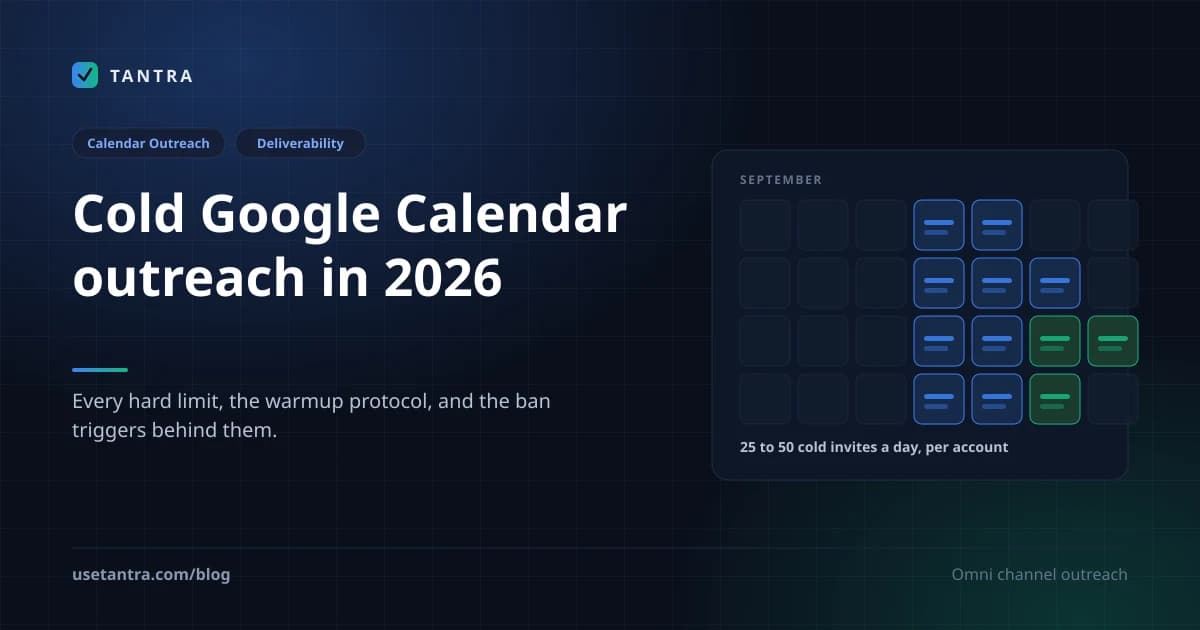
The channel has its own rulebook, and it is stricter than email's in one important way: there is no spam folder to land in, so the failure mode is not a bad placement but a throttled or suspended Google account. Every hard limit, the account warmup protocol, and the ban triggers are in the calendar outreach guide.
The constraint: Google imposes sending limits on calendar invitations. Overuse triggers abuse detection. This is a precision tool, not a broadcast channel.
Reply Intent Sorting#
In 2026, "they replied" is not a useful metric. What matters is how they replied. Tantra sorts replies into nine intents, including interested, pricing objection, timing objection, referral, and out of office, detected across seven languages. Sequences stop on reply automatically.
This matters because a "not right now, check back in Q4" reply is fundamentally different from "send me pricing." Treating them the same wastes your best opportunities and annoys people who asked you to wait.
Cold Email as Funnel Architecture#
I used to think of cold email as a standalone channel. Send emails, get replies, book calls. Linear. Simple.
I was wrong. Cold email is one touch in a non-linear funnel, and treating it in isolation wastes its potential.
Speed-to-Lead#
The probability of qualifying a lead drops dramatically after the first five minutes. When someone replies to your cold email with interest, the window is narrow. If your response takes four hours, they've moved on. They've answered three other emails. They've gone to lunch. The moment is gone.
What I do: Reply intent detection triggers an immediate alert. For "interested" replies, I respond within 15 minutes during business hours. For "pricing objection" replies, I send a relevant case study within the hour. The sequence handles the timing; I handle the conversation.
The Activation Mindset#
Borrowing from SaaS onboarding psychology: the goal of cold email isn't to "get a reply." It's to get the prospect to their "aha moment", the point where they understand, concretely, how your solution changes their specific situation.
This means your email shouldn't sell your product. It should sell the problem. The product is the answer to a question they now want answered. The email creates the question.
Post-Reply Architecture#
What happens after the reply matters as much as the email itself:
- Interested reply → Immediate response + calendar link + one relevant case study.
- Pricing objection → Acknowledge + reframe value + offer a lighter engagement (audit, assessment, pilot).
- Timing objection → Thank them + set a specific follow-up date + add to nurture sequence.
- Referral → Thank them + email the referred person within 24 hours + mention the referrer by name.
- No reply after sequence → Move to a different channel (LinkedIn, calendar invite) or a different angle entirely.
The 48-hour post-webinar playbook is a good model: segment attendees (full viewers vs. partial vs. no-shows) and send each group a different follow-up. Teams using this approach have booked 18 demos in 48 hours from a single webinar, more pipeline than a full month of cold outreach.
Common Mistakes and Troubleshooting#
| Mistake | What Happens | The Fix |
|---|---|---|
| Sending from primary domain | Domain burn affects all company email | Use secondary domains |
| Skipping warmup | Immediate spam placement or SMTP rejection | 3 to 8 week ramp, 5 to 10 emails/day start |
| >100 emails/mailbox/day | Reputation decay, increased complaints | Cap at 50 to 100 |
| No DMARC record | SMTP rejection (Gmail, Nov 2025+) | Publish DMARC, start at p=none |
| AI-generated copy, no editing | 15 to 30% lower spam scores | Human finalization pass, AI detection check |
| Buying email lists | High bounce + spam complaints | Build from intent signals, validate before send |
| Ignoring spam complaint rate | Hard rejection at 0.3% | Monitor Postmaster Tools; target under 0.08% |
| Identical templates across sends | Pattern detection by ML filters | Vary structure, length, opening per segment |
| No List-Unsubscribe header | Compliance violation + filtering | Implement RFC 8058 |
| Sending to role addresses | High spam-mark rate | Validate and quarantine |
| Open tracking pixels | Hurt deliverability, inflate vanity metrics | Track clicks, replies, and intent instead |
| "Just bumping" follow-ups | Sequence fatigue, unsubscribes | Add new value or angle each step |
Troubleshooting Deliverability#
If your open rate drops suddenly: Check DNSBL listings. Check SPF/DKIM/DMARC alignment. Check if a recent campaign generated complaints. Check if you changed sending volume.
If your reply rate drops but opens are stable: Your copy is the problem. Your targeting is the problem. Your offer is the problem. The email arrived. They saw it. They chose not to engage.
If your bounce rate exceeds 3%: Stop sending immediately. Clean your list. Run MX verification on every address. Quarantine catch-all domains. Resume at lower volume.
If you get SMTP rejections: Your authentication is broken. Check SPF alignment (the sending IP must match the SPF record). Check DKIM signature validity. Check DMARC policy. This is a technical problem with a technical fix.
Tool Selection, a Decision Framework#
The 2026 cold email tool market segments into three categories. Here's how I'd choose:
| Category | Tools | Best For | Pricing Model |
|---|---|---|---|
| Volume-first | Instantly, Smartlead | Agencies, high-volume sending, inbox rotation | Per-seat / per-inbox |
| Personalization-first | Lemlist, Overloop | Creative multichannel, visual personalization | Per-seat |
| AI-first + multi-channel | Tantra | Hyper-personalized email + calendar outreach | Per-company (unlimited inboxes) |
My decision framework#
- Sending 10K+ emails/month across many clients? → Volume-first tools with inbox rotation. You need infrastructure, not finesse.
- Running targeted campaigns under 500 prospects with deep research? → AI-first platforms that personalize per-recipient from source material.
- Need calendar outreach + email in one workflow? → Tantra is currently the only platform that runs calendar invitations and multichannel sequences from one workspace, priced per company rather than per inbox.
- Budget-constrained solo founder? → Start with one tool, one secondary domain, 30 emails/day. You don't need a platform. You need a list and a good email.
What to evaluate in any tool#
- Does it handle SPF/DKIM/DMARC monitoring?
- Does it include warmup automation?
- Does it validate emails before sending?
- Does it sort replies by intent (not just "replied")?
- Does it support timezone-aware sending windows?
- Does it stop sequences on reply?
- What's the pricing at 20+ mailboxes? (Per-inbox pricing becomes punitive at scale. Tantra's per-company model means adding mailboxes doesn't multiply your cost.)
- Does it use open tracking pixels? (If yes, that's a deliverability risk. Tantra deliberately excludes open tracking because pixels hurt deliverability and inflate a metric almost nobody acts on.)
Frequently Asked Questions#
Is cold email still legal in 2026?#
Yes. In the US, CAN-SPAM permits cold email without prior consent, requiring accurate headers, a physical address, and an opt-out mechanism. In the EU, GDPR allows B2B cold email under "legitimate interest" with proper documentation. Canada's CASL requires implied or express consent. Penalties for non-compliance reach $53,088 per email under CAN-SPAM.
What spam complaint rate is safe?#
Google's sender guidelines set 0.1% as the ceiling and recommend staying under 0.08%. At 0.3%, Gmail begins hard rejection. Your mail bounces at the SMTP level. Monitor via Gmail Postmaster Tools daily.
How long does domain warmup take?#
Minimum 3 to 4 weeks for a new domain. Microsoft's documentation states 4 to 8 weeks for full deliverability depending on target volume. Start at 5 to 10 emails/day and increase gradually.
Does AI-written email get flagged as spam?#
AI-generated emails score 15 to 30% lower on spam filter tests than human-written equivalents. Filters detect 47+ stylometric markers of machine-generated text with 96% accuracy. Use AI for research and drafting, but finalize every email with human voice.
What's a good cold email reply rate in 2026?#
The average is 3.43%. Good is 5 to 8%. Elite performers exceed 10%. Hyper-personalized, signal-based campaigns reach 15 to 18%. If you're below 2%, your problem is targeting or copy, not volume.
Should I use open tracking?#
I don't, and neither does Tantra. We wrote up the full reasoning here. Open pixels hurt deliverability and inflate a number almost nobody acts on. Track clicks, replies, reply intent, bounces, and unsubscribes instead. These tell you what actually happened. Open rates tell you what a pixel loaded.
How many emails should be in a sequence?#
Four to seven. The first email captures 58% of all replies; the remaining 42% come from follow-ups. Less than four leaves money on the table. More than eight increases spam complaints.
Can I use calendar invites for cold outreach?#
Yes, and it's the one channel with no spam folder. A calendar invitation is delivered by Google itself and lands on the recipient's agenda. Use it for high-value prospects, webinar invitations, and "office hours" style outreach. Don't use it as a bulk channel. Google imposes sending limits and overuse triggers abuse detection.
Where a platform helps, and where it does not#
I want to be careful here, because the honest answer is that most of what decides your results is not software.
No tool can pick your list for you. No tool can notice the specific thing on a prospect's pricing page that makes your first line land. No tool can decide that this campaign should go to 80 people instead of 800. Those are judgement calls, and they are where the difference between a 3% reply rate and a 15% one actually lives.
What a platform can do is remove the failure modes that have nothing to do with judgement. It can refuse to send to an address that fails MX validation. It can hold a mailbox to its daily and hourly ceiling whether or not you remembered the limit. It can stop a sequence the moment somebody replies, so you never send a follow up to a person who already answered. It can scan your sending domains every morning and tell you that SPF broke before Gmail tells you by rejecting your mail. It can sort a reply as a pricing objection rather than just marking it "replied."
That is roughly the line Tantra draws. Calendar campaigns and cold email sequences both send through your own mailboxes, both personalize from a scrape of the recipient's own site, and both report on things a recipient actually did. If you want the reasoning behind the metric we deliberately do not report, that is its own post.
Conclusion: What I'd Do If I Were Starting Today#
If someone handed me a list of 200 prospects and said "go," here's exactly what I'd do:
Day 1 to 3: Register two secondary domains. Set up SPF, DKIM (2048-bit), DMARC, MTA-STS, and BIMI on both. Connect them to Google Workspace mailboxes. Start warmup at 5 emails/day.
Day 1 to 7: Research all 200 prospects. Read their websites. Read their LinkedIn. Find the one specific thing that connects their situation to what I offer. Write 200 individual opening lines. Let AI help with research synthesis. Write the final emails myself.
Day 21: Warmup complete. Begin sending. 30 emails/day across two mailboxes. Five-step sequence over 18 days. Each email adds new value.
Day 22 to 40: Monitor replies. Sort by intent. Respond to "interested" within 15 minutes. Send case studies to "pricing objection." Set follow-up dates for "timing objection." Thank referrers and email their referrals same-day.
Day 25: Send calendar invites to the top 40 prospects who didn't reply to email. "Office Hours: [Their Specific Challenge]." 30-minute window. No pitch. Just a conversation.
Day 40: Analyze. What worked? Which opening lines got replies? Which segments responded? Which day-of-week performed best? Build the next campaign from the data.
The tools matter less than the thinking. The infrastructure matters more than the copy. The psychology matters more than the volume. And the person who reads your email is not a "lead." They're a human being with a full inbox, a skeptical mind, and about four seconds of patience for your first sentence.
Earn those four seconds. Everything else follows.
Key Takeaways#
- Average reply rate is 3.43%. Personalized campaigns hit 15 to 18%. The gap is execution, not luck.
- Gmail rejects non-authenticated mail at the SMTP level as of November 2025. No SPF+DKIM+DMARC = no delivery.
- AI-generated text is detectable with 96% accuracy using 47 stylometric features. Use AI for research; write like a human.
- Spam complaints must stay below 0.08% to maintain safe sender status.
- Domain warmup takes 3 to 8 weeks. There is no shortcut.
- Calendar outreach bypasses spam folders entirely. Use it for high-value prospects.
- The first email gets 58% of replies. Follow-ups get the other 42%. Send 4 to 7 emails.
- Psychology beats volume. Reciprocity, cognitive load reduction, and loss aversion drive replies more than send volume.
- One idea per email. One ask. Under 150 words. Complexity kills conversion.
- Per-company pricing beats per-inbox pricing when scaling to 20+ mailboxes.
Sources#
- Google Email Sender Guidelines
- Google Security Blog on RETVec
- Opara, C. (2025). Stylometric detection of AI generated phishing emails. Expert Systems with Applications
- RFC 8058, one click List-Unsubscribe
- Microsoft bulk sender requirements, May 2025
- Woodpecker cold email statistics, 20M+ emails
- Instantly 2026 benchmark report
- Gmail Postmaster Tools
- Fogg, B.J. (2009). A Behavior Model for Persuasive Design. Persuasive Technology.
Try Tantra on accounts you already own
Omnichannel sequences across Gmail, LinkedIn and WhatsApp, plus Google Calendar invitation campaigns. Optional AI personalization on your own AI account or key.