
Sending windows and daily limits
Control when Tantra sends cold email with a sending window, and cap volume per mailbox with enforced daily and hourly limits.
intermediate6 min readUpdated
Open in Tantra
These open the app in a new tab. You may be asked to sign in.
Overview#
Two things control how fast your cold email goes out: a sending window that defines when sending is allowed, and per-mailbox caps that limit how many emails each mailbox sends per day and per hour. Unlike calendar campaigns, these per-mailbox caps are enforced on every send.
How it works#
Before every send, Tantra runs two checks:
- Sending window. Is the current time inside the days and hours you allowed? If not, the step waits.
- Quota. Does the mailbox have room under its daily and hourly caps? Tantra reserves a slot atomically, so two sends can never both take the last slot.
Only when both pass does the email go out. A mailbox also waits at least half a second between sends, which keeps it under Gmail's per-mailbox rate.
The sending window#
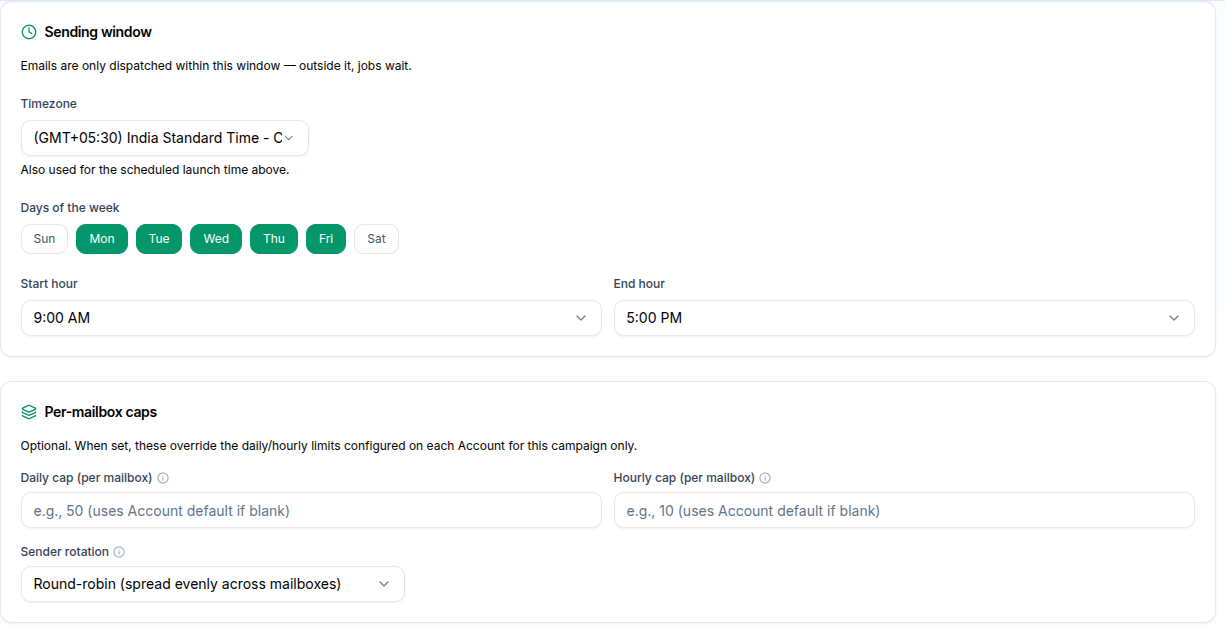
Set the window in Step 5 of the builder.
- Timezone. The window is measured in the campaign timezone. The same timezone is also used if you schedule the campaign to launch later.
- Days of the week. Toggle the days sending is allowed. At least one day is required.
- Start hour and End hour. The hours sending is allowed, on the hour. The start hour must be before the end hour.
Outside the window, due steps do not send. They wait and fire when the window next opens. This is true even if you chose Start now.
If you choose Schedule for later, the date and time are read in the selected campaign timezone. If you change the timezone afterward, Tantra keeps the displayed clock time and updates the corresponding moment.
Per-mailbox caps#
Each mailbox has a daily cap and an hourly cap. These are the limits Tantra enforces at send time.
- Default daily cap: 50 emails per mailbox per day.
- Default hourly cap: 25 emails per mailbox per hour.
You set these per mailbox on the Accounts page, using the Emails/day and Emails/hr boxes on each connected sender card, then selecting Save. Editing them there changes the caps that are actually enforced. To change many mailboxes at once, use the Bulk update panel at the top of the list. See Add and verify your senders.
Google also applies a Workspace ceiling of 1500 recipients per mailbox per day. A mailbox cap only ever lowers your limit below that ceiling. It never raises it.
The per-mailbox cap fields in the builder#
Step 5 also has Daily cap (per mailbox) and Hourly cap (per mailbox) fields. The panel describes them as overriding each mailbox's limit for that campaign, and the values are saved on the campaign.
They do not currently change how fast a campaign sends. Every send checks the caps stored on the sending mailbox, so those are the numbers that throttle delivery. If you want a campaign to send more slowly, lower Emails/day or Emails/hr on the mailboxes it uses, on the Accounts page. Leaving the builder fields blank is the clearest choice, since a value there can read as a limit that is in force when it is not.
Sender rotation#
When you select several mailboxes, Sender rotation decides how enrollments are spread across them:
- Round-robin. Spread evenly across mailboxes.
- Fill first. Exhaust one mailbox before using the next.
- Random. Assign at random.
A contact's mailbox is chosen when they enroll and stays the same for every step, so the whole conversation comes from one address.
Field reference#
| Control | Where | Rules |
|---|---|---|
| Timezone | Step 5 sending window | Controls both the sending window and a scheduled launch. |
| Days of the week | Step 5 sending window | At least one day. |
| Start hour / End hour | Step 5 sending window | On the hour. Start before end. |
| Daily cap (per mailbox) | Step 5 | 1 to 2000. Stored on the campaign. |
| Hourly cap (per mailbox) | Step 5 | 1 to 500. Stored on the campaign. |
| email cap / day | Accounts page, per mailbox | Enforced daily cap. Default 50. |
| email cap / hour | Accounts page, per mailbox | Enforced hourly cap. Default 25. |
| Sender rotation | Step 5 | Round-robin, fill first, or random. |
What happens next#
When a step becomes due:
- Inside the window, with quota available: the step sends within about a minute.
- Outside the window: the step waits and is retried when the window next opens.
- Hourly cap reached: the send is deferred and retried later in the day, after the hour rolls over.
- Daily cap reached: the send is deferred to the next day, around 09:00.
None of these are errors. They are the throttle working. You can watch each contact's next send state on the campaign's enrollments view.
Best practices#
- Keep caps conservative for new mailboxes and raise them slowly. See Warm up your sending mailboxes.
- Match the campaign timezone and window to the business hours you want to target.
- Add more mailboxes to raise total volume instead of pushing one mailbox to its ceiling.
Common mistakes#
- Blaming a stalled send on a bug. Outside the window or at a cap, waiting is expected.
- Setting a limit only in the builder. Set enforced caps on the mailbox in the Accounts page.
- Expecting to beat Google's ceiling. A mailbox cannot send more than 1500 recipients per day regardless of your settings.
Troubleshooting#
| Symptom | Cause | Fix |
|---|---|---|
| Campaign is active but no emails have sent | Current time is outside your sending window. | Wait for the window, or widen the days and hours. |
| Sending slowed to a trickle | A mailbox hit its hourly cap. | Sends resume after the hour rolls over, or raise the hourly cap on the mailbox. |
| Sending stopped for the day | A mailbox hit its daily cap. | Sends resume the next day, or add more mailboxes. |
| A mailbox cap I set in the builder seems ignored | The enforced cap is the one on the Accounts page. | Set the cap on the mailbox in the Accounts page. |
| No emails at all from one sequence | No connected sender, or all outside window. | See My emails are not sending. |
FAQ#
What are the default per-mailbox limits? 50 per day and 25 per hour, per mailbox.
Can I send more than 1500 a day from one mailbox? No. That is Google's Workspace ceiling. Mailbox caps can only lower your limit.
Does the sending window apply to Start now campaigns? Yes. Even with Start now, sends wait until the window is open.
Which timezone is used for the window? The campaign timezone selected in Step 5. It also controls the scheduled launch time.
Where do I change the enforced caps? On the Accounts page, per mailbox, using the daily and hourly email cap inputs.
Do email caps and calendar invite limits share the same budget? No. They are tracked separately, so cold email and calendar invites do not consume each other's allowance.
Related articles#
Was this article helpful?
Related articles
- Warm up your sending mailboxesWarm up new Gmail mailboxes in Tantra with a gradual peer-to-peer ramp that builds sending reputation before you run cold email at volume.
- My emails are not sendingFix a cold email sequence that is not sending. Check daily and hourly limits, sending windows, sender status, suppression, and enrollment state.
- Enrollment lifecycle and statusesUnderstand how a contact moves through a Tantra cold email sequence, what each enrollment status means, and how to manage enrollments.