Webinar follow-up emails for attendees and no-shows: segments, timing and templates
How to send webinar follow-up emails by segment, from engaged attendees to no-shows, with timing, a four-touch sequence and five templates.
 Bhaskar Dev20 min read
The people who registered and did not show up are the warmest list your webinar produces, and this guide shows you how to turn them into replay views, replies and meetings.
Webinars are one of the most effective lead generation strategies in B2B, and one of the easiest to set up. Yet most webinar and marketing teams struggle to make the funnel work. They follow the traditional approach: one "sorry we missed you" email sent to everyone.
We have run thousands of webinars for 250+ B2B and enterprise brands, and Tantra is that playbook turned into software. The data in this guide is backed by our internal metrics from those webinars and by other industry sources, with a clear label on which is which.
This is a practical deep dive into the follow-up stage of the webinar funnel, based on our own experience and industry benchmarks. Our verdict from that work is simple: marketing, outreach and reminders bring people to the session, the webinar creates interest, and the post-webinar email turns that interest into action. The webinar marketing strategy guide sets out the full plan.
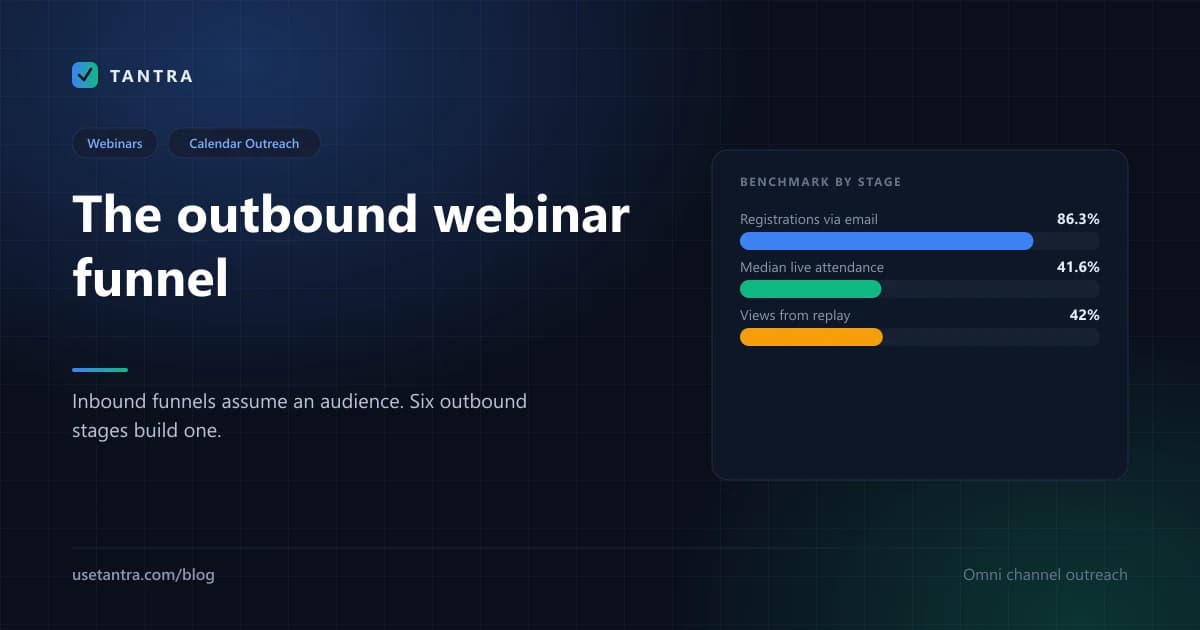
Start with the size of the list. Roughly half of the people who register for a B2B webinar do not show up live. Contrast's independent B2B data, via VoxBooster, puts the median live-attend rate at 41.6% for the period from Q3 2025 to Q1 2026. ON24's platform-wide figure is higher, at 60% registration to attendance, but that number includes people who watched on demand. Either way, a large block of your registrants never saw the session as it happened.
It is easy to send one "sorry we missed you" email and move on to the next event. But the people who missed the session still chose to register. They gave you their name and email because something about the topic interested them. A useful recording, a short excerpt or an answer to their question gives you a natural way to continue that conversation after the live date.
The first step is to work out what each person needs from you now. We will cover how to split the list, when to send the replay and how to plan four follow-up touches across email and an appropriate social channel. There are five templates to help you write the messages. The B2B webinar attendance playbook covers the reminders and live-session planning if you also need help with the earlier part of the event.
The short answer
Send the replay within hours, not days. Split your list into five groups by what each person actually did, because an attendee who left at minute ten and a registrant who never opened the link need different messages. Run a short sequence of about four touches over a week, mostly email with one LinkedIn or WhatsApp nudge, and stop the moment someone replies. Lead with value (the replay, one useful excerpt), and only then ask for a conversation. Measure replay views, replies and meetings booked, not opens.
Why are no-shows still worth chasing?
Missing the live session does not tell you whether someone will watch the recording. Replay viewing accounts for a substantial part of the audience in the two vendor figures below, though each measures it differently:
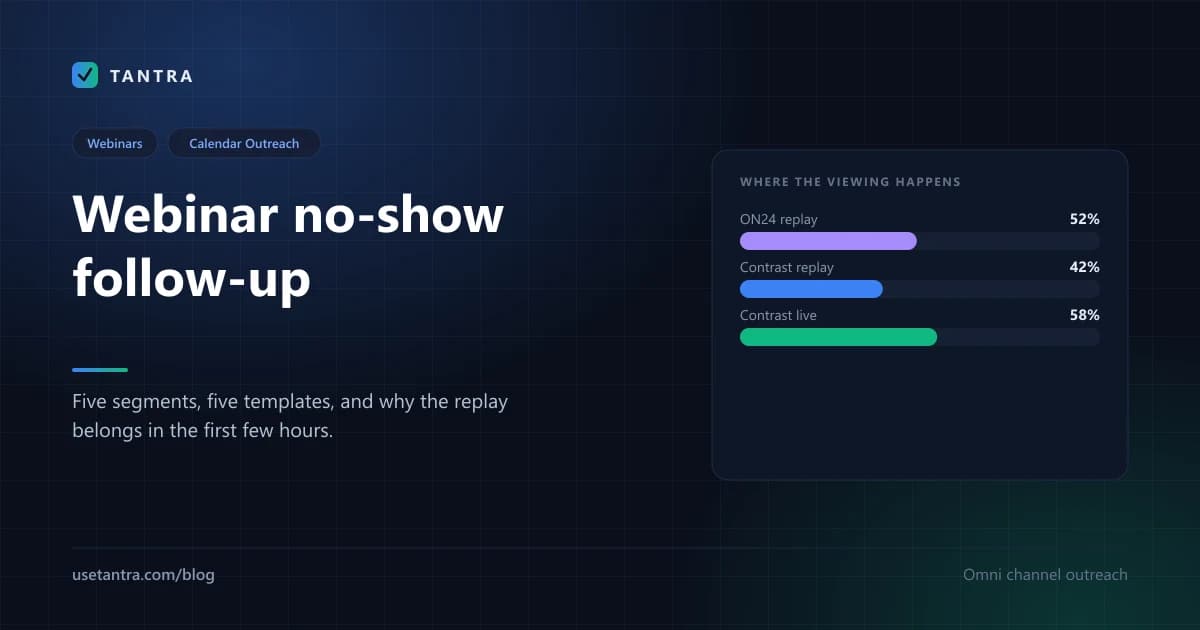
- Contrast reports that 42% of views come from on-demand replay (via Konabayev).
- ON24 reports a 52% on-demand share of attendance (via Stealth Agents).
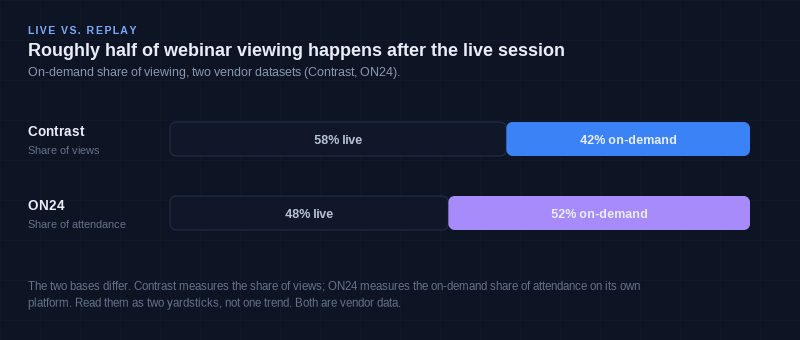
Do not average these or treat them as one trend. One counts views, the other counts attendance on a single platform, and both come from vendors who sell webinar software. The honest reading is narrower: a substantial share of the people who will ever watch your session watch it later. If your follow-up is one email with a link, you have effectively decided to ignore that audience.
There is an older data point worth knowing for the same reason. GoTo reported in 2017 that 42 of the 100 most successful webinars in its analysis had below-average live attendance. That is a 2017 vendor figure, so treat it as a reminder rather than a benchmark. The point it makes still holds: a webinar can succeed with a modest live room if the recording does its work afterward.
Follow-up is also where teams say they struggle. In Livestorm's benchmark, 38.2% of practitioners listed post-event follow-up as a top-three challenge. That is a survey of webinar practitioners from a webinar vendor, not a measure of results, but it matches what you would expect: the live event has a deadline and a team around it, and the days after do not.
You also have a useful starting point for the message: they registered for this particular topic. A clashing meeting, an urgent task or a missed reminder may explain their absence, so leave room for that rather than reading it as rejection. Their registration gives you context for a relevant follow-up while the session is still fresh in their mind.
How should you split the list before sending?
By behaviour, not by a single "attended or not" flag. The playbook linked above covers the basic split of attendees, partial viewers, replay viewers and high-intent participants, and the rule that a no-show's first message is a recap, never a pitch. Here is the finer version that decides which template and channel each person gets.
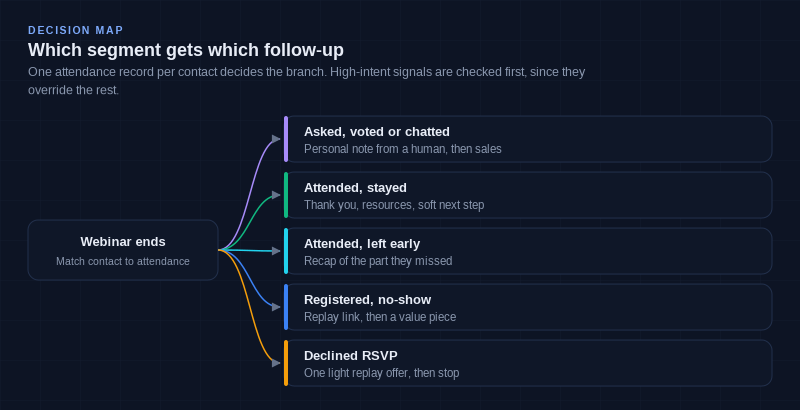
| Segment | How you identify them | What they need | Primary channel |
|---|---|---|---|
| High intent | Asked a question, voted in a poll, used chat, or replied before the event | A personal reply from a human who can talk about their situation | Email or LinkedIn, from a named person |
| Attended and stayed | Present for most of the session | Thanks, the promised resources, a low-pressure next step | |
| Attended, left early | Joined, then dropped off partway | The part they missed, framed as a short excerpt | |
| Registered, did not attend | Registered, no attendance record | The replay and a reason to watch it | Email first, then LinkedIn or WhatsApp |
| Declined RSVP | Said no or never confirmed, if you invited by calendar | One light offer of the replay, then silence | Email, once |
Order matters when you build the rules. Check the high-intent signals first, because someone who asked a question and then dropped off at minute 40 should still get the personal note, not the generic no-show recap. Then branch on attendance. The declined group goes last and gets the lightest touch, since they have already told you something.
If you invited people with a Google Calendar invitation, the RSVP is a useful extra signal. A "yes" who did not attend is a different person from a "no" who never intended to, and the first deserves a more persistent follow-up. The calendar invitation guide explains how to read each response. Calendar RSVPs are intent, not attendance, so always take the attendance record itself from your webinar platform.
The practical requirement here is a single record per contact that holds what they did. If your registration list lives in the webinar tool, your invites live in an outreach tool and your replies live in a CRM, the segments are hard to build and easy to get wrong. This is the main operational argument for connecting these systems, which is covered in the webinar automation post.
When should the replay go out?
Within hours of the session ending. WebinarNinja has claimed that open rates on replay emails fall by about 40% after the first three hours. We could not trace that to a published study, so treat it as a vendor's rule of thumb, not a measured fact. The direction is easy to believe even without the number: the session is a fresh topic for a short window, and by the next day it is competing with the next day's work.
A workable schedule looks like this:
- Within two hours of the end: the replay email to every segment except the declined group. It is the same asset, with a first line adjusted to the segment.
- Same day or next morning: the high-intent personal notes. These should come from a person, not a template that looks like one.
- Next business day: the declined-RSVP offer, if you send one at all.
Two practical points. First, the replay must be ready. If processing takes a day, say so in the registration confirmation and send the "recording is on its way" note when the session ends, then the link when it exists. Second, send in the recipient's local time where you can. A replay email that arrives at 3 a.m. for the recipient is just as buried as one sent three days late. The attendance playbook covers local time in more detail for the live session, and the same logic applies here.
A note on gating. Livestorm's benchmark found public replays averaged 14.60 views against 3.97 for gated ones. That is roughly 3.7 times as many views, which Livestorm describes as 368% more for public, and it is vendor data from one platform.
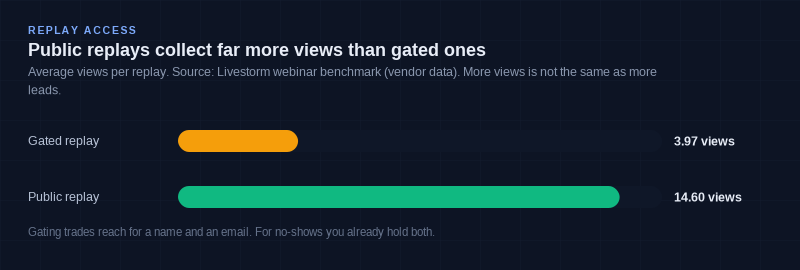
For a follow-up programme the implication is practical. Your no-shows have already given you their details, so a gate adds friction without capturing anything new. Link them straight to the recording. If you do want the replay to generate leads from new viewers, a gated version on your site is a separate decision from the link you send to registrants.
What does a no-show sequence look like across channels?
Start with four touches spread over about a week, then adjust the spacing to your audience and sales cycle. The schedule below is the Tantra Growth Team's suggested starting point, rather than a measured benchmark. Each message should give the person a different reason to find the session useful.
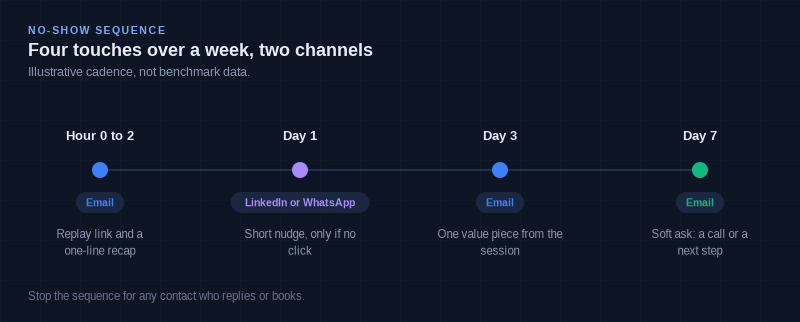
Touch 1, email, hours 0 to 2: the replay. Subject line that names the session, one line on what was covered, the link, and a note on the length. Nothing else. No ask. This is the highest-value message in the sequence and it should be short enough to read in ten seconds.
Touch 2, LinkedIn or WhatsApp, day 1: the nudge. Only for people who did not click through. One or two sentences, no links beyond the replay, and a human tone. Pick the channel you already have a relationship on. A LinkedIn message works well when you have connected or interacted before. WhatsApp should only be used where the contact has given you their number in a context where that is expected, such as a registration form that said so. Both channels have platform limits and account-safety considerations, so keep volumes low and personal; our LinkedIn outreach and WhatsApp campaigns pages cover what Tantra supports.
WhatsApp automation. Tantra can send bulk messages and reminders from a normal WhatsApp account or a WhatsApp Business account. You do not need to buy the WhatsApp Business API, and the setup takes about three minutes. One thing to remember: use a WhatsApp account you can afford to lose, because WhatsApp can block a number when recipients report its messages.
Touch 3, email, day 3: one useful piece. Pull a single insight, chart or checklist from the session and send it with a reason it matters to their role. This is the content touch. It is useful even if they never watch the replay, which makes it a safer bet than a second "did you see the replay?".
Touch 4, email, day 7: the soft ask. Now you can offer a conversation, framed around the topic and their situation, not around your product. Offer something specific: a fifteen minute call, a review of their setup, a short audit. Make it easy to say no.
Stop conditions matter more than the cadence. Remove anyone who replies, books, unsubscribes or clicks the replay and then replies. A sequence that keeps sending after someone has engaged is the fastest way to turn a warm contact into a complaint. In Tantra, replies are detected and the contact leaves the sequence, and the unified inbox shows the conversation across channels, so the person who answers sees the whole history.
For someone who asked a specific question or showed clear interest, start with a personal note that addresses it. If they answer, continue the conversation yourself. They have already given you a reason to write something relevant, so a generic four-step follow-up would miss the chance to respond to what they actually said.
Which templates work for each segment?
Use the five templates below as first drafts for the different segments. Fill in the square brackets with details from your session, then adjust the wording until it sounds like something you would send. Keep the subjects plain, and check that every reference to a question, timestamp or resource is accurate.
Template 1: high-intent participant (asked a question, voted or chatted)
Subject: Your question about [topic] from Thursday
Hi [First name],
You asked [paraphrase of their question] during the session, and I did not have time to do it justice live.
Short version: [two sentences of actual answer]. The longer discussion is at [timestamp] in the recording: [link].
If it is useful, I am happy to look at how this applies to [their company] in a quick call. No slides, just your situation. Would [day] or [day] work?
[Your name]
Send this one personally, within a day. If the contact asked in chat, quote it back accurately. Do not invent a question they did not ask.
Template 2: attended and stayed
Subject: Slides and the resources from [webinar title]
Hi [First name],
Thanks for spending the time with us on [topic]. As promised, here are the slides and [resource]: [link].
The point I would take away is [one sentence]. If you try it, I would like to hear how it goes.
If you would rather talk it through, you can pick a time here: [calendar link]. Otherwise, no need to reply.
[Your name]
Give them the promised resources without making a response feel obligatory. Someone who stayed to the end has already invested their time. An optional invitation to talk lets them choose whether they want help applying what they learned.
Template 3: attended, left early
Subject: The part of [webinar title] you may have missed
Hi [First name],
Thanks for joining [webinar title]. If you had to leave before the end, I thought this section might be useful to catch up on.
The section after [point they left at] covered [one-line summary], and it is the part most people asked about afterwards. It starts at [timestamp]: [link].
Here is the one-minute version: [two or three bullet points].
[Your name]
Be careful with "looks like you left". Say it kindly and only if your platform data is reliable. If you are not sure when they left, drop that line and lead with the excerpt.
Template 4: registered, did not attend
Subject: The recording from [webinar title] is ready
Hi [First name],
Thanks for registering for [webinar title]. I wanted to send you the recording in case the live time did not work for you: [link]. The full session runs [length] minutes, and you can watch it whenever it suits you.
If you only have five minutes, start at [timestamp], where we covered [one specific thing].
[Your name]
For the day 1 nudge on LinkedIn or WhatsApp, shorten it further:
Hi [First name], I sent the recording of [webinar title] to your email yesterday. If you only have a few minutes, the part on [specific thing] is the bit people found most useful: [link]. No pressure at all.
Template 5: declined RSVP
Subject: Replay of [webinar title], if the timing was off
Hi [First name],
You could not make [webinar title], so I wanted to make sure you could still see it: [link].
I will not follow up again on this one. If [topic] ever becomes a priority, reply to this and I will point you to the right place.
[Your name]
Keep the promise to leave it there for this event. A person who declined can still appreciate the recording, but they should not have to decline again to stop the reminders. If they choose to reply later, you can continue from that conversation rather than from an automated schedule.
When should a no-show go to sales?
Agree with sales before the event on which behaviours warrant a personal follow-up. Write the rule down so the team can apply it consistently when the attendance and reply records come in. The signals below are a useful starting point, listed roughly from the clearest indication of interest to those that need more context:
- A reply that asks something or shows interest. Handle replies the same day. Positive replies are the strongest signal you will get.
- A question or poll answer during the live session, which the attendance playbook cites as a short-lived buying signal that should reach sales within 24 to 72 hours.
- Watching the replay through to the end, if your platform reports watch-through per person.
- Clicking the replay and then a pricing, product or booking page, if you track clicks on those links.
- A job title and company that match your ideal customer profile, combined with any of the above.
Replay views alone are weak. People click out of curiosity, and a click does not tell you whether they watched anything. That is also why we do not track email opens: an open can be a security scanner or an image proxy, and a rule built on opens will route noise to your sales team.
When you hand off, send the context with it. Sales should see which webinar, which segment, what the person did and what they have already been sent. A cold-sounding call from a rep who has no idea the person watched a session is a waste of the warm signal. The same principle applies to the rest of the pipeline, which we cover in webinar attribution.
How do you measure whether the follow-up worked?
Choose a small set of outcomes tied to the goal, which is a conversation, not an impression.
| Metric | What it tells you | How to read it |
|---|---|---|
| Replay views from the follow-up | Whether the first touch reached anyone | Compare views before and after your send, by segment |
| Replies | Genuine interest or objections | Count positive and negative separately |
| Meetings booked | The outcome that matters | Attribute to the webinar and the segment |
| Clicks on the replay link | A rough engagement signal | Treat as directional, since some clicks are automated |
| Unsubscribes and complaints | Whether the sequence is too aggressive | If these rise, shorten the sequence |
Compare segments against each other and against your own previous events. Public benchmarks for no-show follow-up are scarce, and we have not found a credible published reply or meeting rate for this specific sequence, so we will not quote one. What we can say from our own campaigns is the direction: follow-up after the webinar shows higher conversion than stopping at a single thank-you email. Your own first three events are a better baseline than any number from another company's audience. The wider framework for choosing metrics is in outreach KPIs beyond open rates.
Two cautions. First, a replay view count includes people you did not email, so separate the views that came from tracked links from the total. Second, give the sequence time. A soft ask on day 7 may produce its meeting in week three, and a report cut off at day 3 will undercount it.
Where Tantra fits
Tantra can act as your webinar marketing platform for the follow-up. You run the session in Zoom or WebinarGeek, and Tantra handles the outreach on either side of it.
- Invite on every channel. Tantra sends invitations by email, LinkedIn and WhatsApp, and puts the session on registrants' calendars with Google Calendar invitations. Connect unlimited email and calendar accounts. Build as many sequences as you need, and each one can cover any mix of channels.
- Make every invitation one to one. Tantra reads each prospect's website, then AI personalization writes the invitation email and the calendar invitation description for that person. LinkedIn and WhatsApp steps are personalized with merge tags and spintax. Invitations written this way bring more people into the webinar.
- Turn a Yes into a registration. When a contact answers Yes or Maybe to a Calendar invitation, Tantra can register them on your webinar platform automatically, once you switch that on for the campaign. Zoom and WebinarGeek are direct integrations. Other platforms, such as WebinarNinja, connect through a webhook or an AI agent.
- Catch landing page sign-ups too. When someone fills in the form on your own registration page, an inbound webhook adds them to a Tantra campaign through prospect intake, so their calendar invitation and reminder emails start without anyone exporting a list.
- Follow up by what each person did. After the session, sync attendance from the webinar integration, split attendees from no-shows, and send each group its own hyperpersonalized sequence. Replies land in the unified inbox and stop the sequence for that contact.
Attendance and replies pass into a CRM or workflow tool through webhooks, a REST API, an MCP server, and n8n, Zapier and Make recipes, which the webinar automation post walks through. The webinars use case shows how those pieces connect.
What do we see in our own campaigns?
These observations come from our own webinar outreach for 250+ brands. They are experience from practice, not a published study.
- Follow-up after the webinar shows higher conversion. It is where the interest the session created becomes a conversation.
- Campaigns with automated WhatsApp follow-up show higher attendance, which leaves fewer no-shows to recover.
- For a cold-invited audience, attendance drops by about 80% when no reminder emails go out, so the size of your no-show list is partly decided by the reminder sequence.
- Hyperpersonalized cold invitations typically draw a response rate of about 30%, against about 10% for a generic template. The cold invitation guide covers that stage.
The third-party numbers in this post are labelled as such, and they come with a caveat. Most describe webinars promoted to an existing audience, through funnels whose setup the source does not describe. A cold-invited audience behaves differently, which the webinar statistics page discusses source by source.
Frequently asked questions
How soon after a webinar should I send the no-show email?
Within a couple of hours of the session ending, with the recording link. WebinarNinja claims replay email opens drop about 40% after three hours, which we could not verify independently, but the principle of moving quickly holds on its own.
How many follow-up emails should no-shows get?
About three emails plus one social touch over a week is a sensible default: replay, value piece and soft ask, with a LinkedIn or WhatsApp nudge between the first two. Stop for anyone who replies, books or unsubscribes. Declined RSVPs get one email and nothing more.
Should I gate the replay?
Not for people who already registered. Livestorm found public replays averaged 14.60 views against 3.97 for gated ones, and your registrants have already given you their details. Whether to gate a public version for new viewers is a separate question about lead capture.
Is it acceptable to message no-shows on LinkedIn or WhatsApp?
LinkedIn is usually fine if you have a relevant reason and keep it personal. WhatsApp needs more care: use it only where the contact has provided their number in a context where messaging is expected, and respect local rules on consent. If unsure, stay with email.
What is a good no-show follow-up open or reply rate?
We could not find a credible published benchmark for this specific sequence, so we will not give you one. Open rates are also an unreliable measure, as explained here. Track replies, replay views from tracked links and meetings booked, and compare against your own previous events.
What if I have a large no-show list and a small team?
Automate the first two touches and the stop conditions, and keep the high-intent personal notes manual. That is where a human adds the most value. For the wider design of the funnel around this step, see the outbound webinar funnel.
Key takeaways
- Roughly half of registrants miss the live session. Contrast's median live-attend rate is 41.6% for Q3 2025 to Q1 2026, via VoxBooster. They are a warm list.
- A large share of viewing is on demand. Contrast reports 42% of views and ON24 reports a 52% share of attendance. The bases differ and both are vendor data.
- Split five ways, high intent first. High intent, attended and stayed, left early, no-show, declined RSVP.
- Send the replay within hours. The 40% drop after three hours is WebinarNinja's claim, not a verified study.
- Do not gate the replay for registrants. Livestorm's public replays averaged 14.60 views against 3.97 for gated.
- Four touches over a week, with stop conditions. Replay, social nudge, value piece, soft ask. Stop on reply.
- Hand off on behaviour, not on opens. Replies and live questions beat replay clicks.
- Measure replies, replay views and meetings booked. Compare against your own events.
- Our verdict: the webinar creates interest, and the post-webinar email turns it into action. In our own campaigns, follow-up after the webinar shows higher conversion.
Sources
- Contrast, B2B webinar benchmark (median live-attend rate 41.6%, Q3 2025 to Q1 2026; 42% of views from on-demand), via VoxBooster and Konabayev. Vendor data, secondary source.
- ON24, 2026 benchmarks (60% registration to attendance, live and on-demand; 52% on-demand share of attendance), via VoxBooster and Stealth Agents. Vendor data, secondary source.
- Livestorm, webinar best practices and benchmark: public replays 14.60 average views against 3.97 gated; 38.2% of practitioners cite follow-up as a top-three challenge. Vendor data.
- GoTo, 2017 analysis (42 of the 100 most successful webinars had below-average live attendance), via SalesTechStar. Older vendor data, secondary source.
- WebinarNinja, claim that replay email open rates fall about 40% after three hours. Vendor claim, not independently verified.
- The four-touch cadence, segment definitions and templates are the Tantra Growth Team's illustrative recommendations, not benchmark data.
- Tantra campaign experience: the higher conversion with post-webinar follow-up, the higher attendance with automated WhatsApp follow-up, the drop of about 80% in attendance without reminder emails for a cold-invited audience, and the response rate of about 30% on hyperpersonalized cold invitations. Observations from our own webinar outreach for 250+ brands, not a published study.
About the author

Bhaskar Dev
Co-founder, Tantra · Bengaluru, India
Bhaskar Dev is a serial entrepreneur, engineer-turned-marketer, and Co-founder of Tantra. With over a decade of experience in B2B technology marketing and growth, he specialises in building AI-powered marketing systems, scaling SaaS businesses, and turning complex technologies into market-ready ventures. His work spans deep-tech, IoT, MarTech, and AI-driven automation.
Connect with Bhaskar on LinkedIn.