Webinar marketing strategy: a playbook for registrations, attendance and follow-up
A webinar marketing strategy in three stages: win registrations, lift show-up, and follow up with attendees and no-shows, with a four-week plan.
 Bhaskar Dev31 min read
A webinar funnel that fills the room and turns attendees into pipeline is built in a specific order, and this guide shows you how to build it and how to optimize each stage.
Webinars are one of the most effective lead generation strategies in B2B, and one of the easiest to set up. Yet most webinar and marketing teams struggle to make the funnel work. The reason is rarely the session itself. They follow a traditional webinar marketing strategy: a big push at the start, one confirmation email, then hope.
We have run thousands of webinars for 250+ B2B and enterprise brands, and Tantra is that playbook turned into software. The data in this guide is backed by our internal metrics from those webinars and by other industry sources, with a clear label on which is which.
So this is a practical deep dive. It takes the problems teams actually hit when they implement a webinar funnel and gives the solution for each, based on our own experience and industry benchmarks.
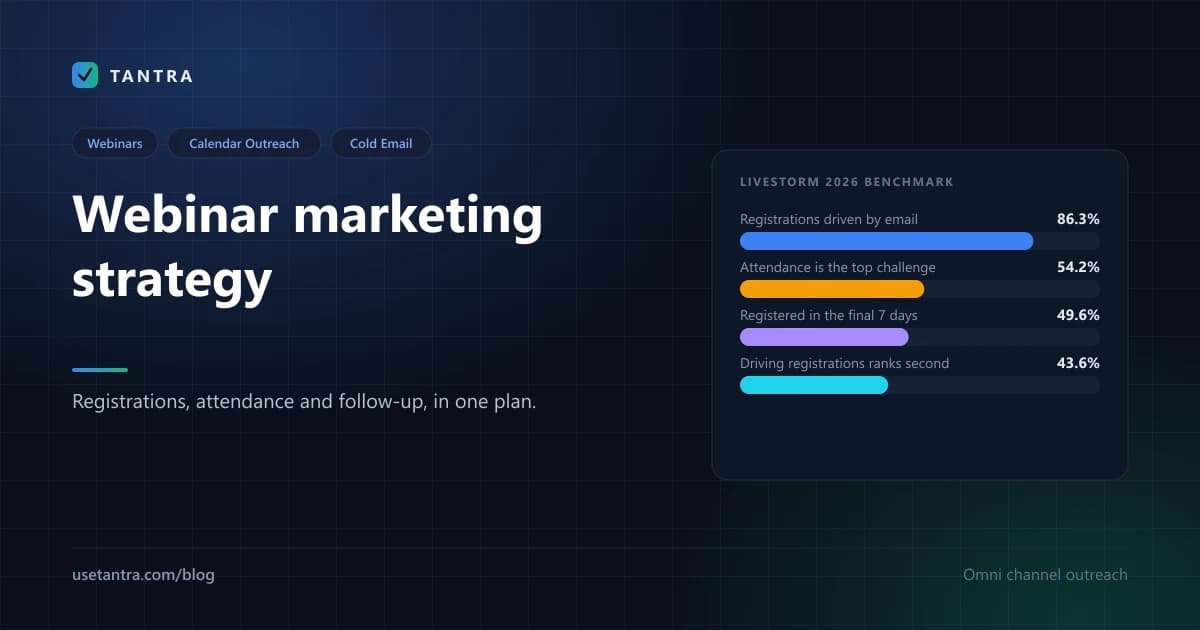
Start with the problem the traditional plan creates. Nearly half of all webinar registrations land in the final seven days, and about 15% land on the day itself. That is Livestorm's 2026 benchmark: 49.6% in the last week, 15% on the day. A plan that front-loads promotion runs in the opposite direction to the audience.
That gap is where webinar marketing is won or lost. The live hour is the smallest part of the job. The result is decided in three stages around it: do the right people register, do registrants actually show up, and what happens to attendees and no-shows afterwards. In the same Livestorm survey, 54.2% of webinar teams named turning registrants into attendees as their top challenge, and 43.6% named driving registrations.
The short answer
TL;DR
- Pick one goal, then work backwards from the event date to the number of invitations you need.
- Registrations: invite on more than one channel. Your own newsletter rarely covers the goal.
- Attendance: layer reminders that change channel as the day gets closer, and give late registrants a shorter track.
- Follow-up: message people by what they did. One "thanks for joining" to everyone is where pipeline goes to die.
- Measure each stage on its own metric. A good registration count says nothing about show-up, and a good show-up says nothing about pipeline.
Our verdict: put the effort into marketing, outreach and reminders, and attendance follows. The webinar creates interest. The post-webinar email turns that interest into action.
What is a webinar marketing strategy?
Webinar marketing is using live or recorded online sessions to attract an audience, teach them something useful and move the interested ones toward a conversation.
A webinar marketing strategy is everything around the session: who it is for, what it should achieve, how people hear about it, how they get reminded, how you follow up, and how you know it worked.
Three stages, three jobs, three different ways to fail. Here is the funnel with its leaks.
Funnel view
The outbound webinar funnel, and where it leaks
Registration dropAbout 92 in 100 invited people never register.
Attendance dropHalf of registrants never show. For a cold audience with no reminder emails, attendance falls by about 80%.
Follow-up dropInterest fades fast. Follow-up after the webinar converts better than a single thank-you email.
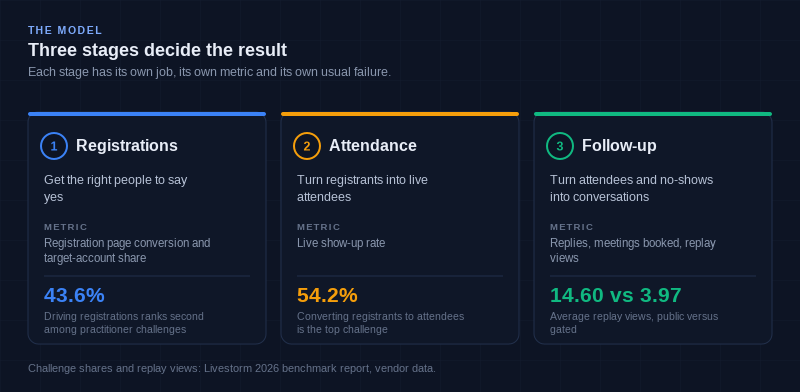
| Stage | Its job | Metric to watch | Where it usually fails |
|---|---|---|---|
| Registrations | Get the right people to say yes | Registrations from target accounts, registration page conversion | Promoting only to the list you already own, with a generic title |
| Attendance | Turn registrants into live attendees | Live show-up rate | One confirmation email, and no plan for people who register late |
| Follow-up | Turn attendees and no-shows into conversations | Replies, meetings booked, replay views | One "thanks for joining" email sent to everyone |
How do you set a webinar goal and work back to the numbers?
Choose the goal before you choose the topic. A session for existing customers needs a different audience and a different follow-up from one meant to open new sales conversations. Agreeing on the goal early also gives the team one clear way to judge the result afterwards.
| Goal | Who you invite | Primary measure |
|---|---|---|
| Pipeline | Target accounts and recent leads | Meetings booked per 100 registrants |
| Customer adoption | Existing customers and their teams | Attendance and replay views |
| Authority and list growth | A wide industry audience | Registrations and watch time |
| Product launch | Customers, prospects and press | Attendance and questions asked |
Then run the funnel in reverse. Start from the number of people you want in the room. Divide by a show-up rate. Divide again by the share of invited people who register. The numbers below are illustrative assumptions, not benchmarks.
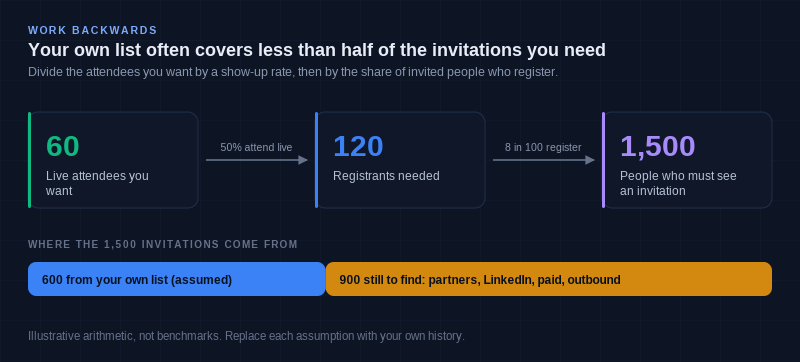
| Step | Assumption | Number |
|---|---|---|
| Live attendees you want | Your goal | 60 |
| Registrants needed | 50% of registrants attend live | 120 |
| People who must see an invitation | 8 in 100 invited people register | 1,500 |
| Reached by your own list | An assumed list of 600 | 600 |
| Still to find | Partners, LinkedIn, paid and outbound | 900 |
The last row is the one to stare at. It tells you how much of the audience has to come from somewhere other than your newsletter. If your list cannot cover the goal, you need time to line up partner promotion, LinkedIn activity or direct invitations before the session, and that is a three to four week job.
The best route: personalized outreach, then a calendar invitation. You do not need ads to fill a B2B webinar. Build the people data for your ICP from tools like ZoomInfo and Apollo and upload it to Tantra. Tantra runs the outreach: sequences across email, LinkedIn and WhatsApp, with AI personalization writing each email. When someone registers, a Google Calendar invitation puts the session on their agenda. Connect your webinar platform, such as Zoom or WebinarGeek, and measure campaign effectiveness, attribution and attendance rate, all in Tantra. The webinars use case shows the full setup.
Where does the 50% come from? Published live show-up rates run from about 42% to 51%: a 41.6% median from Contrast, 49% from Univid, both set out with their definitions on our webinar statistics page, and 51.3% from Livestorm. Figures that include replay or on-demand viewing run from 57% to 60%. Pick the definition that matches how you will count.
Reality check on benchmarks. Most of those numbers come from webinar platforms measuring their own customers, many of whom promote to an audience that already knows them, and none of the reports says how each funnel was built or optimized. Show-up is higher when registrants already know the host. Cold invitation is a different game, and it needs its own numbers.
Real show-up can sit well below 50%. In the first-party data later in this post, WebinarGeek webinars linked to Tantra had a median live rate of 23.8% and a pooled rate of 14.1%. At the median, 60 live attendees need about 250 registrants. At the pooled rate they need about 430.
Track warm and cold registrants separately. People you invited cold usually show up at a lower rate than people who found the registration page themselves, so one blended show-up rate flatters one group and punishes the other.
What should the webinar be about, and in what format?
Pick one promise for one audience. The test: can you write the title as a result for a named role? "How RevOps leads cut handoff time between marketing and sales" passes. "An introduction to our approach" does not.
The strongest topics come from questions your sales team hears every week, objections that stall deals, and searches your buyers already make. A topic about your product's features asks for attention before you have earned it. A topic about a problem your buyer already has asks for much less.
Once the goal and audience are clear, pick the format that delivers the promise.
| Format | Works best for | Watch out for |
|---|---|---|
| Single expert talk | Authority and list growth | Needs a speaker who is genuinely worth an hour |
| Interview or fireside chat | Pipeline with a mixed audience | The host must prepare questions, not improvise |
| Panel | Reaching several audiences at once | Panellists who do not promote it, and drift in the middle |
| Demo or workshop | Customer adoption, late-stage prospects | Too product-led for a cold audience |
| Customer story | Pipeline and launches | Needs the customer's approval and a real result |
Length. In Livestorm's data the average webinar runs about 68 minutes and the average attendee watches 26 of them, roughly 38% of the runtime. Univid found total attendance highest for 60 minute sessions. So length is a trade-off between reach and completion, not a rule. A practical default: a 30 to 45 minute talk, the rest for questions, and the most valuable material in the first half.
Date and time. Midweek, mid-morning to mid-afternoon in the attendee's local time is a reasonable first hypothesis. In Univid's live-attendance data Wednesday reached 51% and Friday 46%, and Livestorm reports Tuesday with the highest show-up rate at 51.7%. The differences are a few points, so test your own audience. The B2B webinar attendance playbook covers scheduling in more detail.
Our own research and Tantra data point the same way, with a sharper answer: webinars run in the first half of the day on Wednesday and Thursday work well. For the other days, rule out weekends, and rule out Monday, when schedules are busiest.
Co-hosts. A partner or customer speaker adds credibility and, more usefully, an audience you do not own. Agree up front who sends what and when, and hand them the copy, the image and a tracking link, so promoting it costs them nothing.
Stage 1: how do you get webinar registrations?
Build a registration page that does one job
The registration page exists to get a yes. Nothing else.
Put the promise in the headline. Three concrete takeaways under it. The speakers, with one line of credibility each. The date and time, with automatic time zone conversion. Ask only for what you will use: name and work email are enough for most webinars, and a job title or company size is worth adding only if you will segment follow-up by it.
If you plan to remind people on WhatsApp, ask for a mobile number as an optional field with its own tick-box that says so, for example "Send me reminders on WhatsApp". A number collected for that stated purpose is the only kind worth sending a WhatsApp message to.
After registering, send people to a confirmation page that adds the event to their calendar and offers a share link. That page is read more carefully than any email you will send.
Plan promotion around when people actually register
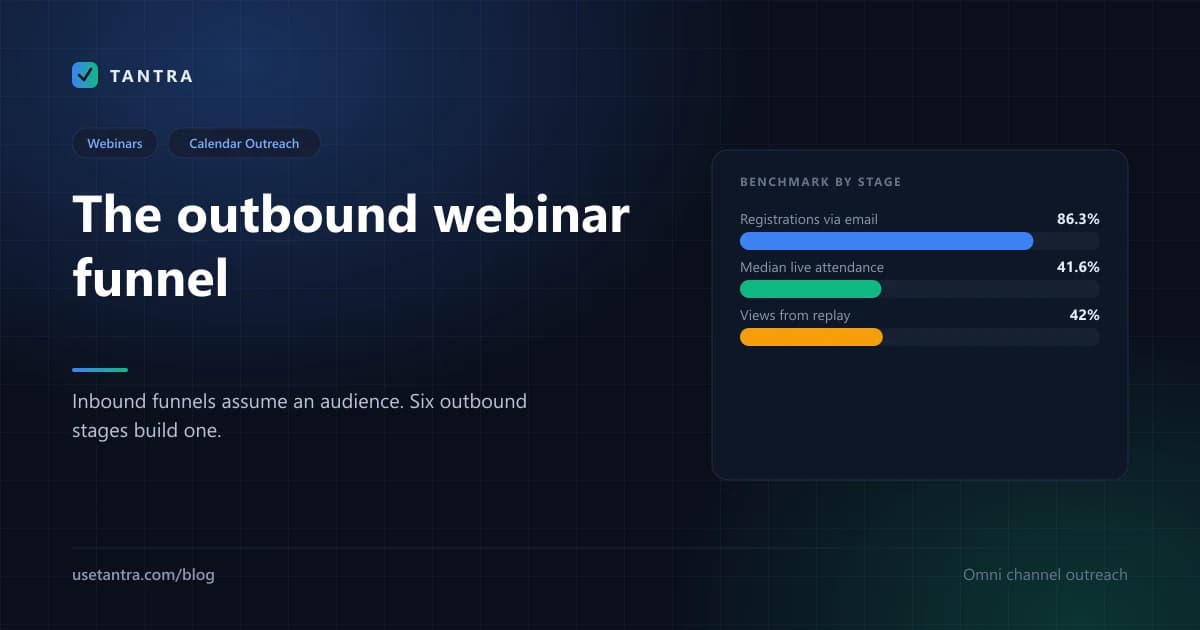
Livestorm's data gives three facts to plan around. Nearly half of registrations (49.6%) arrive in the final seven days and 15% on the day. Email is the largest registration channel by a wide margin: it drives 86.3% of registrations in Livestorm's data, although channels overlap, so that is not a share of a total. And 20.4% of teams use paid social to drive registrations.
A plan that spends all its effort in week one is fighting the way people actually register. Three things follow.
- Start three to four weeks out, so there is time to reach audiences you do not own. But plan the heaviest sending for the final week, as a deliberate second launch and not a panic.
- Do not stop on the day. A short "starts today" message to registrants and a last call to a warm unregistered segment are both worth sending.
- Treat late registrants as the normal case. The next stage covers how.
The first-party data later in this post suggests the pattern can be steeper still: 91.7% of registrations in that sample arrived in the final seven days.
| Channel | Best for | Watch out for |
|---|---|---|
| Your email list or newsletter | The largest share of registrations | One blast to everyone. Segment by role and past behaviour |
| Partners and speakers | Audiences you do not own | Late or missing promotion. Agree dates and supply the assets |
| LinkedIn, organic and direct | Named accounts and warm connections | Mass pitching. Keep direct messages personal and short |
| Paid social | Cold audiences that match your buyers | Cost per registrant. Check quality, not just volume |
| Outbound invitation | Target accounts that do not know you | Needs a relevant promise, a clean list and care over deliverability |
| Sales and customer success | Customers and open opportunities | Forwarded blasts. Ask for named, personal invitations |
Outbound and paid end at the same registration, but they get there by different routes, and the route decides where you lose people. A paid funnel has two extra stages in front of the registration page, so two extra places to leak. An outbound funnel has one step before registration, which is why the invitation itself carries so much weight.
Funnel view
Outbound invitation
Registration dropInvited, did not register
Attendance dropRegistered, did not show
Follow-up dropAttended, no next step
Funnel view
Paid ads
Engagement dropSeen, scrolled past
Click dropEngaged, did not click
Landing page dropVisited, did not register
Attendance dropRegistered, did not show
Follow-up dropAttended, no next step
Stage widths are illustrative, not measured. The two funnels show where each route can lose people, not how many.
Invite people who have never heard of you
A webinar is an easier first ask than a demo. It asks for an hour of listening, not a sales conversation. That makes it the best reason you have to contact target accounts that have never engaged with you.
Build the list from your ideal customer profile, past event attendees and lapsed leads. Keep the invitation to one promise, one date, one line on why it matters to that role, and one link. Email is the base channel. LinkedIn suits decision makers you want to reach personally. Once someone registers, a calendar invitation puts the session straight onto their agenda with a Yes, No or Maybe to answer.
Personalization decides the result.
The personalization game. In our own campaigns, cold invitations that are hyperpersonalized to each prospect typically draw a response rate of about 30%. A generic template sent to the same list draws about 10%, and even that beats the generic cold email invitations used in traditional marketing. Personalization triples the result, so measure your own response rate on a small batch, then scale the personalized version.
Cold invitations carry rules that warm ones do not: use real sending accounts, keep volumes moderate, honour unsubscribes, and check the consent rules that apply where your recipients are. This guide is not legal advice.
The guide to inviting cold B2B prospects to a webinar has templates and a sequence. The outbound webinar funnel puts the whole outbound path in six stages. Once someone registers, the webinar calendar invitation guide covers putting the session on their calendar.
Stage 2: how do you get registrants to attend?
Start the reminder sequence at the moment of registration
A registrant who closes the tab has only a database entry to remind them. The first job of the confirmation is to put the event somewhere they will actually see it: a calendar invitation or file, plus an email with the title, date, time zone and join link stated once.
Add one easy question, such as what they most want answered. A reply is an intent signal, and it hands you material to prepare.
Then explain what people get by joining live. Livestorm suggests offering a resource or experience that is only available during the session, such as a template or the chance to ask questions. Make that benefit clear next to the replay promise, so someone deciding how to spend the hour can see why the live slot is worth it.
A reminder schedule you can adapt
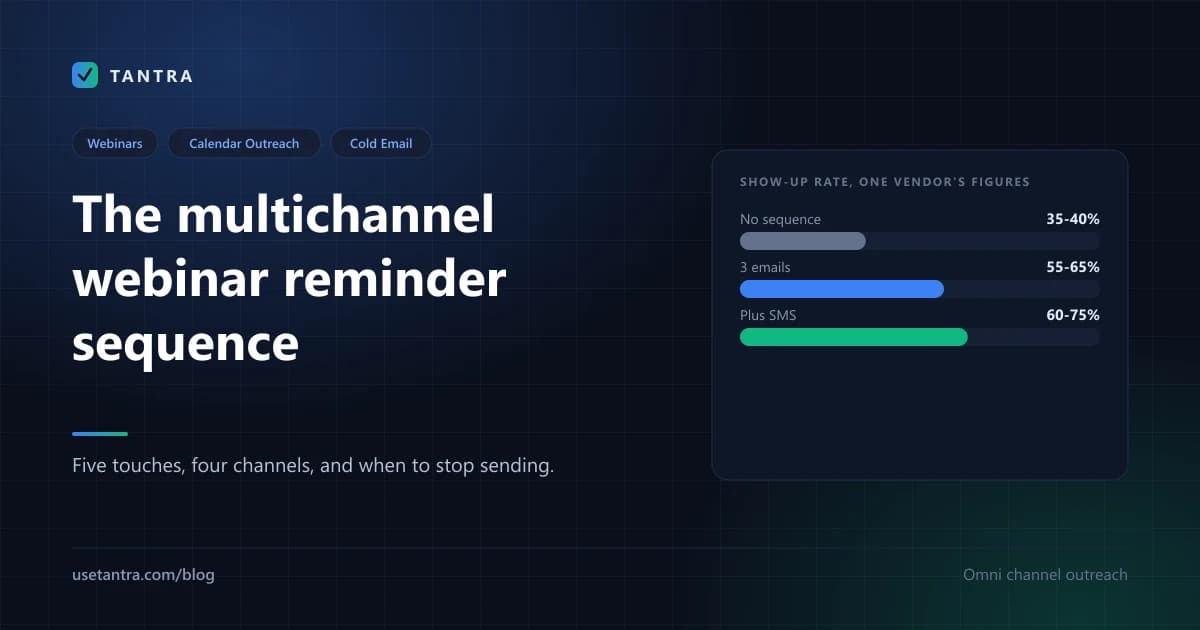
Livestorm recommends three to four reminders: a confirmation, one 24 hours before, one an hour before, and a final "starting now". Our own schedule has five touches and changes channel as the event approaches. It is a starting point to test, not a measured optimum.
| Touch | When | Channel | Job |
|---|---|---|---|
| 1 | On registration | Calendar invitation and email | Commit |
| 2 | About a week before | Give a reason to attend | |
| 3 | One day before | Email, plus a LinkedIn message for contacts you already know | Prepare |
| 4 | Morning of | One-line email | Remove friction |
| 5 | 15 minutes before | Webinar platform reminder, or WhatsApp for people who gave you their number for this | Last mile |
Because so many people register in the final week, a large share of your registrants never receive touch 2. Build the schedule backwards from the start time and skip any touch whose moment has passed. Someone who registers at 8 a.m. on the day should get the confirmation and the last-mile message, not "one week to go".
Why this is not optional. Among people who registered on their own, a reminder lifts show-up. Among people you invited cold, it decides it: in our own campaigns, attendance for a cold-invited audience drops by about 80% when no reminder emails go out. The webinar creates interest. The reminders get people into the room.
The multichannel webinar reminder sequence has the templates and stop rules for each touch.
Which channel for which job
Email carries the most registrations, so it is the natural reminder channel, and also the one where your message competes with the most others. Keep the middle reminders about value, not logistics.
Calendar invitations are reminders that do not look like reminders. Once the event is on a registrant's agenda, their own calendar notifies them and you see a Yes, No or Maybe. They suit registrants, who expect them. Read webinar calendar invites versus add to calendar links for the full comparison.
LinkedIn works best as a day-before message to people you are already connected to. It reads as a person remembering. It is a poor channel for the final hour and for strangers who registered through a form.
WhatsApp is read quickly, which makes it a strong last-mile channel, and it is the channel with the most rules. Use it only for people who gave you their mobile number for this purpose.
WhatsApp automation. Tantra can send bulk messages and reminders from a normal WhatsApp account or a WhatsApp Business account. You do not need to buy the WhatsApp Business API, and the setup takes about three minutes. One thing to remember: use a WhatsApp account you can afford to lose, because WhatsApp can block a number when recipients report its messages.
So keep volume inside the account's daily limit and send to people who have a reason to hear from you. Write like a person, use phone numbers with the country code, and stop for anyone who replies or asks you to. Used that way it earns its place: in our own campaigns, the ones with automated WhatsApp follow-up show higher attendance than the ones without it.
How do you run the live session so it keeps its promise?
The session is where the promise made on the registration page is kept or broken, and attention is short: the average attendee leaves after 26 minutes of a 68 minute session in Livestorm's data. Four habits matter most.
- Restate the promise in the first three minutes, then deliver the most valuable idea early. Do not hold the best material for the end.
- Build in interaction from the start. A poll or one-line chat question in the first five minutes tells people the session is two-way, and the answers become follow-up material. The attendance playbook covers slide design and interaction in depth.
- Prepare the run of show. Rehearse once, name a second presenter or moderator, open the room ten minutes early, and confirm that recording and replay processing work before you go live.
- Capture the signals. Who asked a question, who answered a poll, how long each person stayed and who clicked the call to action are the raw material for the segments in stage 3. Export them from your webinar platform the same day.
Offer one next step at the end and make the link easy to find. Say what the attendee gets from taking it. Several competing asks leave people unsure which one matters, especially when they are already moving on to the next meeting.
Stage 3: what should you do after the webinar?
Split the list by what people did
Before writing a word of follow-up, look at what each person did. Someone who asked a question needs an answer. Someone who missed the session may simply need the recording. Five groups cover it.
| Segment | First message | Timing | Channel |
|---|---|---|---|
| High intent (asked, voted or replied) | A personal reply from a named person | Same day or next business day | Email or LinkedIn |
| Attended and stayed | Thanks, the promised resources, a low-pressure next step | Within hours | |
| Attended and left early | The part they missed, as a short excerpt | Within hours | |
| Registered, did not attend | The replay and a reason to watch | Within hours, then a nudge | Email first, then LinkedIn |
| Declined | One light offer of the replay | Next business day | Email, once |
Look for questions and other signs of clear interest before sorting by attendance. Someone who asked a useful question and then had to leave still deserves a personal answer. Once those contacts are accounted for, separate the rest by what they watched. The webinar no-show follow-up guide has messages and a sequence for each group.
Send the replay while the topic is fresh
Send the replay within hours, not days.
On gating: Livestorm found that public replays averaged 14.60 views against 3.97 for gated ones, which it describes as 368% more. Yet 62% of teams restrict replays to registered users. Your registrants have already given you their details, so link them straight to the recording. If you want the replay to generate new leads, a gated version on your site is a separate decision from the link you send to registrants.
Hand over high-intent contacts quickly, and nurture the rest
High-intent contacts get a person, not a sequence. A question in the chat, a poll answer that points to a live project, or a click on the call to action are all reasons for a salesperson to write the same day or the next business day.
For everyone else, three or four useful messages over one to two weeks is enough: the replay, one insight pulled from the session, and a soft offer of a conversation framed around their situation. Then move them to your regular content.
Where the money is. In our own campaigns, post-webinar follow-up shows higher conversion than leaving attendees and no-shows with a single thank-you email. The webinar created the interest. This is the step that turns it into action, and it is the step most teams rush.
Repurposing the recording into clips, an article and a short email series extends its life, and an on-demand version can keep registering people long after the live date.
What do we see in our own campaigns?
These observations come from our experience running webinar outreach for 250+ brands, the process Tantra is built on. They are not a published study, so read them as one source with its context stated, the same way you read every other number in this guide.
Our verdict. Put the effort into marketing, outreach and reminders, and attendance follows. The webinar creates interest. The post-webinar email turns that interest into action.
These figures sit apart from the vendor benchmarks for a reason. Most published numbers describe webinars promoted to an existing audience, through funnels whose setup the source does not describe, so nobody outside can tell how well each one was optimized. A cold-invited audience behaves differently at every stage. That is why we plan from our own campaign history and suggest you build yours.
How do you measure webinar marketing?
Agree on the measures for each stage before the first event, and keep the definitions with the report. That lets you compare future webinars fairly and see where a change helped.
| Stage | Metric | How to calculate it | Note |
|---|---|---|---|
| Registrations | Registration page conversion | Registrants divided by unique visitors to the page | Split by source |
| Registrations | Target-account share | Registrants from your target list divided by all registrants | Volume without fit is a weak result |
| Attendance | Live show-up rate | Live attendees divided by registrants | Say whether replay views are excluded |
| Attendance | Share of runtime watched | Average minutes watched divided by session length | Livestorm: 26 of about 68 minutes |
| Follow-up | Replay views per no-show | Replay views from registrants who did not attend, divided by those registrants | Public and gated replays differ |
| Follow-up | Conversations started | Replies and meetings booked per 100 registrants | The number that connects to pipeline |
The most common measurement mistake is comparing a live-only rate to a figure that includes replays. Five well-known sources give five different attendance figures because they count different things, which our webinar statistics page sets out source by source. Prefer your own median over any benchmark once you have five or six events with consistent definitions.
Do not use email open rate as the measure of a reminder or follow-up. Opens now fire for privacy proxies and security scanners, so they say little about whether a person read the message. Read why we do not track email opens and outreach KPIs beyond open rates for the reasoning and the measures to use instead.
What does first-party data from webinars linked to Tantra show?
How many registrants watched live?
The largest sample is WebinarGeek webinars that nine Tantra accounts linked and refreshed after they ended, using the totals WebinarGeek reports for each broadcast.
| Measure | Value |
|---|---|
| Webinars included | 186 |
| Registrations | 229,875 |
| Watched live, all registrations pooled | 14.1% |
| Watched live or replay, pooled | 14.4% |
| Watched live, median webinar | 23.8% |
| Watched live, middle half of webinars | 14.1% to 45.0% |
The largest account supplies 42% of the registrations. Counting replay viewers moves the pooled rate by only 0.3 percentage points, so replays are not hiding attendance. The pooled figure counts every registration once, which gives large webinars more weight, while the median counts each webinar once.
A quarter of the webinars reached 45.0% or more, in line with the vendor benchmarks earlier in this post. The typical webinar sat well below them. The data does not say how registrants were acquired or which audiences the webinars targeted, so we do not read the gap as a benchmark. One plausible reason is audience: Tantra is an outreach platform, and people invited cold show up at a lower rate than an existing list does.
We read the gap as a reason to measure your own show-up rate before trusting a vendor average, and to run the arithmetic in the goal section with your own number.
When did people register?
Registration times come from a smaller set of 58 WebinarGeek webinars, the ones whose registrant lists were synced after the event ended: 41,095 registrations across six accounts, none of which supplies more than half.
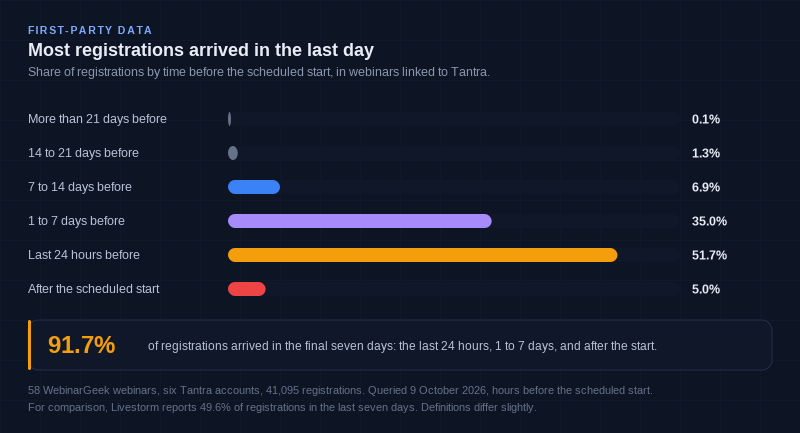
| When the person registered | Share of registrations |
|---|---|
| More than 21 days before the start | 0.1% |
| 14 to 21 days before | 1.3% |
| 7 to 14 days before | 6.9% |
| 1 to 7 days before | 35.0% |
| In the last 24 hours before the start | 51.7% |
| After the scheduled start | 5.0% |
In total, 91.7% of registrations arrived in the final seven days and 56.7% within 24 hours of the start or later. Livestorm's 2026 data puts the last-seven-days share at 49.6%. The definitions differ slightly, because we measure hours before the scheduled start and include people who registered after the session began, but the gap is large.
The data does not show why registrations came this late. It does support the planning advice earlier in this post: a reminder schedule built from the registration date will miss most of these registrants, and a short track for late registrants is the normal case, not an exception.
Definitions and what the data leaves out
Show-up rates are the live viewers and total registrations that WebinarGeek reports for each broadcast, for broadcasts refreshed after they ended and with at least 10 registrations. Registration timing is measured in hours before the scheduled start, from the registration time WebinarGeek records for each registrant.
Zoom webinars are left out because one account supplied all of them, so any figure would describe a single customer. The same applies to how many people that Tantra registered from Yes or Maybe responses went on to attend, where one account supplies almost the whole group. None of the rates is adjusted for audience, topic, day or time of day.
What does a four-week webinar marketing plan look like?
Use the event day, shown as T, to work backwards through preparation and promotion, then forwards through follow-up. This is a suggested starting plan rather than a tested optimum. Adjust the dates to your sales cycle, the time speakers need and the channels you will use to reach people.
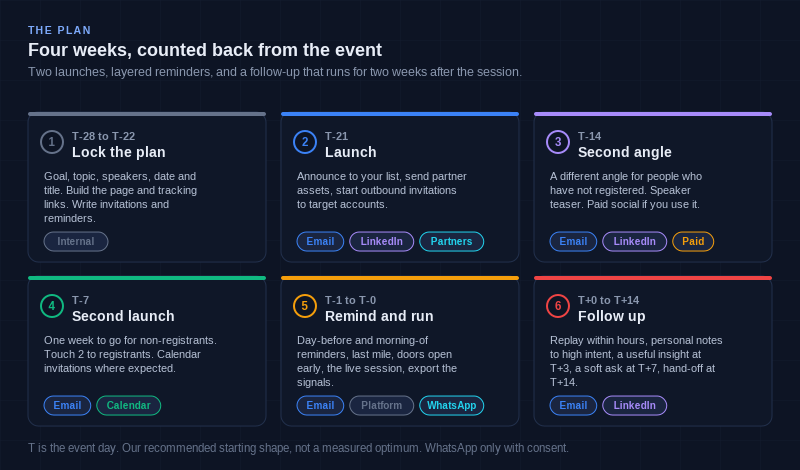
| When | What happens | Main channels |
|---|---|---|
| T-28 to T-22 | Lock the goal, topic, speakers, date and title. Build the registration page and tracking links. Write the invitations and reminders | Internal |
| T-21 | Launch: announce to your list, send partner assets, start outbound invitations to target accounts | Email, LinkedIn, partners |
| T-14 | Send a second angle to people who have not registered, a speaker teaser and, if you use it, paid social | Email, LinkedIn, paid |
| T-7 | Second launch: "one week to go" to non-registrants, touch 2 to registrants, calendar invitations for audiences that expect them | Email, calendar |
| T-1 | Touch 3, a last call to non-registrants, a full dry run | Email, LinkedIn |
| T-0 | Morning-of reminder, last-mile message, open the room early, run the session, export signals | Email, platform, WhatsApp where consented |
| T+0 to T+1 | Replay to everyone but the declined, thanks to attendees, personal notes to high-intent contacts | Email, LinkedIn |
| T+3 | One useful insight to attendees and no-shows | |
| T+7 | A soft offer of a conversation | Email, LinkedIn |
| T+14 | Hand off qualified contacts, review the metrics, write down what to change | Internal |
Which webinar marketing mistakes cost the most?
- Promoting only to people who already know you. Your own list rarely covers the goal, as the reverse funnel shows.
- Front-loading promotion and going quiet in the final week, when nearly half of registrations arrive.
- Treating the confirmation email as the reminder sequence.
- Repeating logistics in every reminder. The date and link are in the confirmation. Later reminders need a reason to attend.
- Ignoring late registrants. A sequence designed from the registration date gives them touches that are already past.
- Sending one generic template to a cold list. Cold invitations work when each one is personalized to the prospect, and WhatsApp belongs to people who gave you their number for it.
- Sending one follow-up to everyone.
- Judging success by registrations or opens. Judge it by who attended and who started a conversation.
- Skipping the dry run, then discovering during the session that recording or sharing does not work.
Where Tantra fits
Within a webinar marketing strategy, Tantra is the outreach platform. It runs the messages around the session and works alongside the webinar platform you already use.
| Stage | What Tantra does | What stays with you or your webinar platform |
|---|---|---|
| Registrations | Invitation sequences across email, LinkedIn and WhatsApp with AI-written emails, Google Calendar invitations with RSVPs, optional registration of Yes and Maybe responses with a linked Zoom or WebinarGeek webinar | The topic, the registration page, partner promotion, paid social |
| Attendance | Day-based reminder sequences across email, LinkedIn and WhatsApp, calendar invitations, one inbox for replies | Hour-level reminders, join links, the live session |
| Follow-up | Separate sequences for attendees and no-shows from imported lists, attributed attendees in reports, reply labels, outbound webhooks | The recording, the replay page, the sales conversation |
Where to go deeper on each stage
- Registrations: how to invite cold B2B prospects to a webinar, the outbound webinar funnel for B2B teams and webinar calendar invites versus add to calendar links.
- Attendance: the multichannel webinar reminder sequence and the B2B webinar attendance playbook.
- Follow-up: webinar no-show follow-up across channels.
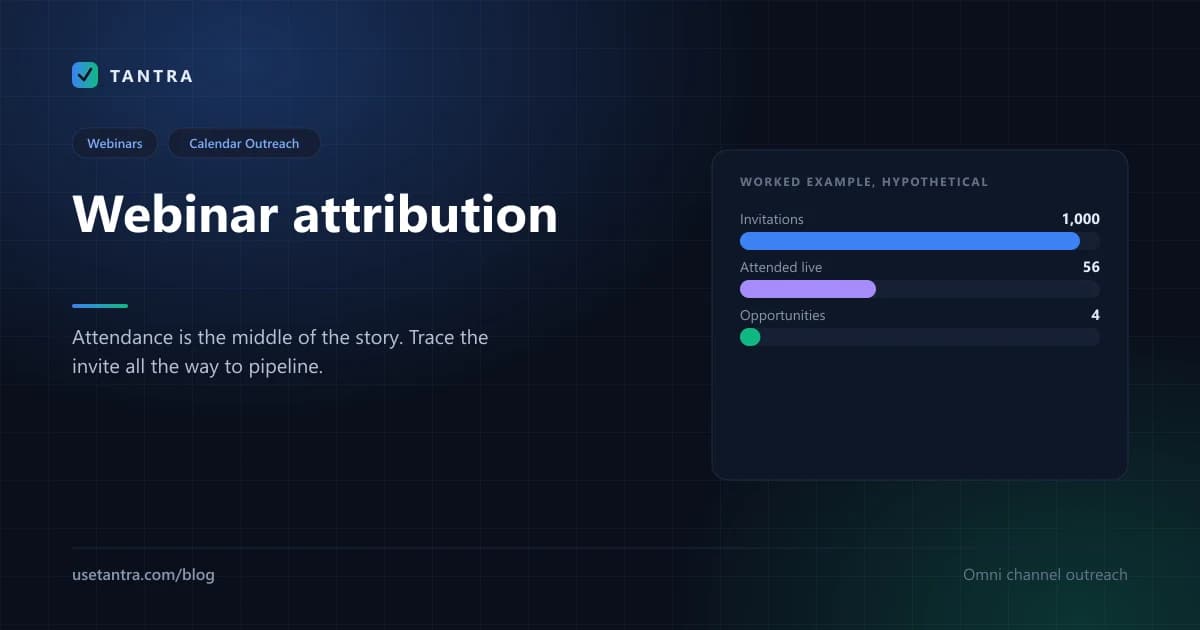
- Measurement: webinar attribution from invite to pipeline, webinar statistics for 2026 and outreach KPIs beyond open rates.
- Automation: webinar automation from form fill to calendar invite to CRM.
Frequently asked questions
What is webinar marketing?
Webinar marketing is using live or recorded online sessions to attract an audience, teach them something useful and move interested people toward a sales or support conversation. It includes the promotion before the session, the reminders, the live delivery and the follow-up afterwards.
What is the best webinar marketing strategy?
Start with one goal and an audience that would find the session useful. Choose the channels that can reach them, allow for late registrations and build reminders around the event date. Afterwards, tailor follow-up to what people did and measure each stage separately. Use your results across several events to refine that plan for your own audience.
How do you promote a webinar?
Use more than one channel. Email your own list, ask partners and speakers to promote it, invite target accounts directly by email and LinkedIn, and consider paid social for cold audiences. In Livestorm's data email drives the largest share of registrations, so segment your list and tailor the message to each role.
How far in advance should you start promoting a webinar?
Three to four weeks gives you time to reach audiences you do not own. Plan for the heaviest activity in the final week, because 49.6% of registrations arrive in the last seven days and 15% on the day itself in Livestorm's data. Keep promoting until the session starts.
How many reminders should you send for a webinar?
Three to five. Livestorm suggests a confirmation, one 24 hours before, one an hour before and a final "starting now". The five-touch schedule above adds a mid-week value email and a morning-of message. More than five rarely helps.
What is a good webinar attendance rate?
It depends on the definition. Published live show-up figures run from about 42% to 51%, and figures that include replay or on-demand viewing run from 57% to 60%. In our own sample of 186 WebinarGeek webinars linked to Tantra, the median live rate was 23.8% and the pooled rate 14.1%, well below those averages. Compare your rate only to a benchmark that counts the same thing, and rely on your own median once you have several events.
How do you follow up with webinar no-shows?
Send the replay within hours, then a short nudge on LinkedIn or WhatsApp where that is appropriate, a useful insight a few days later, and a soft offer of a conversation after about a week. Stop for anyone who replies. Treat no-shows as a warm list, not a lost one.
Should you use WhatsApp to remind webinar registrants?
Yes, for people who gave you their mobile number for that purpose. In our own campaigns, the ones with automated WhatsApp follow-up show higher attendance. Keep volume inside the account's daily limit, because WhatsApp's Terms of Service list bulk messaging and auto-messaging among impermissible communications, and it can suspend accounts that break them. For large registrant lists the WhatsApp Business Platform, with templates and opt-in, is the route built for volume.
Can you invite cold prospects to a webinar?
Yes, and a webinar is an easier first ask than a demo. Keep the list targeted, the volumes moderate and the invitation specific, honour unsubscribes, and check the consent rules where your recipients are. See the guide to inviting cold B2B prospects to a webinar.
What share of people accept a calendar invitation to a webinar?
It depends mostly on how personal the invitation is. In our own campaigns, cold invitations hyperpersonalized to each prospect typically draw a response rate of about 30%. A generic invitation to the same list draws about 10%, so measure your own response rate on a small batch before you scale a campaign.
How do you measure whether a webinar worked?
Measure each stage separately: registration conversion and target-account share, live show-up rate and share of runtime watched, then replies, meetings booked and pipeline per 100 registrants. Attribute pipeline by invited contact, not by the webinar as a whole.
How does Tantra work with a webinar platform?
Side by side. You run the session on Zoom, WebinarGeek or your own webinar platform. Tantra sends the invitations and reminders around it, receives the replies, and can link a Zoom or WebinarGeek webinar to a campaign to report who attended.
Key takeaways
- A webinar marketing strategy has three stages. Registrations, attendance and follow-up each need their own plan and their own metric.
- Plan for late registration. Livestorm reports 49.6% of registrations in the final seven days and 15% on the day.
- The top challenge is attendance. 54.2% of practitioners say converting registrants to attendees is hardest, ahead of driving registrations at 43.6%.
- Work backwards from a goal. Your own list often covers well under half of the invitations you need.
- Invite on more than one channel. Email carries the most registrations, but partners, LinkedIn, paid and outbound reach people you do not own.
- Remind in layers. Change the channel as the event approaches and give late registrants a shorter track.
- Add WhatsApp follow-up where you have consent. In our campaigns it lifts attendance. Get consent for the specific purpose first and keep volume inside the account's limits.
- Follow up by behaviour. Attended and engaged, attended and quiet, registered but absent, and declined need different messages.
- Measure each stage separately, and compare only definitions that match.
- Check your own numbers. In webinars linked to Tantra the median live show-up was 23.8% and 91.7% of registrations arrived in the final seven days, so plan from your own history and not from a vendor average.
- Our verdict. Focus on marketing, outreach and reminders, and attendance follows. The webinar creates interest, and the post-webinar email turns it into action.
Sources
About the author

Bhaskar Dev
Co-founder, Tantra · Bengaluru, India
Bhaskar Dev is a serial entrepreneur, engineer-turned-marketer, and Co-founder of Tantra. With over a decade of experience in B2B technology marketing and growth, he specialises in building AI-powered marketing systems, scaling SaaS businesses, and turning complex technologies into market-ready ventures. His work spans deep-tech, IoT, MarTech, and AI-driven automation.
Connect with Bhaskar on LinkedIn.