The multichannel webinar reminder sequence: 5 touches, 5 templates
A five-touch webinar reminder schedule across email, calendar, LinkedIn and WhatsApp, with five copyable templates and rules for when to stop sending.
 Bhaskar Dev19 min read
A reminder sequence is what turns a registration into a seat in the room, and this guide gives you the schedule, the channels and the templates to build one and optimize it.
Webinars are one of the most effective lead generation strategies in B2B, and one of the easiest to set up. Yet most webinar and marketing teams struggle to make the funnel work. They follow the traditional approach: one confirmation email, one reminder the day before, and hope.
We have run thousands of webinars for 250+ B2B and enterprise brands, and Tantra is that playbook turned into software. The data in this guide is backed by our internal metrics from those webinars and by other industry sources, with a clear label on which is which.
This is a practical deep dive into the reminder stage of the webinar funnel, with the problems teams hit and the solution for each, based on our own experience and industry benchmarks.
Here is what the traditional plan is up against. Someone registers for your webinar with every intention of coming. Nine days later, they are catching up on work, moving between meetings and trying to remember an appointment. The confirmation email has slipped down their inbox, and the session they wanted to attend is easy to overlook. One reminder has a lot to compete with.
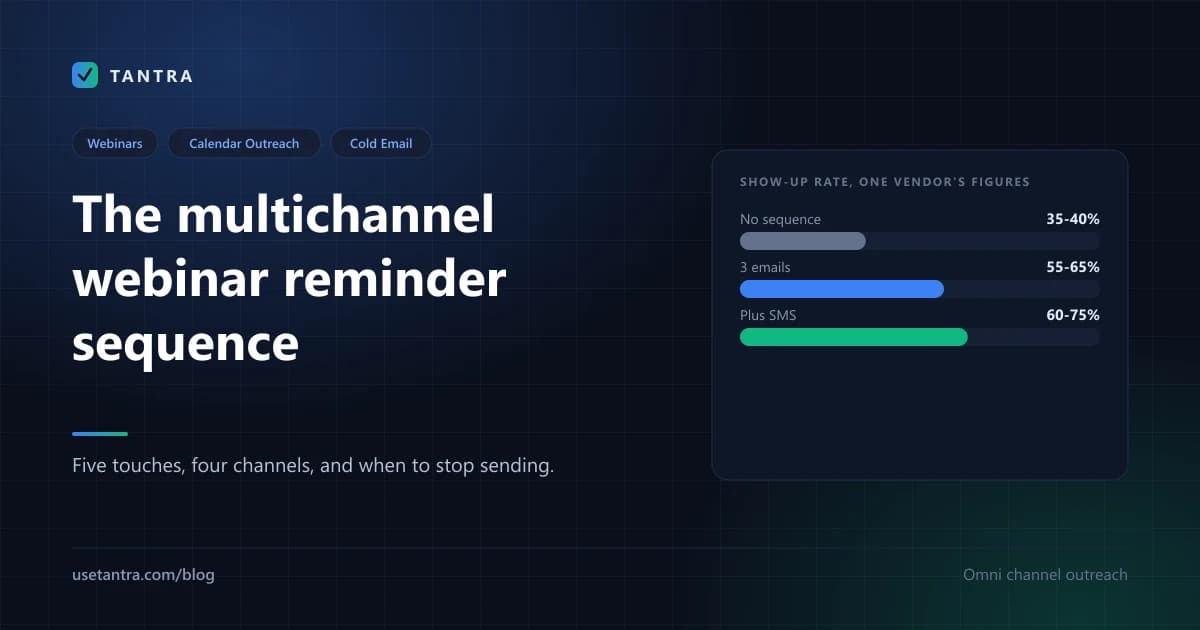
The usual fix is more email, and it helps. One vendor, WebinarNinja, says a 3-email reminder sequence moves show-up from roughly 35 to 40% to roughly 55 to 65%. That is a vendor's claim and not an independent benchmark, but the direction matches what most webinar teams see. The weaker spot is that every reminder in that sequence goes to the same inbox, where the registration email already sits unread.
Our own experience is sharper still. In our campaigns, for a cold-invited audience, attendance drops by about 80% when no reminder emails go out. People who registered on their own are far more forgiving. Most published reminder advice assumes that second group, so if you invite cold, reminders are the plan and not a courtesy.
A useful reminder plan tells you what to send, when to send it, which channel to use and when to step back. We will work through each of those decisions, with five templates you can adapt to your session. The B2B webinar attendance playbook covers the wider planning, slide design and follow-up questions if you are putting the whole event together, and the webinar marketing strategy guide shows where reminders sit between promotion and follow-up.
The short answer: five touches, four channels
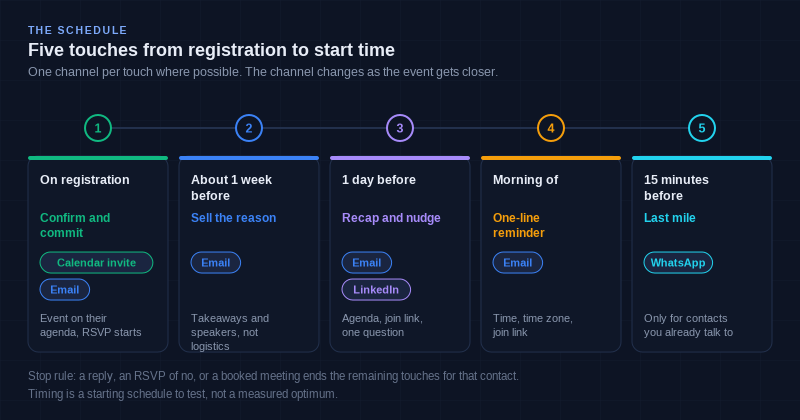
Send five reminders, counted back from the start time, and change the channel as the event gets closer.
- On registration: a calendar invitation plus a confirmation email.
- About one week before: an email that sells the reason to attend.
- One day before: an email recap, plus a LinkedIn message for contacts you already know there.
- Morning of: a one-line email with the join link.
- 15 minutes before: a WhatsApp message, only for people who already talk to you there.
Stop sending to anyone who replies, declines or books a meeting. Skip any touch whose moment has already passed for a late registrant.
How many webinar reminders should you send?
The right number depends on when people register and how they already hear from you. Published schedules can give you a starting point, but even the two familiar examples below place their reminders at different moments. Looking at that difference helps you choose which gaps your own schedule needs to cover.
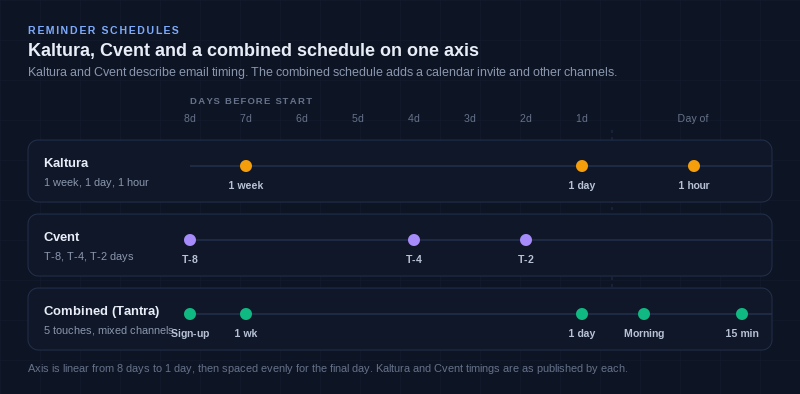
Kaltura recommends reminding people one week before, one day before and one hour before. Cvent's webinar checklist describes a common email schedule of eight days, four days and two days before (T-8, T-4, T-2). Both are three touches. They differ in where the weight sits: Kaltura front loads one touch early and puts two in the final day, while Cvent spreads all three across the last eight days and sends nothing on the day itself.
| Kaltura | Cvent | Combined schedule (this post) | |
|---|---|---|---|
| Touches | 3 | 3 | 5 |
| Timing | 1 week, 1 day, 1 hour before | T-8, T-4, T-2 days | Registration, about 1 week, 1 day, morning of, 15 minutes |
| Channel | Not specified by channel in the summary we read | Calendar invite, email, LinkedIn, WhatsApp | |
| Touches on the day | 1 | 0 | 2 |
| Strength | Simple, covers the last hour | Gives time to act on a late invite | Covers every phase and every channel |
| Weakness | Nothing between week and day | Silent on the day of the event | More to manage, needs stop rules |
| Source | Kaltura | Cvent checklist | Our recommendation, not a measured optimum |
The combined schedule is not a benchmark. It is a synthesis: keep Kaltura's last-hour idea, keep Cvent's early spacing, and add the calendar invite and the on-the-day touches. Treat it as the first version to test against your own attendance data.
Why five and not three
Five touches can make sense when each one gives the registrant something useful. The confirmation helps them save the time, the next message explains what they will learn, and the day-before note helps them prepare. On the day, the messages simply make joining easier. If an extra email says exactly what the previous one said, there is little reason for the reader to give it their attention.
Why not more than five
Before adding another reminder, ask what it would help the registrant do. A long run of similar messages can make people start skipping them, including the useful follow-up you send afterwards. Review the attendance data over several events and remove a touch if it consistently adds little. The schedule should earn its place in their inbox.
What about people who register late?
This is the case most schedules ignore. Livestorm's 2026 benchmark data puts 49.6% of registrations in the final seven days and 15% on the day itself. So close to half of your registrants never receive the one-week touch, because they were not registered yet. They join the sequence part way through.
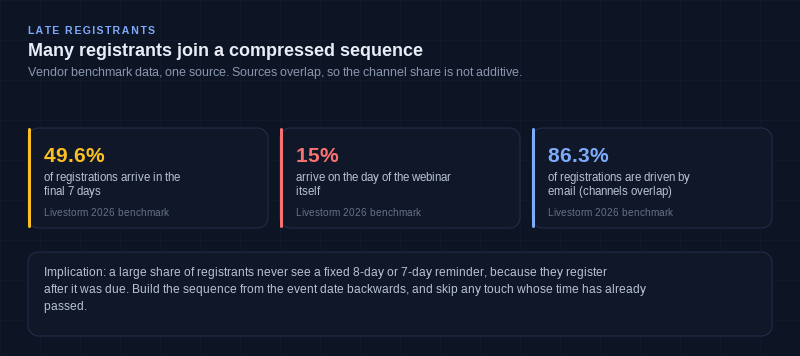
Design the sequence from the event date backwards, and give late registrants the touches that are still ahead of them. Someone who registers at 8 a.m. on the day should get the confirmation, then the 15 minute message. They should not get a "one week to go" email, and they should not get the one-day recap either.
What should each webinar reminder say?
The most common mistake is repeating logistics. The date, the time and the link are already in the confirmation. Repeating them four times trains people to stop reading, which is why the playbook's rule is to make reminders about value. Here we make that concrete, touch by touch.
Touch 1, confirmation. Job: make the commitment real. State the title, date, time zone and join link once. Say what happens to the invitation in their calendar. Ask one low-effort question, such as what they most want answered, because a reply is both an intent signal and content you can prepare.
Touch 2, about a week before. Job: give a reason to care that is not the date. Name one or two specific things they will leave knowing. Introduce a speaker with one line of credibility. This is where you win the "is it worth my hour" decision, so it should be the most substantive of the five.
Touch 3, one day before. Job: prepare them. Give the agenda in three bullets, the join link, and one thing to bring or think about. If you collected questions in touch 1, tell them you will answer some. This is also the touch to add a second channel for contacts you already know.
Touch 4, morning of. Job: remove the last bit of friction. One or two lines, the start time in their time zone, the link. Nothing else. A long message on the morning of the event is the one most likely to be skimmed and dropped.
Touch 5, 15 minutes before. Job: catch the person who meant to come and got pulled into something else. A short message, a single link, no persuasion. By now the decision is made; you are only reducing the cost of acting on it.
Write as you would to someone you are glad to have in the session. A concrete detail helps them remember why they signed up: "we will show the exact subject lines from three campaigns" gives them something to look forward to. A repeated "do not miss it" gives them very little to use when deciding how to spend their time.
Is email the only channel for webinar reminders?
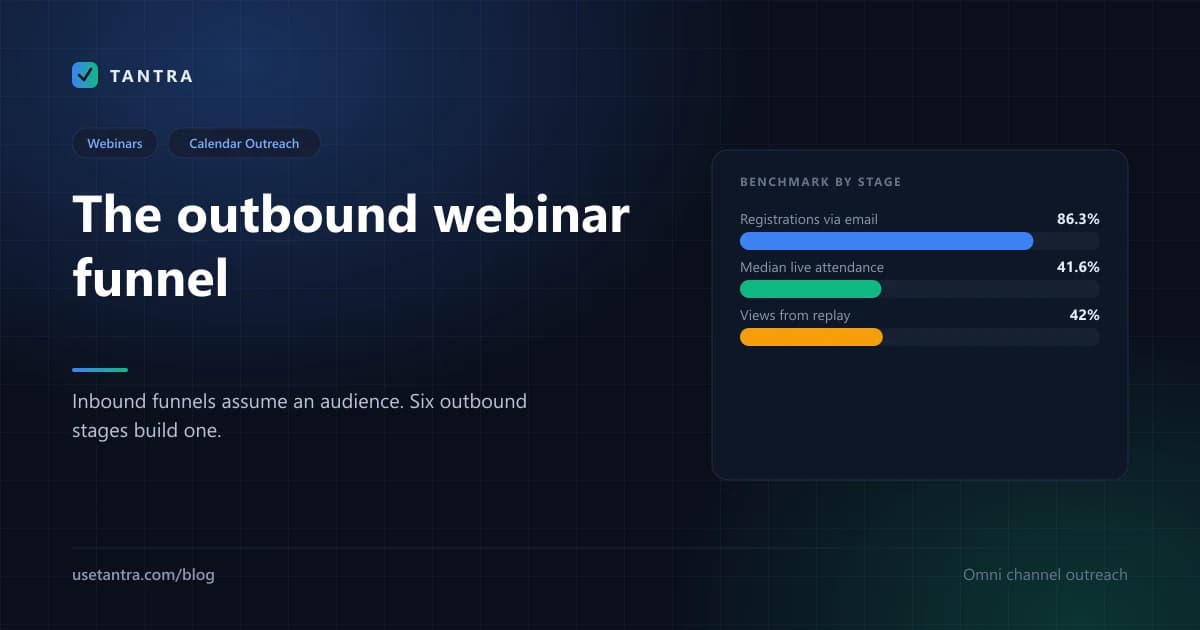
No, and relying on it alone is a choice rather than a default. Email is how most registrations arrive: Livestorm reports email drives 86.3% of registrations, though channels overlap so that figure is not a share of a total. That makes email the natural reminder channel, but it is also the channel where your last message is competing with the most others.
Different channels do different jobs, and in B2B the right question is which ones you have earned the right to use.
The calendar invitation
A calendar invitation is a reminder that does not look like one. Once it is on the registrant's agenda, their own calendar notifies them, and you get a yes, no or maybe back. It fits touch 1 and, in effect, covers the on-the-day moment through native notifications. For the full comparison with an add-to-calendar link, see webinar calendar invites vs. add to calendar links.
The caveat: invitations only land automatically when the recipient's calendar settings allow it. Sent to registrants, who asked for the session, they are expected.
LinkedIn works best as the day-before touch for contacts you are already connected to, or have been working in a sequence. A short direct message reads as a person remembering, not a system. It is a poor fit for the last hour, because few people watch LinkedIn messages in real time, and a poor first contact for someone who registered through a form and has never met you. See LinkedIn outreach for how that channel is used in a sequence.
WhatsApp is the strongest last-mile channel where it is appropriate: people read it quickly. In our own campaigns, the ones with automated WhatsApp follow-up show higher attendance than the ones without it. It is appropriate when the contact has already dealt with you there or has given you the number for that purpose, such as on the registration form. More on this in WhatsApp campaigns.
WhatsApp automation. Tantra can send bulk messages and reminders from a normal WhatsApp account or a WhatsApp Business account. You do not need to buy the WhatsApp Business API, and the setup takes about three minutes. One thing to remember: use a WhatsApp account you can afford to lose, because WhatsApp can block a number when recipients report its messages.
SMS
WebinarNinja attributes an extra 5 to 10 percentage points of show-up to a 15-minute SMS reminder. That is one vendor's number and we cannot verify it. For B2B, we would test WhatsApp in that slot where you have the standing to use it, rather than assume the SMS lift transfers.
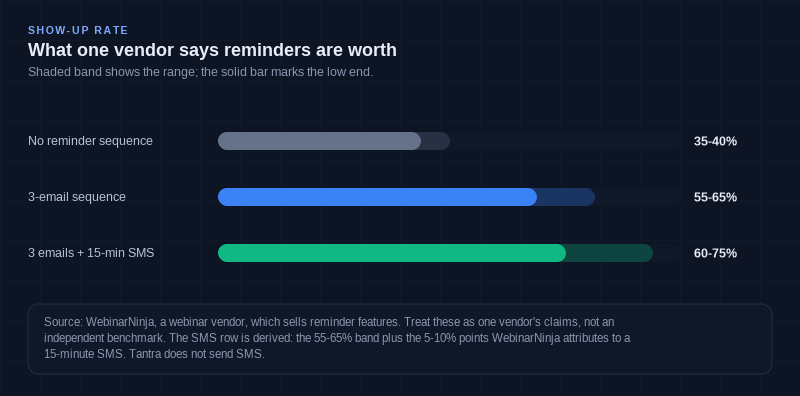
The chart shows the vendor's claim, nothing more. The third bar is arithmetic: the 55 to 65% band plus the 5 to 10 points claimed for SMS. It is not a separate measurement.
How do you sequence channels without nagging?
More channels does not mean more messages. The rule that keeps a multichannel sequence tolerable is simple: one channel per touch, and a stop rule that is honoured everywhere.
One channel per touch, with one exception. Touch 1 can pair the invitation with the confirmation email because they do different things. For touches 2 to 5, send on one channel and move to the next channel only on the next touch. A person who gets an email, a LinkedIn message and a WhatsApp message in the same hour feels chased.
Pick the channel by closeness to the event. Longer lead time suits email, where a longer message is acceptable. The final hour suits the shortest, fastest channel you are allowed to use. The mapping in the five-touch schedule follows that.
Stop on any signal that the person is handled.
- A reply. Someone who answers your confirmation question has told you they are paying attention. Remove them from the automated touches and answer them yourself.
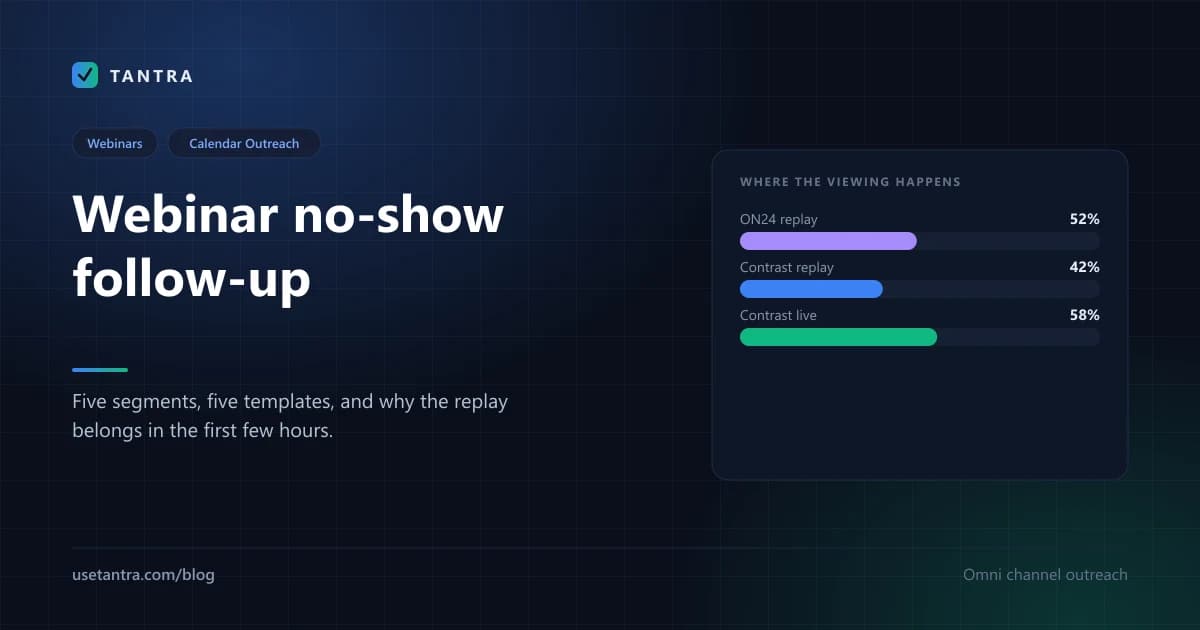
- An RSVP of no. They have declined the live session. Move them to the replay track, which is the subject of webinar no-show follow-up.
- A booked meeting or a conversation already under way. A sales rep should not be undercut by an automated countdown.
- An unsubscribe. Always, on every channel.
Respect time zones. A "morning of" message at 9 a.m. in your time zone is a 3 a.m. message to someone else. Send by the recipient's local time where you can.
Keep the reminder separate from the pitch. Reminders are for people who have said yes. If you want to invite people who have not, that is a different message with a different standard, covered in how to invite cold B2B prospects to a webinar.
Five reminder templates you can copy
Replace the text in square brackets. Keep each one short. These are starting points, so change the voice to match yours.
Template 1: confirmation (calendar invitation description plus email)
Channel: calendar invitation, then email.
Event title: [Exact webinar title]
Invitation description: Thanks for registering. Here is your link to join the session: [join link] [Date], [time] [time zone]. Around 45 minutes.
You will leave with: [outcome 1] and [outcome 2]. Presenting: [Name], [role and one line of credibility].
What is the one thing you would most like us to answer? Reply to this message and we will build it in. If you cannot make it live, reply and we will send the recording.
Subject: You are in: [Webinar title], [date]
Hi [First name],
You are registered for [Webinar title] on [date] at [time, time zone]. I have also sent a calendar invitation so it sits on your agenda with the link.
Is there a question you would like us to cover? Reply with a line or two and we will use it to help prepare the session.
[Your name]
Template 2: about one week before
Channel: email.
Subject: The part of [webinar title] I think you will use first
Hi [First name],
One week to go. Here is what [Speaker] will walk through on [date]:
- [Specific takeaway 1, for example "the three subject lines that got replies, with the data"]
- [Specific takeaway 2]
- [Specific takeaway 3]
[Speaker] is [one line of credibility]. If you want to bring a question, reply to this email.
Link and time are in your calendar invitation: [date], [time, time zone].
[Your name]
Template 3: one day before
Channel: email, and a LinkedIn message for contacts you are already connected to.
Subject: Tomorrow: [Webinar title] at [time, time zone]
Hi [First name],
Tomorrow at [time, time zone], [Speaker] covers [topic]. The agenda:
- [Item 1]
- [Item 2]
- [Item 3, plus live questions]
Join here: [join link]
You asked about [their question, if they replied]. We will cover it in item [n].
[Your name]
LinkedIn message: Hi [First name], quick note that [Webinar title] is tomorrow at [time, time zone]. The link is in your calendar invite, and here it is again: [join link]. Looking forward to seeing you there.
Template 4: morning of
Channel: email.
Subject: Today at [time, time zone]: [short webinar title]
Hi [First name],
We are starting today at [time, time zone]. Here is the link so you have it handy: [join link]
[Your name]
Template 5: 15 minutes before
Channel: WhatsApp, only for contacts who already talk to you there.
Hi [First name], [Webinar title] starts in 15 minutes. Link: [join link]. See you there.
Read the five messages together before you schedule them. If the same sentence appears in each one, change it so every reminder has a clear purpose. The reader should be able to tell what is new without comparing it with your previous email.
How do you measure a reminder sequence?
Start with the question you built the sequence to answer: are more of the people who registered joining the session? Then use clicks, replies and RSVPs to understand where the schedule helped or where it needs work.
Registrant-to-attendee rate. Attendees divided by registrants, from your webinar platform, split by cohort. This is the headline. Benchmarks vary widely and depend on who counts what: ON24 reports 60% registration-to-attendance including on-demand viewers, while Contrast reports a 41.6% median live-attend rate for B2B (both via VoxBooster's roundup). Do not compare your live rate to the first without checking the second.
Click-through on the join link. A click on the join link in touch 3 or 4 is a better signal of intent than any open. It is imperfect, because security scanners can click links, so look at it by contact over time rather than as a single number.
Replies. A reply to a reminder is an unambiguous intent signal, often with a question you can use. Count them by touch to see which one provokes conversation.
RSVPs, if you use calendar invitations. Yes, no and maybe, per contact, before the event. They help you plan, but they are not attendance, so reconcile them with the platform's attendance report afterwards.
Why not open rate. Opens now fire for privacy proxies and security scanners that have no person behind them, so an open does not mean a reminder was read. We explain the measurement problem in why we don't track email opens, and the broader metric hierarchy in outreach KPIs beyond open rates.
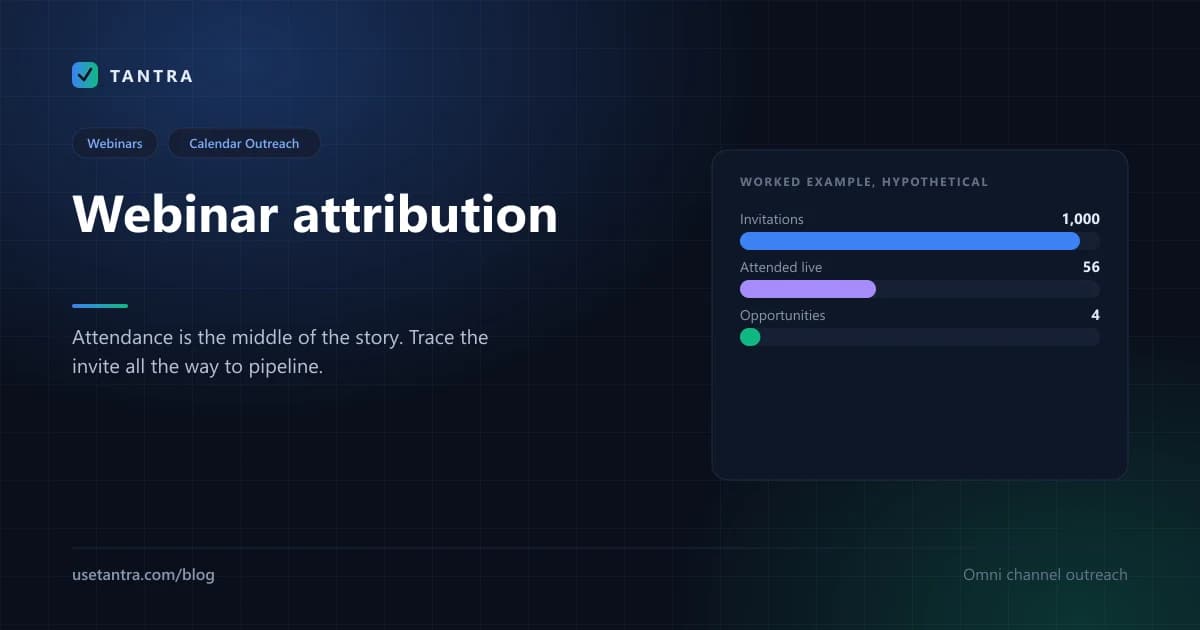
How to test a change. Change one thing per event: add the LinkedIn touch, move the final message, shorten touch 2. Compare the registrant-to-attendee rate between events with similar audiences and topics. With the audience sizes most B2B webinars have, a difference of a few percentage points is noise, so look for consistent movement across several events before you declare a winner. For linking reminders to pipeline later, see webinar attribution, from invite to pipeline.
For benchmarks to compare against, the webinar statistics page sets out the published figures with their definitions. Most of them describe webinars promoted to an existing audience, so track replies and attendance from your own events to see which messages and channels fit yours.
What do we see in our own campaigns?
These observations come from our own webinar outreach for 250+ brands. They are experience from practice, not a published study.
- For a cold-invited audience, attendance drops by about 80% when no reminder emails go out.
- Campaigns with automated WhatsApp follow-up show higher attendance.
- Hyperpersonalized cold invitations typically draw a response rate of about 30%, against about 10% for a generic template, which is what fills the reminder sequence in the first place.
- Follow-up after the webinar shows higher conversion.
Our verdict: focus on marketing, outreach and reminders, and attendance follows. The webinar creates interest, and the post-webinar email turns that interest into action. The outbound webinar funnel shows the stages on either side of this one.
Where Tantra fits
Tantra can act as your webinar marketing platform for the reminder stage. You keep running the session on Zoom, WebinarGeek or whatever platform you use, and Tantra handles the messages around it.
- Invite on every channel. Tantra sends invitations by email, LinkedIn and WhatsApp, and puts the session on registrants' calendars with Google Calendar invitations. Connect unlimited email and calendar accounts. Build as many sequences as you need, and each one can cover any mix of channels.
- Make every invitation one to one. Tantra reads each prospect's website, then AI personalization writes the invitation email and the calendar invitation description for that person. LinkedIn and WhatsApp steps are personalized with merge tags and spintax. Invitations written this way bring more people into the webinar.
- Turn a Yes into a registration. When a contact answers Yes or Maybe to a Calendar invitation, Tantra can register them on your webinar platform automatically, once you switch that on for the campaign. Zoom and WebinarGeek are direct integrations. Other platforms, such as WebinarNinja, connect through a webhook or an AI agent.
- Catch landing page sign-ups too. When someone fills in the form on your own registration page, an inbound webhook adds them to a Tantra campaign through prospect intake, so their calendar invitation and reminder emails start without anyone exporting a list.
- Run the reminders across channels. Day-based sequence steps cover the week-before, day-before and morning-of touches, the calendar invitation's own notification covers the final minutes, and a reply stops the remaining steps for that contact.
The webinars use case describes how a campaign links to a Zoom or WebinarGeek webinar, and the webinar automation guide shows how late registrants join a running sequence without an export.
Frequently asked questions
How many reminder emails should I send for a webinar?
Three emails is the common floor: Kaltura suggests one week, one day and one hour before, and Cvent describes T-8, T-4 and T-2 days. This post uses five touches across channels, of which three are email. More than five rarely adds anything.
When should I send the first webinar reminder?
The confirmation goes immediately on registration. The first persuasion email goes about a week before, or as soon as possible for people who register later than that. For a late registrant, the first reminder is the confirmation itself.
Should I send a reminder on the day of the webinar?
Yes, in most cases. Livestorm's data puts 15% of registrations on the day itself, and people forget things within hours. Keep it to one line in the morning and, where you have a suitable channel, one short message about 15 minutes before.
Is SMS or WhatsApp better for webinar reminders?
Tantra's reminders run on WhatsApp rather than SMS, so we cannot compare the two directly. In our own campaigns, the ones with automated WhatsApp follow-up show higher attendance. WebinarNinja credits a 15-minute SMS with an extra 5 to 10 points of show-up, which is one vendor's claim. For B2B, WhatsApp is often the more natural channel where the contact already uses it with you; it is inappropriate for people who have never dealt with you there.
What should a webinar reminder email say?
A reason to attend, not the logistics again. Name one or two specific takeaways, introduce the speaker in one line, and put the link and time at the bottom. The morning-of and 15-minute messages are the exceptions, which should be one or two lines.
How do I stop sending reminders to people who already replied or declined?
Stop the automated steps for any contact who replies, declines the invitation, books a meeting or unsubscribes. In Tantra, reply detection stops a sequence for that contact. For RSVP responses from a calendar campaign, use webhooks or a segment to move declined contacts to the replay track.
Key takeaways
- Five touches beat one. Confirmation, about a week before, one day before, morning of, and 15 minutes before.
- Change the channel as the event approaches. Calendar invite first, email in the middle, the shortest allowed channel last.
- Late registration is the norm. Livestorm reports 49.6% of registrations in the final week and 15% on the day, so build backwards from the start time.
- Make the middle reminders about value. Do not repeat the logistics four times.
- One channel per touch, with stop rules. Replies, declines, booked meetings and unsubscribes end the sequence for that contact.
- The reminder lift numbers are one vendor's. WebinarNinja's 35 to 40% to 55 to 65% is a claim, not an independent benchmark.
- Measure attendance, clicks and replies, not opens.
- Cold audiences need reminders most. In our own campaigns, a cold-invited audience loses about 80% of its attendance without reminder emails, and automated WhatsApp follow-up lifts attendance.
Sources
- WebinarNinja, webinar best practices: show-up with a 3-email reminder sequence (35 to 40% to 55 to 65%) and the extra 5 to 10% from a 15-minute SMS. Vendor data, undated in the page we read.
- Kaltura, webinar best practices: reminders one week, one day and one hour before.
- Cvent, webinar checklist: common reminder email schedule of T-8, T-4 and T-2 days.
- Livestorm, webinar best practices (2026 benchmark data): 49.6% of registrations in the final seven days, 15% on the day, email driving 86.3% of registrations. Vendor data.
- ON24 2026 benchmarks and Contrast B2B benchmarks, via VoxBooster: 60% registration-to-attendance (ON24) and 41.6% median live attendance (Contrast). Secondary source; trace to the originals before relying on them.
- Tantra campaign experience: the drop of about 80% in attendance without reminder emails for a cold-invited audience, the higher attendance with automated WhatsApp follow-up, and the response rate of about 30% on hyperpersonalized cold invitations. Observations from our own webinar outreach for 250+ brands, not a published study.
The combined five-touch schedule and the templates are our own recommendations, not measured results. Benchmarks come from vendors and aggregators, use different denominators, and should be treated as hypotheses to test on your own events.
About the author

Bhaskar Dev
Co-founder, Tantra · Bengaluru, India
Bhaskar Dev is a serial entrepreneur, engineer-turned-marketer, and Co-founder of Tantra. With over a decade of experience in B2B technology marketing and growth, he specialises in building AI-powered marketing systems, scaling SaaS businesses, and turning complex technologies into market-ready ventures. His work spans deep-tech, IoT, MarTech, and AI-driven automation.
Connect with Bhaskar on LinkedIn.