Webinar calendar invites vs. add to calendar links: which one gets people to show up
An add to calendar link asks registrants to do one more thing. A real calendar invitation puts your webinar on their agenda and shows who is coming.
 Bhaskar Dev19 min read
The fastest way to lift webinar attendance is to put the session on each person's calendar yourself, and this guide shows you how to do it and how to use the RSVPs that come back.
Webinars are one of the most effective lead generation strategies in B2B, and one of the easiest to set up. Yet most webinar and marketing teams struggle to make the funnel work. They follow the traditional approach: a confirmation email with an add to calendar link, and nothing that shows who is coming.
We have run thousands of webinars for 250+ B2B and enterprise brands, and Tantra is that playbook turned into software. The data in this guide is backed by our internal metrics from those webinars and by other industry sources, with a clear label on which is which.
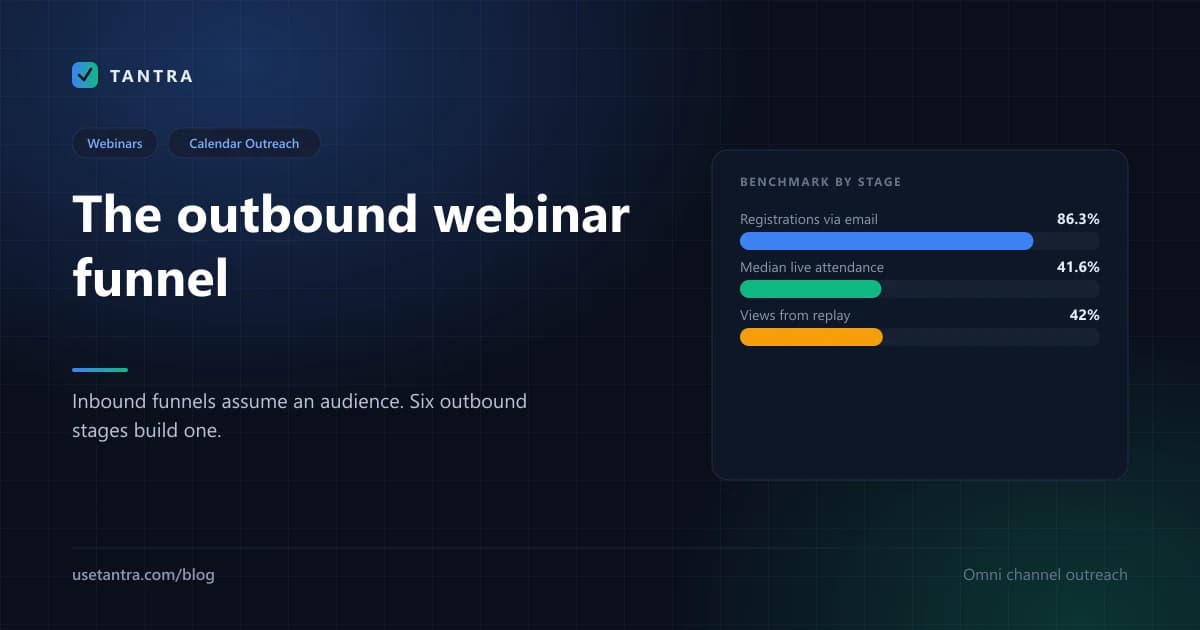
This is a practical deep dive into the calendar step of the webinar funnel, based on our own experience and industry benchmarks. The invitation is one step in the plan set out in our webinar marketing strategy guide and in the outbound webinar funnel.
Picture the traditional version. Someone registers for your webinar on Tuesday. The confirmation email lands, they glance at it, and they go back to their day. By Thursday, the only record that they ever meant to come is a row in your database.
When Thursday gets busy, a registration record is easy to forget. A calendar entry gives them a reminder in the place they already use to plan their day.
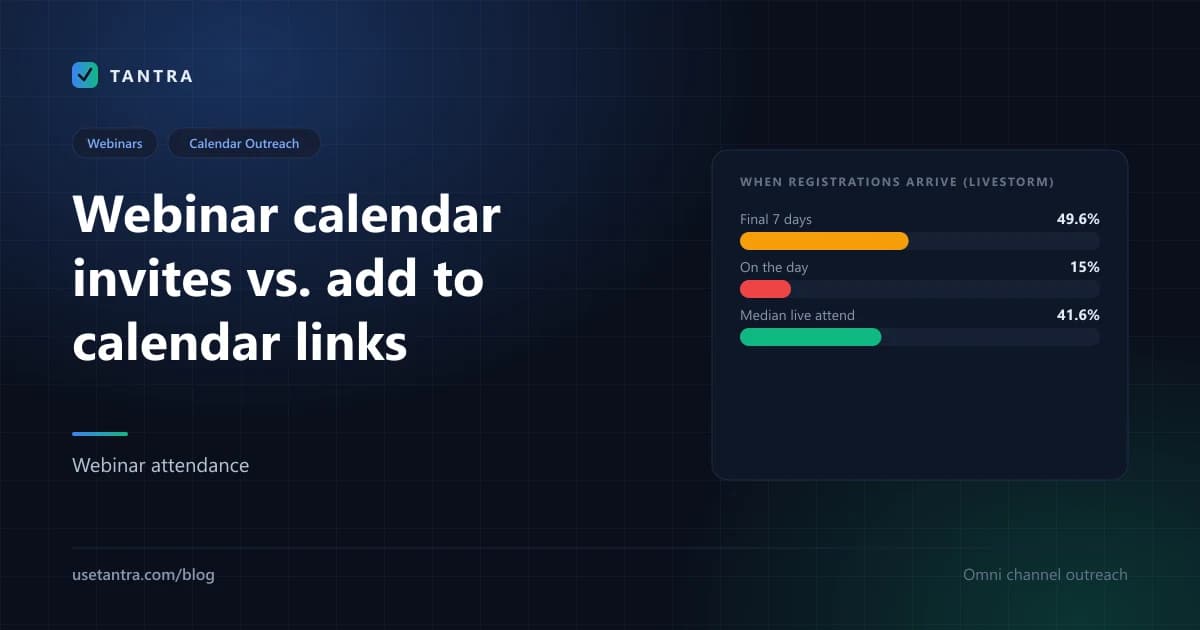
Timing makes this worse than it sounds. Livestorm's 2026 benchmark data reports that 49.6% of registrations arrive in the final seven days before an event, and 15% on the day itself. That is vendor data from one platform's customers, so treat it as a pattern rather than a law, but the shape is familiar to anyone who has watched a registration graph. A large share of your audience signs up when there is almost no time left for a reminder sequence to do any work.
Almost every webinar guide gives the same advice: put an "add to calendar" link in the confirmation email. It is good advice as far as it goes. But there is a second option most guides never mention, and it changes both how many people show up and how much you know before the day: send them an actual calendar invitation.
If you are deciding which approach to use, the useful questions are practical: how much work does the registrant have to do, what can you see afterwards, and what happens if the details change? We will work through those questions, then cover how to send the invitation. You will also find links to the other guides in this webinar series when you need more detail on reminders, follow-up or automation.
The short answer
An "add to calendar" link or .ics file asks the registrant to put the event on their calendar themselves. Some will. You will never know which ones.
A calendar invitation puts the event on their calendar for them, in most configurations, and sends back an RSVP of yes, no or maybe. You can see who intends to come before the webinar starts.
If attendance matters to you, the invitation is the stronger default. The link still works as a backup on the confirmation page. Neither one guarantees attendance: an RSVP is intent, not proof. For the broader attendance picture, start with the B2B webinar attendance playbook; this post is the deep dive on the invitation itself.
What is the difference between an add to calendar link and a calendar invite?
A registrant may see either option in a confirmation message and assume they do the same thing. The difference becomes clearer when you look at who creates the event and who receives the response.
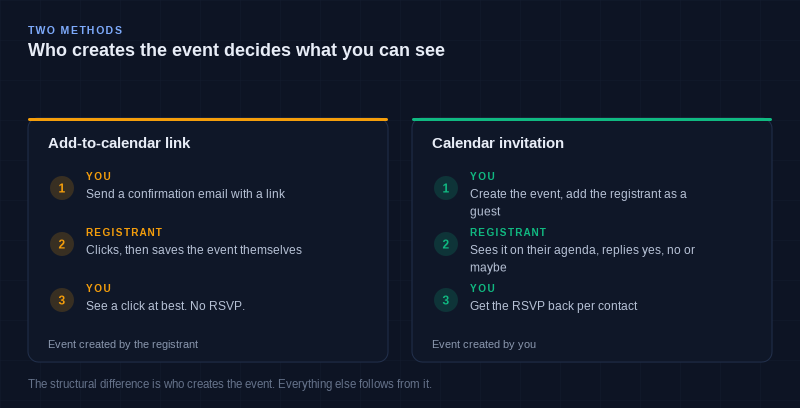
An add to calendar link is a button in your confirmation email or on your thank-you page. Clicking it opens a pre-filled event in Google Calendar or Outlook, or downloads an .ics file that the registrant then opens and saves. The event is created by the registrant, on their side. You do not see whether they did it.
A calendar invitation is an event created on your calendar with the registrant added as a guest. Their calendar receives it the same way it receives any meeting invite from a colleague. When they respond, the RSVP comes back to you.
Who owns the event matters later, too. It affects whether you can see a response, update the join link, or move the session without asking everyone to save another copy.
What is an .ics file, exactly?
An .ics file is a small text file in the iCalendar format. It describes one event: title, start, end, location, description. Calendar apps know how to import it. Most "add to calendar" buttons either generate one of these on the fly or build a link that pre-fills a new event in a specific calendar app.
The .ics file is the oldest and most portable approach, which is why it is still everywhere. Its weakness is built into the design. It is a snapshot. Once a registrant has saved it, the event on their calendar is a separate copy that your systems cannot reach. If you change the time, the copy does not change.
Is a calendar invite the same as a meeting invite?
Technically yes. A calendar invitation for a webinar is the same object as a meeting invite between colleagues: an event with attendees and a response status. The difference is the audience. Registrants are not colleagues, so how their calendar treats the invitation depends on their own settings, and how many you can send depends on your sender accounts. Both points come up again in the limits section below.
Why does the add to calendar link leak attendance?
An add-to-calendar link is easy to include, but getting from that link to a saved event depends on the registrant. Three things tend to get in the way.
It requires an action. Every extra step loses some people. A registrant reading the confirmation on their phone between meetings may intend to click later and never do it. Even those who click have two more steps: choose the calendar, confirm the save. Each step is another place to stop.
It is invisible to you. You can count link clicks, but a click is not a saved event, and an .ics download is not proof that anything was imported. You go into the webinar not knowing how many registrants have it in their calendars. That matters for planning. You cannot size your reminder effort, or judge a promotion, on a number you cannot see.
It arrives at the wrong moment. The confirmation email lands right after registration, when intent is highest and urgency is lowest. The webinar might be two weeks away. Late registrants have the opposite problem: they need the event on their calendar immediately, and a link in a confirmation email asks them to do it whenever they get round to it.
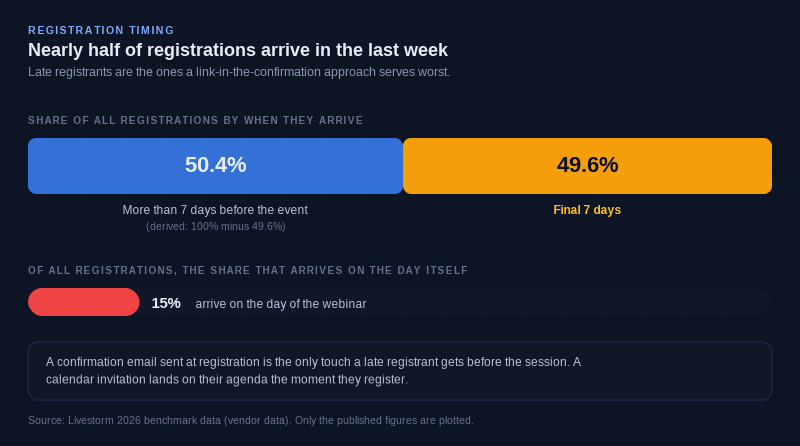
The chart plots only what Livestorm published. The 50.4% for earlier registrations is simply 100% minus 49.6%. We have not invented a day-by-day curve, because the source does not give one.
The link is still useful, especially on a confirmation page where someone wants to save the event straight away. Just account for the extra steps when you plan reminders, and avoid treating a click or download as confirmation that the event was saved.
What do the numbers say about reminders and attendance?
There is no clean public study that isolates "invite versus link" and measures the attendance difference. Anyone quoting a precise lift for that comparison is extrapolating, and we will not pretend otherwise. What can be said honestly is narrower.
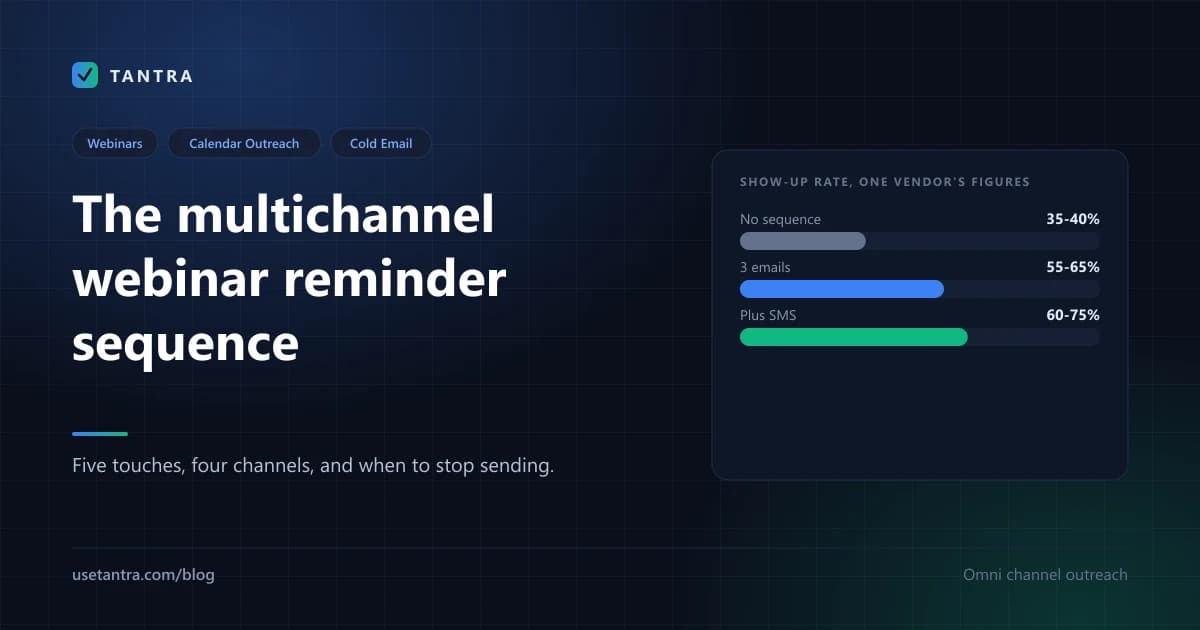
Reminder cadence matters. WebinarNinja's best practices guide says a sequence of three reminder emails can move show-up rates from roughly 35 to 40% to roughly 55 to 65%. That is one vendor's claim about its own customers, not an independent benchmark, and it concerns email reminders rather than calendar entries. The calendar entry is a different kind of reminder, because it fires from the registrant's own device. It is a reasonable hypothesis that it adds to an email sequence rather than replacing it. It is a hypothesis, and your own attendance data is the test.
Our own campaign experience supports the reminder half of that strongly. For a cold-invited audience, attendance drops by about 80% when no reminder emails go out, a much steeper fall than among people who registered on their own. Campaigns with automated WhatsApp follow-up show higher attendance again. So we treat the calendar entry as one layer of the reminder plan and never as a replacement for it.
What does a real calendar invitation change?
The event lives where the decision gets made. Whether someone attends is usually decided in the minutes before the session, when they look at their calendar and see what is next. An invitation puts your webinar in that view, with the join link one click away.
You get an RSVP signal. Yes, no and maybe are three different audiences:
- If 200 people registered and 60 have accepted, you know what you are actually running.
- A "no" tells you to move that person straight to the replay track.
- A "maybe" tells you who might be worth a nudge.
Reminders come from their own calendar. People's calendar notifications typically apply to events they have been invited to, the same as any meeting. That is a reminder from a source they already trust, alongside your email sequence. If you want the full schedule that sits around it, the multichannel webinar reminder sequence covers what to send and when.
Updates propagate. If the time or the join link changes, updating the event updates it for every guest. With .ics files, everyone who saved the old file keeps the old details. For a webinar that moves by an hour, that difference is the gap between a handful of confused emails and a wave of people joining at the wrong time.
Side by side
| Add-to-calendar link / .ics | Calendar invitation | |
|---|---|---|
| Who creates the event | The registrant | You |
| Requires registrant action | Yes | No, in most calendar settings |
| You know if it is on their calendar | No | Yes, via RSVP |
| Yes / no / maybe signal | No | Yes |
| Time or link changes reach everyone | No | Yes |
| Works for late registrants | Only if they click | Sent immediately |
| Setup effort | Low | Moderate at scale |
How do you send a webinar calendar invite?
For a small webinar, you can do this by hand:
- Create the event on the calendar of the person who should own it, usually the host or a shared webinar account. Use the exact webinar title.
- Add registrants as guests. For more than a handful of people, hide the guest list so attendees cannot see each other's emails. In Google Calendar, untick "See guest list" under guest permissions.
- Put the join link in the location field and the description, so it is visible from the calendar view without opening anything.
- Write a short description: one sentence on what they will learn, the agenda, and who is presenting.
- Send the invitation.
That is the whole procedure, and for a webinar with a few dozen registrants it works fine. Two details are worth getting right. First, create the event once and add guests to it, rather than creating a new event per person, so that an update reaches everyone. Second, send from a mailbox your registrants would recognise. An invitation from a person they have heard of is treated very differently from one that arrives from an unfamiliar address.
What breaks when the list grows?
This approach breaks down past a few dozen people. You will be pasting registrants in by hand. You will hit Google's sending limits on invitations. You will have no clean way to match RSVPs back to your registration list. And late registrants, the ones who matter most, will each need a manual step on a busy day.
At that point you need a tool that creates invitations programmatically from your sender accounts and reports RSVPs per contact. You also need to avoid the opposite mistake: one giant event with thousands of visible guests. Large lists should be split into several events, spread across senders and across days, with the guest list hidden.
Can you send the invite automatically at registration?
Yes, if the registration event can reach the tool that sends invitations. The registration form posts the person's details somewhere (a webhook, a Zapier or n8n step, a CRM record), and that step adds them to a calendar campaign. The post on automating the path from form fill to calendar invite to CRM walks through the pieces. The point for this article is simpler: the invitation can arrive within minutes of registering, which is exactly when the late registrant needs it.
What should you put in the invite?
Someone opening the event a few minutes before the session should be able to recognise it, remember why they registered and find the join link quickly. Write the calendar entry with that moment in mind.
- Title. Match the webinar title the person registered for. "Webinar" or "Live session" tells them nothing. Umbrex's webinar playbook makes the same point: the calendar title should closely match the webinar title.
- Time zone. Calendar events render in the viewer's local time, which is a real advantage over emails. Still state the time zone in the description for people forwarding it.
- Join link. Put it in the location field and as the first line of the description.
- Description. Three lines: what they will get, who is presenting, and what to do if they cannot make it (for example, "reply and we will send the recording").
- A question. Ask what they most want answered and invite a reply. Mentimeter recommends collecting attendee questions before the session. Doing it in the invite gives you content to prepare and an early intent signal.
What should the description not contain?
Leave out anything that makes the entry look like marketing. A long block of promotional text is the fastest way to have an invitation treated as clutter. Skip attachments, skip multiple links competing with the join link, and skip a hard sell for another product. The invitation has one job: make the session easy to find and easy to say yes to.
Should the invite go out before or after the confirmation email?
Either order works, but do not make them contradict each other. The confirmation email can say "your calendar invitation is on its way" so the registrant knows what to look for. If your registration platform sends its own confirmation, the invitation then arrives as a second, clearly different message. Keep the title and time identical across both, and keep the .ics or add-to-calendar option on the thank-you page for anyone who wants to save the event immediately.
How do you use yes, no, maybe and no response?
Each response points to a different next step:
| Response | What it tells you | What to do |
|---|---|---|
| Yes | Committed intent | Normal reminder sequence; prioritise for sales follow-up if they also engage live |
| Maybe | Interested, uncertain | One extra value-led reminder the day before |
| No | Not attending live | Move straight to the replay track; do not keep sending reminders |
| No response | Unknown | Treat like an email-only registrant; rely on your reminder sequence |
Pay particular attention to people who decline. They have given you a useful answer, and continuing to remind them about the live session ignores it. Move them out of the live reminder track so your next message reflects what they told you.
For people who have not responded, you still have very little information to act on. Some will join without ever answering the invitation. Keep them in the standard reminder track unless they give you another signal, and let the attendance report tell you afterwards whether they came.
What do you do with the maybes?
A maybe is a person who has told you the topic is relevant and the timing is uncertain. The best response is a single, specific message the day before: one concrete thing they will take away, the join link, and a line saying the recording will follow if they cannot make it. A second maybe-specific nudge starts to feel like pressure.
How do RSVPs connect to follow-up?
They give you a first cut of segments before the session even starts. After the session, the webinar platform's attendance data tells you who actually came, and the combination is more useful than either alone. A yes who did not attend is a warm no-show. A no-response who attended is a pleasant surprise worth a thank-you. For the full treatment of what to send each group afterwards, see webinar no-show follow-up across channels.
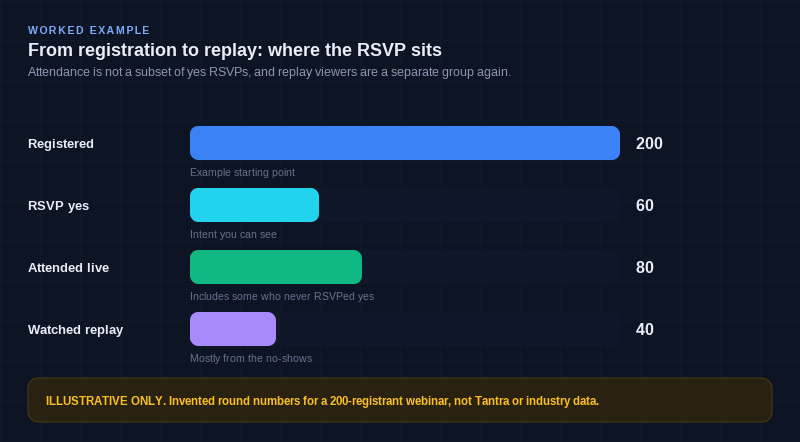
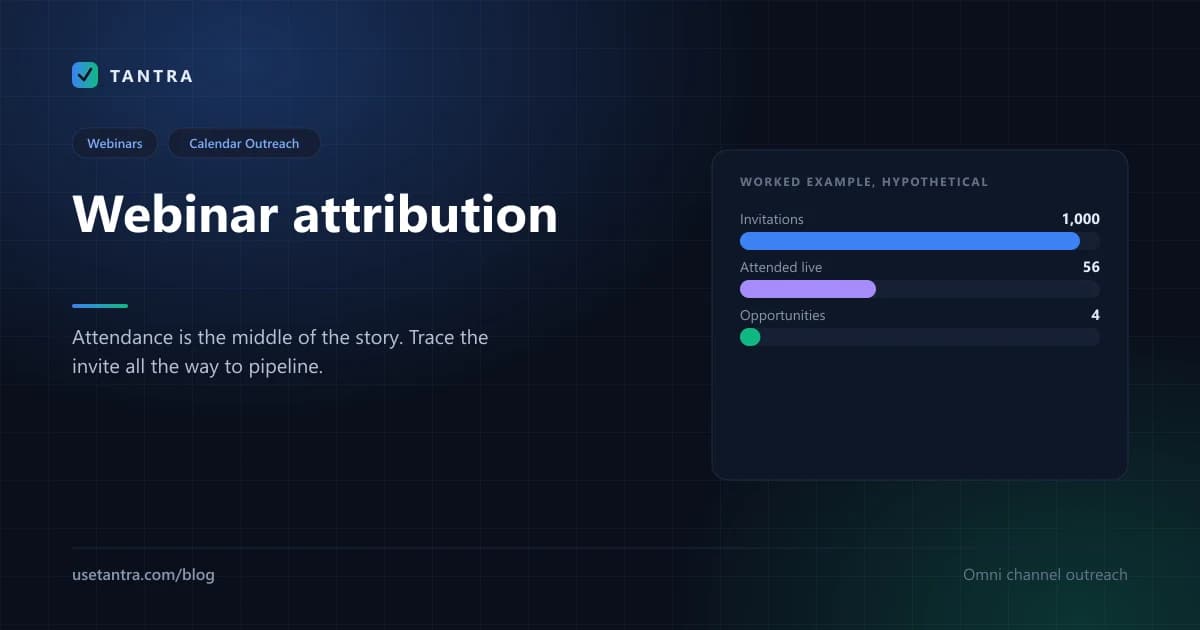
The funnel above uses invented round numbers to show how the stages relate. It is not Tantra data and not an industry benchmark. The point it makes is structural: attendance is not a subset of yes RSVPs, and replay viewers are a separate group again.
What should you plan for?
Calendar settings vary. Google Calendar lets people choose when invitations are added to their calendar: from everyone, only from known senders, or only once they respond. Under the stricter settings, your invite waits as a pending invitation rather than appearing automatically. You lose part of the "no action required" benefit for those people, but you keep the RSVP signal. Other calendar systems behave differently again, and we have not tested every one.
Calendar invitations belong with people who expect them. Sending one to someone who registered, or who asked to hear about the session, is expected and welcome. To reach people who have never heard of you, start with a personalized invitation by email or LinkedIn and send the calendar invitation once they register. In our own campaigns, invitations hyperpersonalized to each prospect typically draw a response rate of about 30%, against about 10% for a generic invitation to the same list. The post on how to invite cold B2B prospects to a webinar covers that sequence.
RSVPs are not attendance. A "yes" is intent. Some yeses will not show and some no-responses will. Benchmarks also vary depending on who is counting. ON24 reports 60% registration-to-attendance conversion on its platform including on-demand viewers, while Contrast's independent B2B data shows a median live-attend rate of 41.6% for Q3 2025 to Q1 2026 (both via a VoxBooster summary, so trace them to the originals before relying on them). The two numbers measure different things, which is why they differ. Use RSVPs to plan, and use your webinar platform's attendance data to measure.
Open rates will not tell you any of this. If you are tempted to judge the invitation by whether the email around it was opened, we explain why we do not track email opens, and outreach KPIs beyond open rates covers what to measure instead. An RSVP is a far better signal than an open.
Keep the link as a fallback. Leave an "add to calendar" option on the thank-you page for registrants on calendar systems you cannot invite cleanly, or for people who want to save it immediately.
Benchmarks describe someone else's audience. Most published attendance figures come from webinars promoted to an existing audience, through funnels whose setup the source does not describe. We have not published a controlled comparison of invitation against link either, so if you run both methods on comparable webinars, track registrants, RSVPs and attendees per method and compare. The first-party show-up and registration-timing data we do publish is in the webinar marketing strategy guide, and the webinar statistics page reconciles the vendor numbers.
Where Tantra fits
Tantra can act as your webinar marketing platform around the calendar invitation. It handles the invitation and the reporting either side of the session, on the webinar platform you already run.
- Invite on every channel. Tantra sends invitations by email, LinkedIn and WhatsApp, and puts the session on registrants' calendars with Google Calendar invitations. Connect unlimited email and calendar accounts. Build as many sequences as you need, and each one can cover any mix of channels.
- Make every invitation one to one. Tantra reads each prospect's website, then AI personalization writes the invitation email and the calendar invitation description for that person. LinkedIn and WhatsApp steps are personalized with merge tags and spintax. Invitations written this way bring more people into the webinar.
- Turn a Yes into a registration. When a contact answers Yes or Maybe to a Calendar invitation, Tantra can register them on your webinar platform automatically, once you switch that on for the campaign. Zoom and WebinarGeek are direct integrations. Other platforms, such as WebinarNinja, connect through a webhook or an AI agent.
- Catch landing page sign-ups too. When someone fills in the form on your own registration page, an inbound webhook adds them to a Tantra campaign through prospect intake, so their calendar invitation and reminder emails start without anyone exporting a list.
- See every RSVP by contact. A calendar campaign reports each yes, no and maybe, and attendance comes back from Zoom or WebinarGeek when you refresh it, so you can see who accepted, who attended and who to follow up. The help articles on calendar campaigns and RSVP tracking show the setup and the report.
RSVP events also go to other tools by webhook, and the developer tools include a REST API and an MCP server. The webinar attribution guide carries each RSVP through to pipeline, the webinars use case shows how the pieces fit, and the B2B webinar attendance playbook covers scheduling, interaction and follow-up.
Frequently asked questions
Is a calendar invite better than an add to calendar link for webinars?
For attendance, usually yes. An invite puts the event on the registrant's calendar without them having to act, in most configurations, and gives you an RSVP. A link depends on the registrant clicking and saving, and you cannot see whether they did. There is no public study that quantifies the difference, so test it on your own audience.
Should I still include an .ics file in my confirmation email?
Yes, as a fallback. It helps registrants on calendar systems you cannot invite cleanly and people who want to save the event immediately.
Can I send calendar invites to all my webinar registrants at once?
For small lists, manually. For larger lists, use a tool that creates invitations from your sender accounts in batches, respects sending limits and matches RSVPs to registrants. Avoid one giant event with thousands of visible guests.
Will attendees see each other's email addresses?
They can if guest list visibility is enabled. Check that setting before sending the webinar invitation and turn it off so registrants cannot browse each other's email addresses.
Does an RSVP of yes mean they will attend?
A yes tells you they intend to attend, but their plans may change before the session. Use that response to plan reminders and follow-up, then check the webinar platform's attendance report to see who actually joined.
What should a webinar calendar invite include?
The exact webinar title, the join link in both the location field and the description, a one-line value statement, the presenters, and what to do if they cannot make it.
Key takeaways
- Registrations arrive late. Livestorm's 2026 data puts 49.6% in the final seven days and 15% on the day, so a confirmation email alone reaches many people too close to the event.
- A link asks, an invitation tells. The link needs the registrant to act and shows you nothing. The invitation lands on their agenda and returns an RSVP.
- Yes, no and maybe each get a different next step. Move the nos to the replay track, nudge the maybes once, and let no-responses follow the normal sequence.
- RSVPs are intent, not attendance. Benchmarks differ by who counts: ON24 reports 60% including on-demand, Contrast 41.6% median live.
- Keep the .ics or add to calendar link as a fallback, and keep the invitation list split across events with the guest list hidden.
- Do not borrow a lift figure. No public source isolates invitation versus link, so measure it yourself.
- What we see in our own campaigns: hyperpersonalized cold invitations typically draw a response rate of about 30%, and a cold-invited audience loses about 80% of its attendance without reminder emails.
- Our verdict: focus on marketing, outreach and reminders, and attendance follows. The post-webinar email turns interest into action.
Sources
-
WebinarNinja, Webinar best practices (reminder sequence show-up figures). Vendor claim.
-
Tantra campaign experience: the response rate of about 30% on hyperpersonalized cold invitations, the drop of about 80% in attendance without reminder emails for a cold-invited audience, and the higher attendance with WhatsApp follow-up. Observations from our own webinar outreach for 250+ brands, not a published study.
The funnel figure in this post uses invented example numbers and is labelled as such.
About the author

Bhaskar Dev
Co-founder, Tantra · Bengaluru, India
Bhaskar Dev is a serial entrepreneur, engineer-turned-marketer, and Co-founder of Tantra. With over a decade of experience in B2B technology marketing and growth, he specialises in building AI-powered marketing systems, scaling SaaS businesses, and turning complex technologies into market-ready ventures. His work spans deep-tech, IoT, MarTech, and AI-driven automation.
Connect with Bhaskar on LinkedIn.