Webinar invitation emails for cold prospects and warm lists
Webinar invitation email templates for cold prospects and warm lists: size the list, five templates, a multichannel sequence and compliance basics.
 Bhaskar Dev22 min read
You can fill a webinar with the right people even when none of them have heard of you, and this guide shows you how to write, send and optimize the cold invitation that does it.
Webinars are one of the most effective lead generation strategies in B2B, and one of the easiest to set up. Yet most webinar and marketing teams struggle to make the funnel work. They follow the traditional approach and promote only to the list they already own.
We have run thousands of webinars for 250+ B2B and enterprise brands, and Tantra is that playbook turned into software. The data in this guide is backed by our internal metrics from those webinars and by other industry sources, with a clear label on which is which. Most published webinar data describes audiences that already know the host, so where our own campaigns say something different, we state it.
This is a practical deep dive into the problems teams hit when they invite cold, and the solution for each, based on our own experience and industry benchmarks. The webinar marketing strategy guide covers the full plan this post sits inside.
Start with the size of the problem. Most B2B webinars are small. One study of B2B technology webinars, cited in our attendance playbook, found that 83% of them had fewer than 50 attendees. We have not been able to trace that study to a public original, so read it as a widely repeated figure rather than a verified one. Even so, it matches what most teams see: the webinar you planned is bigger than the list you own.
When your subscribers and customers are not enough to fill the room, you need a way to reach people beyond that list. Some may discover the session through a partner or a social post. For the target accounts you most want there, a relevant personal invitation gives you a more deliberate way to start the conversation.
If you are inviting prospects who have never signed up to hear from you, start by checking whether the session is relevant to them. Then work backwards from your attendance goal to size the list and write a clear invitation. We will cover those steps, how LinkedIn and WhatsApp fit, and the deliverability and regional rules you need to check before sending.
The short answer
To invite cold prospects to a webinar, build a small, well-matched list sized backwards from your target attendance, and send a short plain-text email from your own mailbox that offers one specific thing to learn, with one link. Follow up on a second channel such as LinkedIn, send one more email with a new reason to attend, and stop the moment someone replies, registers or opts out. Keep volume low per mailbox, keep authentication and opt-out in place, and treat the legal rules in your recipients' countries as a checklist to confirm, not an afterthought. For warm lists such as past attendees and subscribers, the invitation can be shorter and can lead straight to a calendar invitation once they register.
Why is a webinar a better cold offer than a demo?
Think about the invitation from the recipient's side. A demo means setting aside thirty minutes to talk with a salesperson about a product they may not be shopping for. A useful webinar offers a chance to learn about a problem they already have, without starting that sales conversation. That can make it an easier first invitation to consider.
The commitment is lower. A webinar can be attended passively, with the camera off, while doing something else, and watched later as a replay. Nobody is going to ask the attendee for a budget. The decision is "is this topic worth an hour of background attention", which is a far easier yes than "should I let a vendor sell to me".
The value comes first. The offer is a thing to learn. If the topic is specific to the recipient's role and problem, the email reads as useful rather than as a pitch. That changes how the recipient reads the rest of your message and how likely they are to forward it to a colleague.
It gives you a reason to follow up. After the event you have a recap, a recording and a next step for every segment, which is the subject of the no-show follow-up post. A registration or attendance record is also a better signal than an open, for reasons in why we do not track email opens.
There is one honest limit. A webinar is only a better offer if the topic is. "Join our product webinar" is a demo in disguise and gets treated as one. The invitation should promise a specific outcome for a specific kind of person, such as how a particular role handles a particular problem, and the session should deliver it.
Who should you invite, and how many?
Start with the room, not the list. Decide how many people you want live, then work backwards. This is the single step most cold webinar plans skip, and it is why they end with a list that is either far too small or an email blast that damages the sending domain.
Work backwards from the target attendance
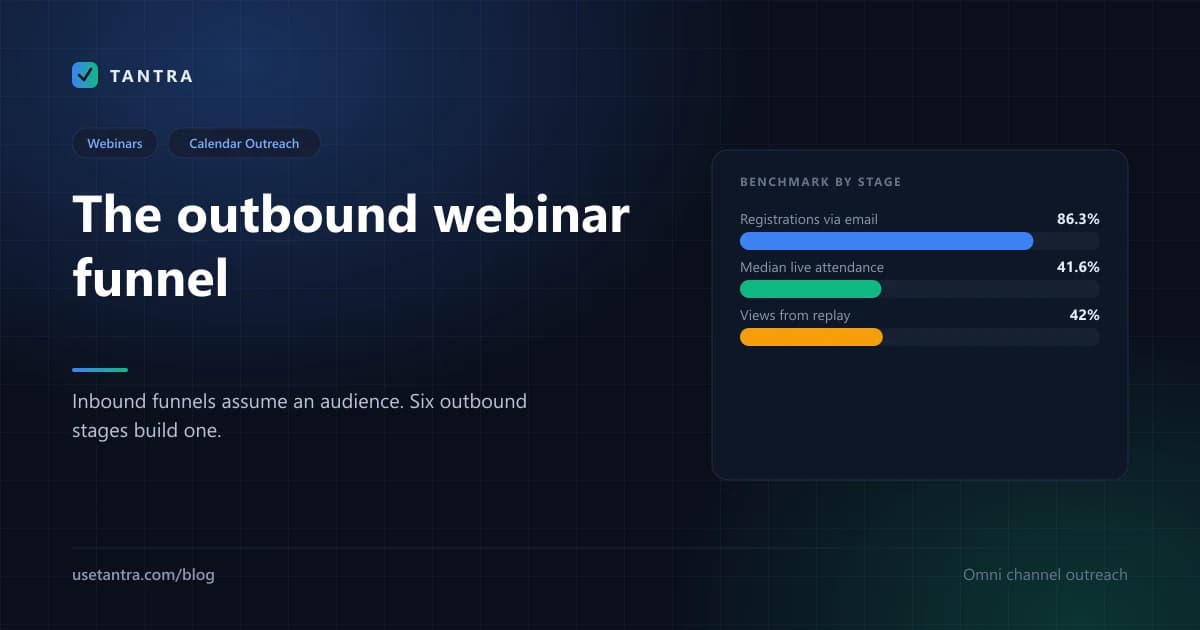
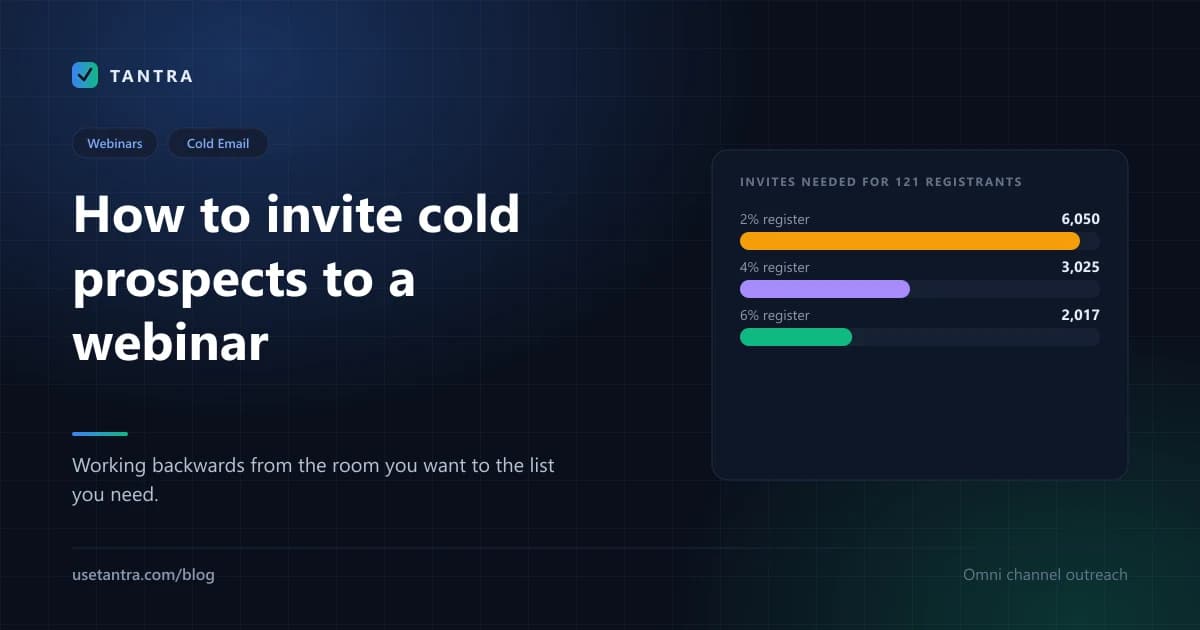
Contrast reported a median live attendance rate of 41.6% for B2B webinars (mean 46.2%), for the period from Q3 2025 to Q1 2026, as cited by VoxBooster. That is the share of registrants who show up live. If you want 50 people live, you need roughly 50 divided by 0.416, which is 121 registrants.
The next number is yours, not the industry's: what share of the people you invite will register? No public benchmark describes cold webinar invitations well, because most published figures come from webinars promoted to an existing audience. Our own experience is the closest guide we can offer: cold invitations hyperpersonalized to each prospect typically draw a response rate of about 30%. A generic template sent to the same list draws about 10%, and even that beats the generic cold email invitations used in traditional marketing. A response is not yet a registration, so the example below uses a deliberately cautious 4% registration rate and labels it as an assumption. It is a placeholder to show the arithmetic. Replace it with the rate from your own first campaign.
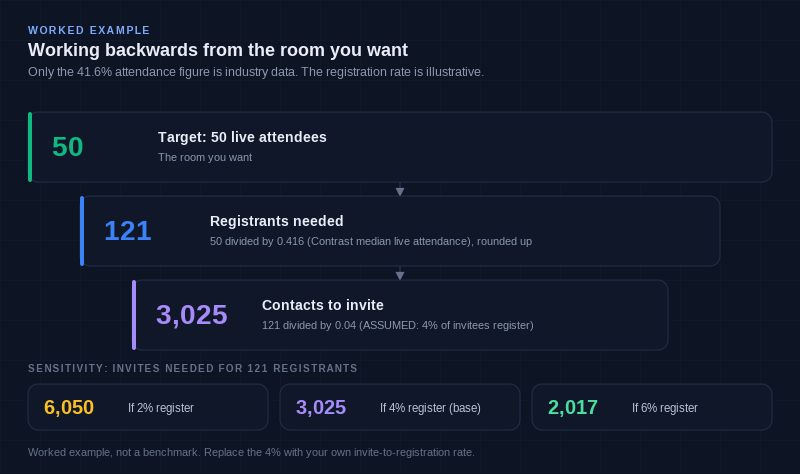
| Step | Calculation | Result |
|---|---|---|
| Target live attendees | Your goal | 50 |
| Registrants needed | 50 divided by 0.416 (Contrast median live attendance) | 121 |
| Contacts to invite, if 2% register | 121 divided by 0.02 (assumed) | 6,050 |
| Contacts to invite, if 4% register | 121 divided by 0.04 (assumed) | 3,025 |
| Contacts to invite, if 6% register | 121 divided by 0.06 (assumed) | 2,017 |
This is a worked example with assumed conversion rates, not a forecast. What it shows is the shape of the problem. Three thousand invitations for a fifty-person room is a lot of mail for a small result, which is why list quality matters more than list size, and why a cold webinar is a pipeline play and not a vanity-attendance play. The sensitivity row is the useful part: a better-matched list and a better subject can move the required volume by a factor of three.
Build the list around a role and a problem
A webinar topic should define the list, not the other way round. Write down the person who would care: a job title, a company size band, an industry, and the specific problem the session addresses. Then pull the accounts that fit.
- Match the topic to the role. A session on reporting pipeline from outbound should go to people who own pipeline numbers, not to everyone at the company.
- Prefer fewer, closer accounts. A list of 600 accounts that all have the problem will out-register a list of 3,000 that loosely might.
- Verify addresses before you send. Bounces hurt the sending domain, and a cold list that has not been verified is the most common reason a first campaign goes badly.
- Segment by how well they know you. Existing connections warrant a warmer message than strangers.
The best route: personalized outreach, then a calendar invitation. You do not need ads to fill a B2B webinar. Build the people data for your ICP from tools like ZoomInfo and Apollo and upload it to Tantra. Tantra runs the outreach: sequences across email, LinkedIn and WhatsApp, with AI personalization writing each email. When someone registers, a Google Calendar invitation puts the session on their agenda. Connect your webinar platform, such as Zoom or WebinarGeek, and measure campaign effectiveness, attribution and attendance rate, all in Tantra. The webinars use case shows the full setup.
If the calculation calls for more contacts than you have, look for another closely related segment or adjust the attendance goal. A smaller room of relevant people may still be worthwhile. Sending the same invitation more often to the same list does little to solve the underlying audience gap.
How do you write the cold invitation email?
Write the invitation as a short note you would be comfortable sending yourself. The reader needs to understand what you are offering, why you thought of them and how to respond. Work through the subject line, opening sentence, next step and length with those questions in mind.
Subject lines
Keep the subject short and specific. Name the topic or the outcome, not the event type.
- "Reporting pipeline from outbound, 30 minutes on Thursday"
- "[First name], how teams handle X without Y"
- "A short session on [problem], Oct 16"
Avoid anything that reads as mass mail: exclamation marks, "free", "webinar" in capitals, "last chance", or a long promotional phrase. Our posts on Gmail's Primary inbox and on how spam filters read cold email go into the word and format signals that push mail into Promotions or spam. For an invitation, the practical summary is plain text, one link, no image header, no multi-column layout.
The first line
Use the first sentence to explain why you thought the session might be useful to this person. Their role, something they wrote or a problem common to companies of their size can give you an honest starting point. Avoid a compliment you could paste into any email. If you cannot explain the connection for a segment, revisit whether that group belongs on the list.
This sentence is where personalization earns its result, and it is the part that does not scale by hand. Tantra's AI personalization writes it per prospect from what it reads on their website. That is how we reach a response rate of about 30% on cold invitations in our own campaigns.
The ask
Choose one next step and make it easy to find. You might use "Register here" with a link, or "Reply with 'yes' and I will send you the link". Giving the reader several options makes the decision harder. For a senior audience, a quick reply may be easier than completing a form, and it gives you a clearer sign of interest than a click alone.
Length
Aim for under 120 words in the invitation itself. Keep enough detail to explain the value and the next step, while letting the reader decide in about fifteen seconds whether the session is relevant.
Three templates for cold prospects
Use these templates to get a first draft down, then read each message aloud and change anything you would not normally say. Fill in every placeholder and check that the promised topic, speaker and resource match the session you will actually run.
Template 1: the topic-led invitation (for a cold, well-matched segment)
Subject: Reporting pipeline from outbound, Thursday 11:00
Hi [First name],
Teams that run outbound across email and LinkedIn often struggle to tie replies back to pipeline. I am running a 30-minute session on Thursday, [date] at 11:00 [time zone], where [Speaker] walks through how they do it with a spreadsheet and a CRM, no new tooling.
I thought it might be useful if you are responsible for outbound results. We will also share the recording if you cannot make that time.
Register here: [link]
[Your name] [Company], [postal address] If you would rather not hear from me, reply "no" and I will remove you.
Template 2: the reply-to-register invitation (for senior contacts)
Subject: Session on [problem], Oct 16
Hi [First name],
I saw [specific, true observation about their company or role]. On [date] we are running a short session on [problem], with [speaker or customer] sharing what they changed and what it did to [result they will describe on the day].
If it is useful, reply "yes" and I will send you the link and a calendar invite. If not, no reply needed.
[Your name] [Company], [postal address] Not relevant? Reply "no" and I will not write again.
Template 3: the second email, with a new reason to attend
Subject: Re: Reporting pipeline from outbound
Hi [First name],
I wanted to share one more detail about the session: [speaker] will walk through the template they use to connect outbound replies to deals. We will send you a copy when you register, so you can try it with your own data.
Thursday [date] at 11:00 [time zone]. Link: [link]
[Your name] [Company], [postal address] Reply "no" and I will stop.
The postal address and one-line opt-out are there on purpose, for the compliance reasons below. The second email adds a reason rather than repeating the first, which is the difference between a follow-up and a nag. Use "Re:" only if the email genuinely follows an earlier one.
Two templates for warm lists
Past attendees, customers, newsletter subscribers and contacts who have replied to you before already know who you are. The invitation can be shorter, can mention the last time you spoke, and can carry the calendar invitation straight away once they say yes.
Template 4: the invitation to past attendees and customers
Subject: Next session: [topic], [date]
Hi [First name],
Thanks for joining [previous session or how you know them]. The next one is on [date] at [time] [time zone]: [Speaker] on [topic], 30 minutes plus questions.
Register here: [link]. Once you are in, we will put it on your calendar so it does not get lost.
[Your name]
Template 5: the invitation to newsletter subscribers
Subject: [Topic] in 30 minutes, [date]
Hi [First name],
You signed up for [newsletter name], so this one should be relevant: on [date] we are running a short session on [topic], with [speaker] covering [one specific thing they will learn].
Save your seat: [link]
[Your name] You are receiving this because you subscribed to [newsletter name]. [Unsubscribe link]
For these lists, a Google Calendar invitation is the natural next step after registration: it puts the session on the agenda and gives you a Yes, No or Maybe you can see. The webinar calendar invitation guide covers when to send it.
Should you invite people on LinkedIn and WhatsApp too?
Livestorm's 2026 benchmark found that email drove 86.3% of webinar registrations, against 43.3% for organic social. These shares overlap, because a registration can be credited to more than one source, so they add up to more than 100%. They also describe webinars with registration pages and mostly opted-in audiences, not cold invitations. Read them as evidence that email is the workhorse and social is a useful second surface, not as a prediction for your cold list. This is vendor data.
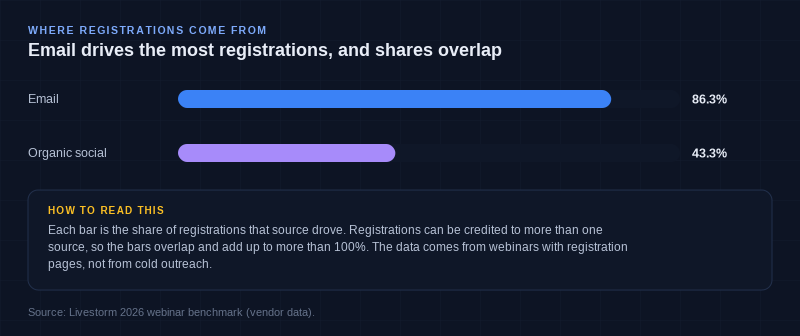
A carefully chosen second channel gives someone another opportunity to notice a relevant invitation. They may miss the email but recognise your name from a LinkedIn interaction. Use the sequence below as a starting point, then adapt it to the channels where you already have a reason to contact that person.
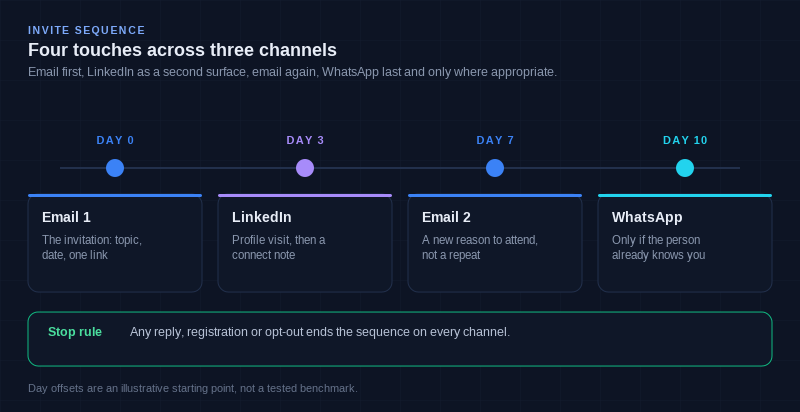
The day offsets in the figure are illustrative. We have no benchmark that says day 3 beats day 4, so test the timing against your own results.
Visit the profile first, so your connection request is not the first time they see your name. Send the request with a short note or none, and keep the webinar pitch out of it. Once they accept, send a plain message: why you thought of them, the date, the link and an easy exit. LinkedIn limits how much outreach an account can do, so use accounts you own and keep volume modest. See the LinkedIn outreach use case for how Tantra runs this step.
WhatsApp is different, and it works best as a follow-up channel, not as the first cold touch. A message there arrives next to the person's family and colleagues, so use it where the person already knows you or has given you their number for this kind of contact: a past customer, someone you have met, a lead who replied, or a prospect who has responded to the invitation. A short, personal message with the date and link then works as an invitation or a reminder, and in our own campaigns the ones with automated WhatsApp follow-up show higher attendance. See the WhatsApp campaigns use case, and the reminder sequence post for WhatsApp as a last-mile reminder.
WhatsApp automation. Tantra can send bulk messages and reminders from a normal WhatsApp account or a WhatsApp Business account. You do not need to buy the WhatsApp Business API, and the setup takes about three minutes. One thing to remember: use a WhatsApp account you can afford to lose, because WhatsApp can block a number when recipients report its messages.
Make the next step easy
If someone replies "yes", do not send them back to a form if you can avoid it. Registering them yourself, or sending a Google Calendar invitation that puts the session on their agenda, removes a step and gives you an RSVP you can see. Registration through a webinar platform should still follow that platform's own opt-in rules.
What do you need to get right on deliverability and compliance?
This is a webinar-specific summary. The long versions are in our deliverability posts, linked below. Nothing here is legal advice; rules differ by country and recipient, so confirm what applies to your list with someone qualified.
Send from your own mailboxes, at human volume
Send from real mailboxes on your own domain, not a shared bulk pool, at a low steady rate. Our Gmail post suggests 30 to 50 emails a day per mailbox as a human-paced rate, and our Workspace deliverability manual describes a warmup ramp of 5 to 20 a day rising over two to four weeks for a new mailbox. A webinar is no reason to break those rules. For a large list, add mailboxes and days instead of volume per mailbox.
Authentication
SPF, DKIM and DMARC should all be in place before the first send. If you have not set them up, the Google Workspace deliverability manual is the step-by-step reference, including the bulk-sender thresholds and the 0.3% spam-complaint ceiling to stay well below. A campaign is a sudden jump in sending for most domains, so check first and watch complaints after.
Opt-out
Every invitation should give the recipient an easy way to say no, and you should honour it quickly. In practice that means a clear line in the body, a working one-click unsubscribe header, and a suppression list that every future campaign checks. Our Gmail post explains why to keep the header. For a webinar, the suppression list also covers the follow-up: someone who opted out of invitations must not get the replay email.
Regional rules, in general terms
- United States. The CAN-SPAM Act applies to commercial email. In broad terms it requires accurate sender information, a non-misleading subject, a valid physical postal address and a working opt-out that you honour. It does not require prior consent for B2B email in the way some other regimes do.
- Canada. CASL is stricter and generally requires consent, with limited exceptions. Cold outreach to Canadian recipients needs particular care.
- European Union and United Kingdom. GDPR and the ePrivacy rules apply, and member states implement the email rules differently. Some treat corporate addresses more permissively than personal ones. You need a lawful basis, a way to tell people where you got their details, and an easy way to object.
For a multi-region list, apply the strictest rule to everyone or segment by region, and get advice before the send.
How many invitations should you send, and when?
Timing relative to the event
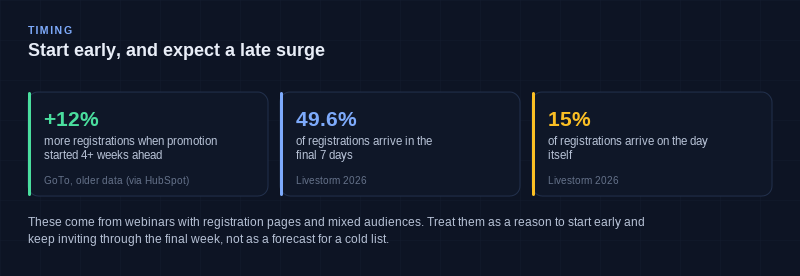
Start earlier than feels necessary. GoTo found that promoting a webinar at least four weeks ahead brought 12% more registrations. That is older data, cited by HubSpot, year unconfirmed, so treat it as a direction.
At the same time, registrations arrive late. Livestorm's 2026 benchmark found that 49.6% of registrations came in the final seven days, and 15% on the day itself. For a cold campaign this means two things: do not conclude the campaign has failed after the first week, and do not stop inviting until the last few days. Four weeks out is a good time for the first email, with the LinkedIn step and second email in weeks three and two, and a final email with a new reason to attend in the last week.
How many touches
Two emails and one social touch is a reasonable ceiling for a cold invitation. A third email rarely adds much and can add complaints. After three touches, stop inviting that person to this event.
What to measure
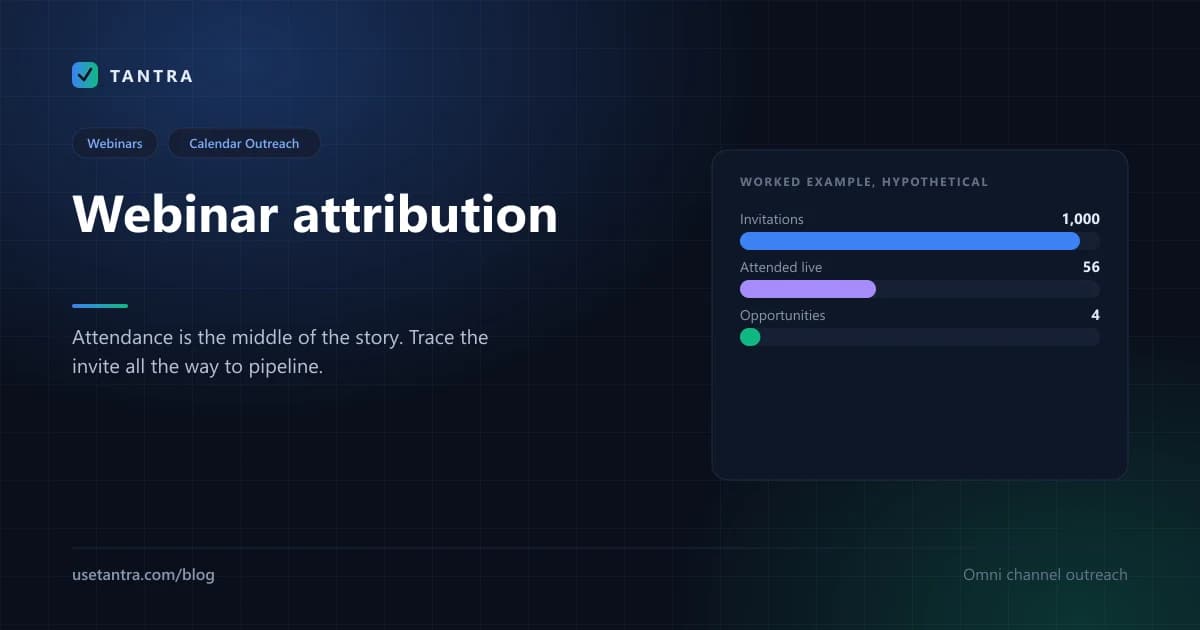
Opens are a poor measure here, as covered in our KPI post. Track replies (positive and negative), registrations per invited contact, registrants who attend, and unsubscribe and complaint rates. The registration rate per invited contact is the number you need to replace the 4% placeholder in the example. Run one small campaign first and size the real one from your own number. The webinar attribution guide shows how to follow each invited contact through to pipeline, and the webinar statistics page sets out the published benchmarks with their definitions.
Once people register, the reminder sequence takes over, and the full outbound funnel shows where invitation sits among the other stages.
What do we see in our own cold invitation campaigns?
These observations come from our own webinar outreach for 250+ brands, the process Tantra is built on. They are experience from practice, not a published study.
- Hyperpersonalized cold invitations typically draw a response rate of about 30%. A generic template to the same list draws about 10%.
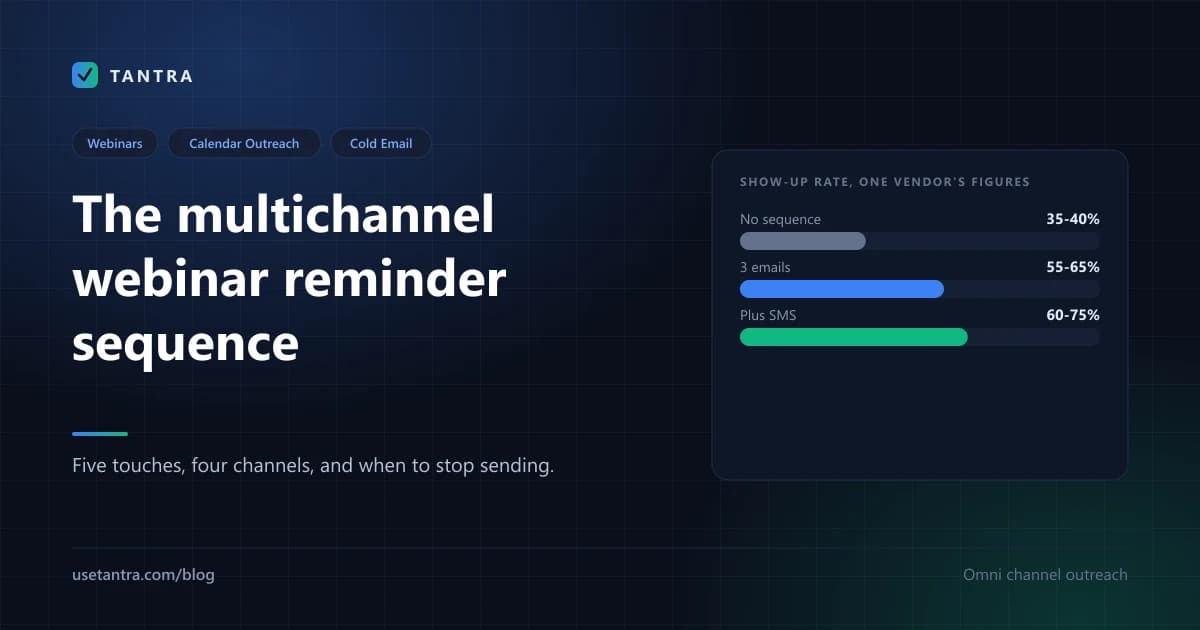
- For a cold-invited audience, attendance drops by about 80% when no reminder emails go out. People who registered on their own are far more forgiving.
- Campaigns with automated WhatsApp follow-up show higher attendance.
- Follow-up after the webinar shows higher conversion.
Our verdict: focus on marketing, outreach and reminders, and attendance follows. The webinar creates interest, and the post-webinar email turns that interest into action.
The vendor benchmarks in this post are still useful context, with one caveat. Most describe webinars promoted to an existing audience, through funnels whose setup the source does not describe. For cold invitations the game is different, which is why a cold campaign needs its own reminders and its own numbers.
Where Tantra fits
Tantra can act as your webinar marketing platform for the cold invitation. You run the event on Zoom, WebinarGeek or whatever you already use, and Tantra handles the outreach that fills it.
- Invite on every channel. Tantra sends invitations by email, LinkedIn and WhatsApp, and puts the session on registrants' calendars with Google Calendar invitations. Connect unlimited email and calendar accounts. Build as many sequences as you need, and each one can cover any mix of channels.
- Make every invitation one to one. Tantra reads each prospect's website, then AI personalization writes the invitation email and the calendar invitation description for that person. LinkedIn and WhatsApp steps are personalized with merge tags and spintax. Invitations written this way bring more people into the webinar.
- Turn a Yes into a registration. When a contact answers Yes or Maybe to a Calendar invitation, Tantra can register them on your webinar platform automatically, once you switch that on for the campaign. Zoom and WebinarGeek are direct integrations. Other platforms, such as WebinarNinja, connect through a webhook or an AI agent.
- Catch landing page sign-ups too. When someone fills in the form on your own registration page, an inbound webhook adds them to a Tantra campaign through prospect intake, so their calendar invitation and reminder emails start without anyone exporting a list.
- Answer every reply in one place. Replies from every channel land in the unified inbox, so a Yes on LinkedIn and a question by email sit side by side, and a reply stops the remaining steps for that contact.
Lists built elsewhere start a sequence through prospect intake, by webhook, REST API or AI assistant. The webinar automation guide covers those connections, and the webinar use case shows the full picture.
Frequently asked questions
Is it acceptable to cold email people about a webinar?
Often yes, if it meets local rules on identification, a physical address and opt-out, and in some regions consent or a lawful basis. Canada under CASL and parts of Europe are tighter. Check each region on your list.
How many people should I invite to get 50 attendees?
It depends on your registration rate, which no public benchmark pins down for cold lists. In the worked example above, using the 41.6% median live attendance from Contrast and an assumed 4% registration rate, 50 live attendees needs about 3,025 invitations. At 2% it is 6,050 and at 6% it is 2,017. Those are cautious assumptions for a generic invitation. In our own campaigns, hyperpersonalized cold invitations typically draw a response rate of about 30%, so personalization can cut the list you need considerably. Use your own rate once you have one.
Should the first email contain the registration link?
Usually yes, one link. For senior contacts, "reply yes and I will send the link" can work better, because a reply is a stronger signal than a click.
How early should I start promoting?
At least four weeks ahead if you can, and keep going until the last week, when nearly half of registrations arrive (Livestorm 2026).
Key takeaways
- Your list is probably smaller than your plan. A widely cited, untraced figure says 83% of B2B tech webinars draw under 50 people.
- Size the list backwards. Target attendees divided by 41.6% (Contrast median) gives registrants; divide by your own registration rate for invites. Our 4% is an assumption.
- A webinar is a lower-commitment cold offer than a demo, if the topic fits the recipient's role and problem.
- Short, plain, one-link invitations, using the three templates above.
- Email is the workhorse (Livestorm: 86.3% of registrations, organic social 43.3%, overlapping, opted-in audiences). Add LinkedIn, and keep WhatsApp for people who know you.
- Own mailboxes, human volume, authentication, opt-out and a suppression list. Check regional rules and get advice where unsure.
- Start about four weeks ahead and keep inviting through the final week, then stop on reply, registration or opt-out.
- Personalize every invitation. In our own campaigns, hyperpersonalized cold invitations typically draw a response rate of about 30%, and a cold audience needs reminders far more than a warm one.
Sources
- Contrast, B2B live attendance rate (41.6% median, 46.2% mean), Q3 2025 to Q1 2026, via VoxBooster, "Webinar statistics 2026" (secondary source)
- Livestorm, 2026 webinar benchmark and best practices: registration sources (email 86.3%, organic social 43.3%) and registration timing (49.6% in the final 7 days, 15% on the day). Vendor data
- GoTo, finding that promoting at least four weeks ahead produced 12% more registrations, via HubSpot (older data, year not confirmed, secondary source)
- B2B technology webinar attendance study (83% under 50 attendees), as cited in Tantra's own attendance playbook. The original study has not been traced
- Worked example in this post: the 4%, 2% and 6% registration rates are illustrative assumptions, not measured data
- Tantra campaign experience: the response rate of about 30% on hyperpersonalized cold invitations, the drop of about 80% in attendance without reminder emails for a cold-invited audience, and the higher attendance and conversion with WhatsApp follow-up and post-webinar follow-up. Observations from our own webinar outreach for 250+ brands, not a published study
Benchmarks here come from vendor reports and secondary sources describing mostly opted-in audiences, not cold invitations. The response rate we quote is our own experience, and the registration rate in the worked example is a labelled assumption for you to replace.
About the author

Bhaskar Dev
Co-founder, Tantra · Bengaluru, India
Bhaskar Dev is a serial entrepreneur, engineer-turned-marketer, and Co-founder of Tantra. With over a decade of experience in B2B technology marketing and growth, he specialises in building AI-powered marketing systems, scaling SaaS businesses, and turning complex technologies into market-ready ventures. His work spans deep-tech, IoT, MarTech, and AI-driven automation.
Connect with Bhaskar on LinkedIn.