
Build a multichannel outreach sequence
Combine email, LinkedIn, and WhatsApp steps in one Tantra outreach sequence.
intermediate7 min readUpdated
Open in Tantra
These open the app in a new tab. You may be asked to sign in.
Overview#
A Tantra outreach sequence can combine email with LinkedIn and WhatsApp actions. You can also create a sequence that uses only non-email channels.
Available actions are:
| Channel | Actions |
|---|---|
| Send email | |
| Visit profile, send connection request, send message | |
| Send message |
Before you start#
- Confirm your plan is active. LinkedIn and WhatsApp are included in every plan, with no separate add-ons.
- Connect at least one ready account for each channel.
- Put the necessary identity on each contact record: an email address for email, a LinkedIn profile for LinkedIn, and a phone number for WhatsApp.
- Add the contacts to a list.
Build the sequence#
- Open Campaigns, select Create Campaign, and choose Omnichannel.
- Name the campaign and choose the contact list.
- In Senders, select the accounts the campaign may send from. Email steps need a connected mailbox. Each other channel needs at least one connected account of that type.
- In Sequence, edit the first step or select Add step.
- Choose a channel and action.
- Write the email or plain-text message, where the action needs one.
- Set the delay before each follow-up step.
- Add, reorder, or remove steps until the journey is complete.
- Set the launch time, sending days and hours, timezone, and limits.
- Review the campaign and launch it.
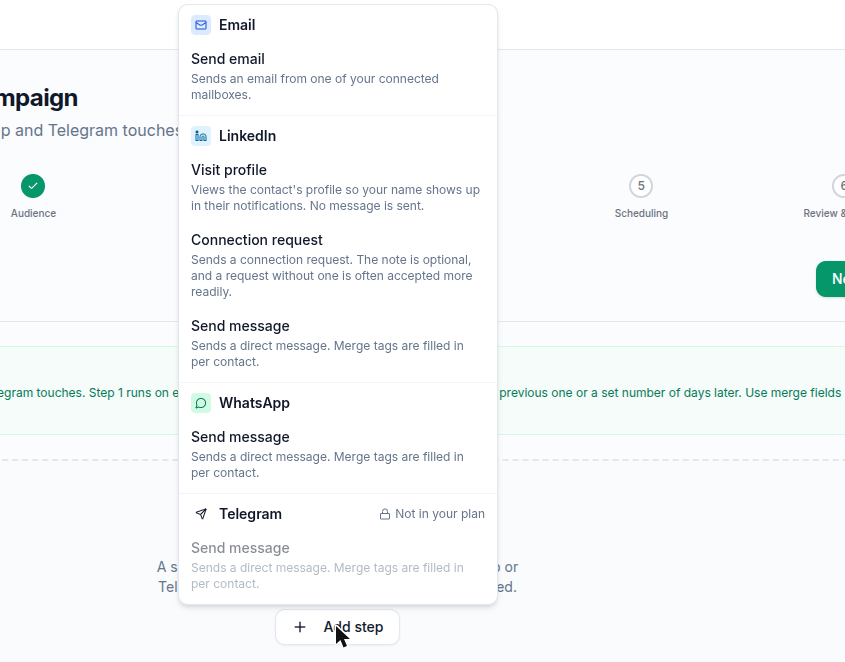
If LinkedIn or WhatsApp access is not active on your account, that channel is marked Not in your plan and its actions cannot be selected.
Write social messages#
LinkedIn and WhatsApp messages are plain text. Use Insert variable to add contact or sender details, including first name, last name, full name, company, job title, website, location, and sender name or company.
Email-only features such as subjects, email signatures, reply threading, and AI personalization do not appear on social steps.
| Message type | Limit or behavior |
|---|---|
| LinkedIn connection note | Optional, up to 300 characters |
| LinkedIn message | Up to 8,000 characters |
| WhatsApp message | Up to 4,096 characters |
| LinkedIn profile visit | No message is written |
Short, personal messages usually work best even when a channel allows more characters.
Important channel behavior#
LinkedIn#
- A profile visit sends no message. Contacts without a LinkedIn profile on their record skip the step.
- A connection request can be sent with or without a note.
- A later LinkedIn message step runs only after the contact accepts the connection request.
WhatsApp#
- Messages are plain text, without email-style HTML formatting.
- The contact needs a usable phone number, including country code.
Select account coverage#
The campaign cannot launch unless every channel used in the sequence has a selected account:
- If any step sends email, select at least one email mailbox.
- If a step uses LinkedIn or WhatsApp, select at least one ready account for that specific channel.
- An all-social sequence does not require an email mailbox.
If no account is ready, use the link in Senders to open the channel connector, connect an account, then return to the campaign.
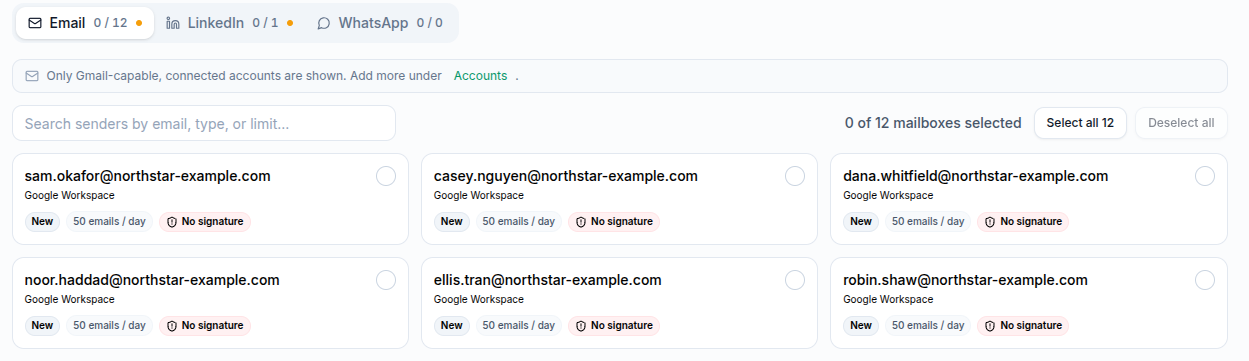
The Senders step has one tab per channel, each showing how many accounts you have picked out of how many are available, such as Email 0 / 12. A channel whose add-on is inactive does not get a tab at all. Each mailbox card shows its provider, warm status, daily email cap, and whether a signature is set.
Timing and launch#
The first step starts with no delay. Later steps can wait up to 365 days. The sequence runs in its selected timezone and sending window.
If you schedule the launch, the chosen date and time are interpreted in the campaign timezone. Changing the timezone keeps the displayed clock time but changes when that moment occurs elsewhere.
Troubleshooting#
| Symptom | Fix |
|---|---|
| A channel says Not in your plan | Confirm your plan is active under Billing |
| The campaign says no account is selected | Return to Senders and choose a ready account for every channel used |
| No account is available to select | Connect it under Connectors, or wait for a syncing account to become ready |
| A LinkedIn profile visit is skipped | Add the contact's LinkedIn profile to the contact record |
| A LinkedIn message after a connection request is waiting | The message runs only after the request is accepted |
| A WhatsApp step is skipped | Add a valid phone number with country code to the contact |
| A message will not save | Shorten it to the character limit shown beside the editor |
Related articles#
Was this article helpful?
Related articles
- LinkedIn and WhatsApp accounts on your planHow many LinkedIn and WhatsApp accounts each Tantra plan includes, how to add more, and where to manage them.
- Build an email sequenceUse Tantra's six-step wizard to build a cold email sequence, pick senders and audience, set limits, and launch or schedule your campaign.
- Use the unified inboxRead and filter email, LinkedIn, and WhatsApp conversations in one inbox and view every conversation with the same person.