
Webhook event triggers
Choose calendar, email, LinkedIn, and WhatsApp campaign events for each outbound webhook.
intermediate7 min readUpdated
Open in Tantra
These open the app in a new tab. You may be asked to sign in.
Overview#
Each webhook endpoint subscribes only to the campaign actions you select on the Webhooks page. Calendar, email, LinkedIn, and WhatsApp actions are grouped separately. LinkedIn and WhatsApp remain visible but require the channel to be active on your plan.
Delivery contract#
Every event is an HTTPS POST with JSON and these headers:
| Header | Value |
|---|---|
Content-Type | application/json |
X-Tantra-Event | Event type, such as email.replied |
X-Tantra-Event-Id | Unique event identifier |
A 2xx response counts as delivered. Treat delivery as at-least-once and deduplicate with X-Tantra-Event-Id.
Selectable events#
You choose these when you create or edit an endpoint, under Actions to trigger this webhook. They are grouped by channel, and each group explains what it covers.
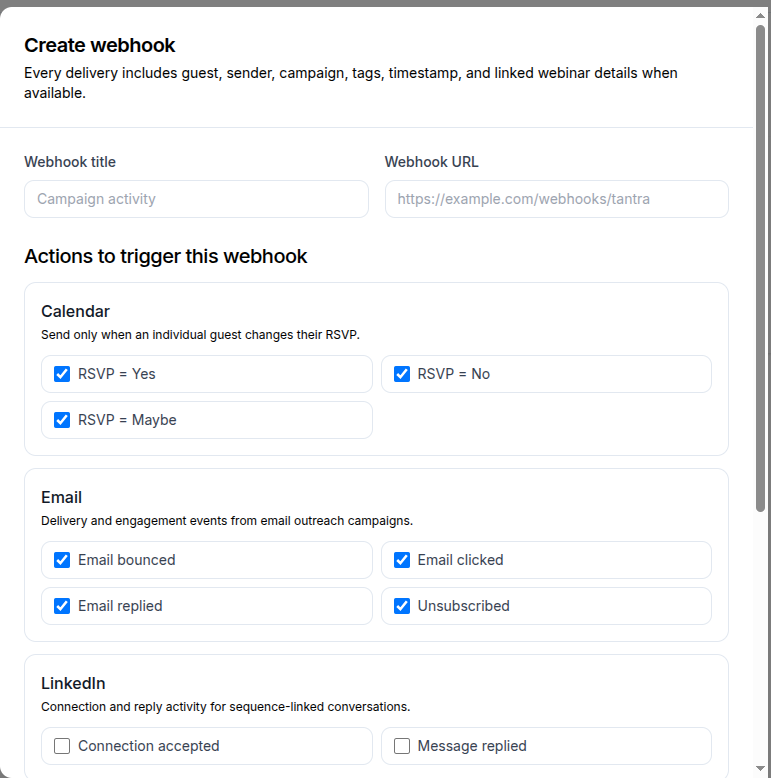
Calendar and email actions are ticked by default. Social actions are not, so a new endpoint receives RSVP and email activity until you change it, and receives nothing from LinkedIn or WhatsApp until you tick those boxes. A channel whose add-on is inactive stays visible but cannot be selected.
The tick boxes are labelled in plain language. This is how each one maps to the event you receive:
| Channel | Tick box | Event | Fires when |
|---|---|---|---|
| Calendar | RSVP = Yes | calendar.rsvp.yes | A guest changes their RSVP to accepted |
| Calendar | RSVP = No | calendar.rsvp.no | A guest changes their RSVP to declined |
| Calendar | RSVP = Maybe | calendar.rsvp.maybe | A guest changes their RSVP to tentative |
| Email bounced | email.bounced | A bounce or spam complaint is detected | |
| Email clicked | email.clicked | A human clicks a tracked campaign link | |
| Email replied | email.replied | A genuine email reply is detected | |
| Unsubscribed | email.unsubscribed | A recipient unsubscribes | |
| Connection accepted | linkedin.connection.accepted | A campaign invitation is accepted | |
| Message replied | linkedin.message.replied | A campaign lead sends an inbound reply | |
| Message replied | whatsapp.message.replied | A campaign lead sends an inbound reply |
Calendar does not expose or emit a “Needs action” webhook. Polling an unchanged calendar event also emits nothing.
Social reply events are limited to conversations linked to a Tantra sequence. An unrelated conversation in the unified inbox does not fire a campaign webhook. LinkedIn acceptance is emitted once: the real-time callback is primary, while a periodic reconciliation job is the fallback if that callback is missed.
Common payload fields#
Payloads use a common envelope:
eventId,eventType,occurredAt, andchannelguest: name plus email or LinkedIn profile URL when availablesender: sender mailbox email when the event has onecampaign: id, name, creation date, and campaign tagswebinar: Zoom webinar identifiers or WebinarGeek broadcast id when linked- Event-specific fields such as
url,snippet,connectionId, or calendar event dates
Calendar RSVP example:
{
  "eventId": "a1b2c3d4...",
  "eventType": "calendar.rsvp.yes",
  "occurredAt": "2026-09-15T09:30:00.000Z",
  "channel": "calendar",
  "guest": {
    "name": "Alice Example",
    "email": "[email protected]",
    "response": "yes",
    "previousResponseStatus": "needsaction"
  },
  "sender": { "email": "[email protected]" },
  "campaign": {
    "id": "campaign_123",
    "name": "Product Launch",
    "date": "2026-09-01T08:00:00.000Z",
    "tags": ["webinar", "product-launch"]
  },
  "event": {
    "id": "google_event_123",
    "name": "Product Launch Webinar",
    "start": "2026-09-15T10:00:00.000Z",
    "end": "2026-09-15T11:00:00.000Z",
    "timeZone": "Asia/Kolkata"
  },
  "webinar": { "provider": "zoom", "zoomWebinarId": "12345678901" }
}
LinkedIn reply example:
{
  "eventId": "d4c3b2a1...",
  "eventType": "linkedin.message.replied",
  "occurredAt": "2026-09-15T09:35:00.000Z",
  "channel": "linkedin",
  "guest": {
    "name": "Alice Example",
    "profileUrl": "https://www.linkedin.com/in/alice-example"
  },
  "campaign": { "id": "campaign_123", "name": "Product Launch", "tags": ["webinar"] },
  "messageId": "msg_123",
  "snippet": "Yes, I would like to learn more.",
  "repliedAt": "2026-09-15T09:35:00.000Z"
}
Connect to an automation tool#
- Create an incoming webhook in n8n, Zapier, Make, or your own service.
- Register that URL on Webhooks.
- Select only the actions the workflow handles.
- Route on
X-Tantra-Eventand deduplicate onX-Tantra-Event-Id. - Return
2xxquickly and perform slower work after responding.
Troubleshooting#
| Symptom | Cause | Fix |
|---|---|---|
| A social action is disabled | The channel is not active on your plan | Confirm your plan is active under Billing |
| No calendar event arrives | The guest has not changed to Yes, No, or Maybe since the last snapshot | Change a guest RSVP and wait for calendar reconciliation |
| No social reply arrives | The conversation is not linked to a sequence, the channel is not active on your plan, or provider callback routing is unhealthy | Check the campaign enrollment, plan, channel account, and callback endpoint |
| The same event arrives twice | A delivery was retried | Deduplicate on X-Tantra-Event-Id |
Related articles#
Was this article helpful?
Related articles
- Receive outbound webhooksRegister an endpoint, select channel actions, inspect payloads, and understand delivery retries.
- Create and manage API keysCreate a Tantra API key, copy it once at creation, use it in the X-API-Key header, and revoke keys you no longer need.
- Connect the Tantra MCP serverRun the Tantra MCP server on your own machine or server with your API key, and work with campaigns, contacts, the inbox and reports from an AI assistant.