
Cancel or change your plan
Move between Tantra plans, cancel at the end of your paid period, or keep a subscription that is scheduled to end.
beginner4 min readUpdated
Open in Tantra
These open the app in a new tab. You may be asked to sign in.
Change your plan#
- Open Billing and select the Plan tab.
- Choose Monthly or Yearly, then select the plan you want.
- Review what changes and what you pay today, then confirm.
Upgrades apply right away with a prorated charge. Downgrades take effect at your next billing date; until then you can undo them from the current plan card.
Cancel your subscription#
- Open Billing.
- On the current plan card, select Cancel plan.
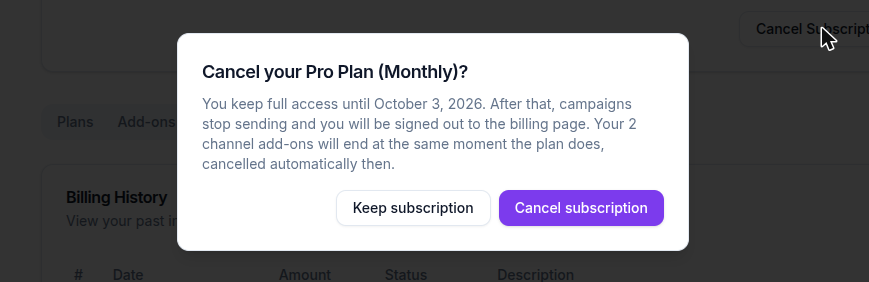
- Read the confirmation. It names the date your plan ends and explains that sending stops after it.
- Select Cancel at period end to confirm.
Your plan continues until the date shown. Campaigns can keep running until then. After that date, sending stops and the app stays available to view, with a banner to choose a plan again.
Cancellation does not delete your contacts, campaign history, or account.
LinkedIn and WhatsApp after cancellation#
LinkedIn and WhatsApp accounts are part of your plan, not separate purchases, so there is nothing extra to cancel. When your plan ends, connected LinkedIn and WhatsApp accounts stop sending along with the rest of your campaigns.
Undo a scheduled cancellation#
If your plan is scheduled to end but the end date has not arrived:
- Open Billing.
- Select Keep my plan on the current plan card.
- Wait for the card to return to its normal active state.
Troubleshooting#
| Symptom | Fix |
|---|---|
| The cancellation confirmation does not open | Refresh Billing and select Cancel plan again |
| The plan still looks active after cancellation | Check whether the card says Subscription ending; access continues through the shown date |
| Keep my plan fails | Wait a moment and retry; contact support before the end date if it continues |
| Sending stopped after the end date | Choose a plan from Billing to resume |
FAQ#
Does cancellation take effect immediately?#
No. You keep access until the end date shown in the confirmation and on the subscription card.
Can I reverse a cancellation?#
Yes, before the end date. Select Keep my plan on the Billing page.
What happens to my LinkedIn and WhatsApp accounts?#
They are included in your plan, so they stop sending when your plan ends. There are no separate channel add-ons to cancel.
Will my data be deleted?#
No. Cancelling stops paid access and sending; it does not delete your contacts or campaign history.
Related articles#
Was this article helpful?
Related articles
- Plans, pricing, and managing your subscriptionCompare Tantra Pro, Scale and Tantra Enterprise, monthly or yearly, add LinkedIn or WhatsApp accounts, update your card, and download invoices.
- LinkedIn and WhatsApp accounts on your planHow many LinkedIn and WhatsApp accounts each Tantra plan includes, how to add or remove accounts, and what happens over the allowance.