
What is Tantra
Tantra helps teams run calendar, email, LinkedIn, and WhatsApp outreach from one place.
beginner4 min readUpdated
Open in Tantra
These open the app in a new tab. You may be asked to sign in.
Overview#
Tantra is an outbound outreach platform. It helps you reach prospects across calendar invitations, email, LinkedIn, and WhatsApp, then bring the resulting conversations back to one inbox.
Tantra has two outreach engines that share one login:
- Calendar campaigns send Google Calendar invitations and track who accepts.
- Outreach sequences send multi-step journeys through email, LinkedIn, and WhatsApp.
You can run either engine on its own, or both together.
How it works#
The two engines differ in what they send:
- A calendar campaign creates a Google Calendar event, adds your prospects as attendees, and lets Google deliver the invitation. The prospect's RSVP is the engagement signal.
- An outreach sequence runs one step at a time with delays between steps. It can send email, visit a LinkedIn profile, send a LinkedIn connection request or message, and send WhatsApp messages.
AI is built into both engines. Tantra can read each prospect's public website and write that person's message from what it finds, using your own connected AI provider.
Screens and controls#
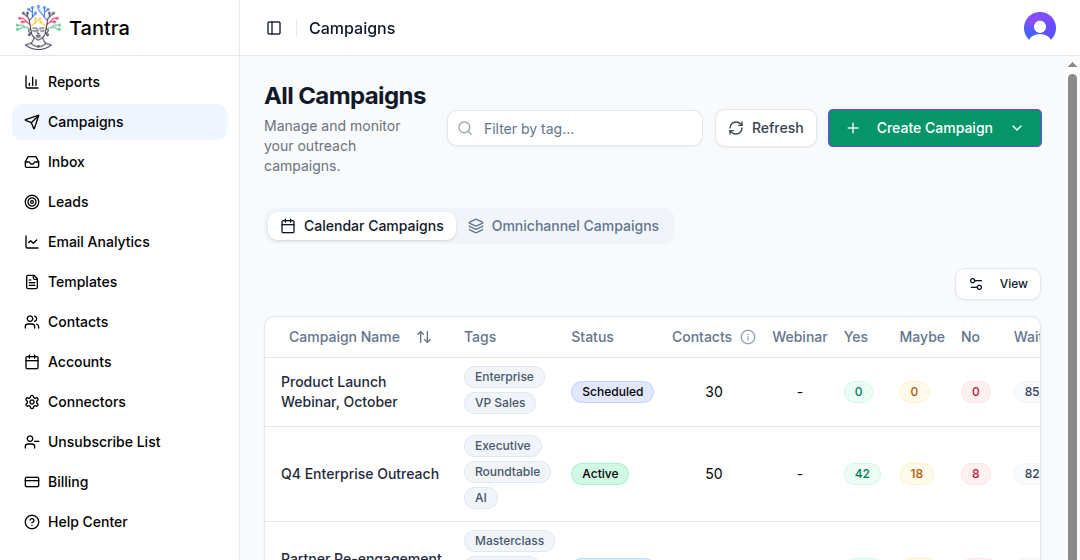
After you sign in, the left sidebar is your main navigation. These are the sections you will use most:
| Sidebar item | What it covers |
|---|---|
| Reports | Campaign results and RSVP reporting |
| Email Outreach | The campaigns list filtered to your sequences |
| Campaigns | Create and manage calendar and multichannel outreach campaigns |
| Inbox | Read conversations across email, LinkedIn, and WhatsApp |
| Leads | Track lead stages and scores |
| Email Analytics | Deliverability and email performance |
| Templates | Reusable message templates |
| Contacts | Import and manage contacts and lists |
| Accounts | Add and verify your sending mailboxes |
| Connectors | Connect email, calendar, LinkedIn, WhatsApp, AI, and other services |
| Unsubscribe List | People who opted out of your email |
| Billing | Your plan, subscription, and channel add-ons |
| Help Center | These articles |
The Campaigns page has two tabs: Calendar Campaigns and Omnichannel Campaigns. Each tab lists campaigns of that type.
What happens next#
To start using Tantra, you connect Google Workspace, load contacts, and build your first campaign. The Quick start walks through each step in order.
If you are deciding which engine to use, read Calendar campaigns vs cold email. It explains when each one fits.
Best practices#
- Connect the accounts required by the channel you want to use before launching.
- Start with one engine and a small contact list before scaling up.
- Connect your own AI provider if you want personalized messages written from each prospect's website.
Common mistakes#
- Expecting Tantra to log in to individual inboxes. It uses one service account for the whole domain instead.
- Assuming calendar and cold email are the same feature. They are separate engines with separate signals.
FAQ#
Which channels can Tantra use?#
Tantra supports calendar invitations, email, LinkedIn, and WhatsApp. LinkedIn and WhatsApp are included in every plan: up to 2 LinkedIn or WhatsApp accounts on Pro and up to 12 on Scale.
Do I need Google Workspace?#
Yes. Tantra sends as your own mailboxes using a Google service account with domain-wide delegation. See How Tantra sends as your mailboxes.
Whose AI writes the messages?#
Yours. You connect your own AI provider key and choose the model and prompt. Personalization is optional on every campaign.
Can I run calendar and outreach campaigns at once?#
Yes. Each campaign type has its own tab on the Campaigns page.
Where do results go?#
Into the product under Reports, Inbox, Leads, and Email Analytics, and outward through webhooks to any endpoint you configure.
Related articles#
Was this article helpful?
Related articles
- Calendar campaigns vs cold emailCompare Tantra's two outreach engines. Calendar campaigns send Google invitations and track RSVPs. Cold email sends multi-step sequences.
- Quick start, from sign up to first sendSet up Tantra, connect the accounts you need, load contacts, and launch your first calendar or multichannel outreach campaign.
- Build a multichannel outreach sequenceCombine email, LinkedIn, and WhatsApp steps in one Tantra outreach sequence.